F.8 Errors, other software and validation
What you will learn
- Find a short, checked answer to 17 common questions about errors, comparison and validation.
- Follow the link after each answer to the page that explains it and shows the evidence.
- Recognise the mistakes that these questions come from, so that you do not make them.
Prerequisites: Chapter 39 and Chapter 40 are helpful.
What to do in the first five minutes of a failure, the questions that come back most often, and how nlmx compares with NONMEM, PsN, PopED and Monolix.
Commands named on this page: resume, validate.
How to read an answer. Each answer restates what the book says, in a few sentences, and ends with Read more: the page that explains it, with its evidence. The answers are short on purpose. When a decision depends on one, open the linked page.
The 17 questions on this page
- What should I do in the first five minutes of a failure?
- The folder contains results. Did the run finish?
- Does exit code 0 mean PASS?
- Can I ignore a warning if the estimates look reasonable?
- Should I increase the iterations or the tolerance?
- Can I just delete the subject that causes trouble?
- Why is there no log file?
- Why did
resumerefuse after a tiny change of settings? - Can I copy a
.covfile from another run? - The control stream is rejected with exit code 5. Can I delete the record?
- My command worked yesterday and fails today. What changed?
- What do I include in a bug report?
- How does nlmx differ from NONMEM, PsN, PopED and Monolix?
- Why is my objective function different from NONMEM's?
- How do I move an analysis from NONMEM, PsN, PopED or Monolix?
- What does the validation chapter cover, and who declares the program qualified?
- Where do I look when none of this answers my question?
Answers
F.8.1 What should I do in the first five minutes of a failure?
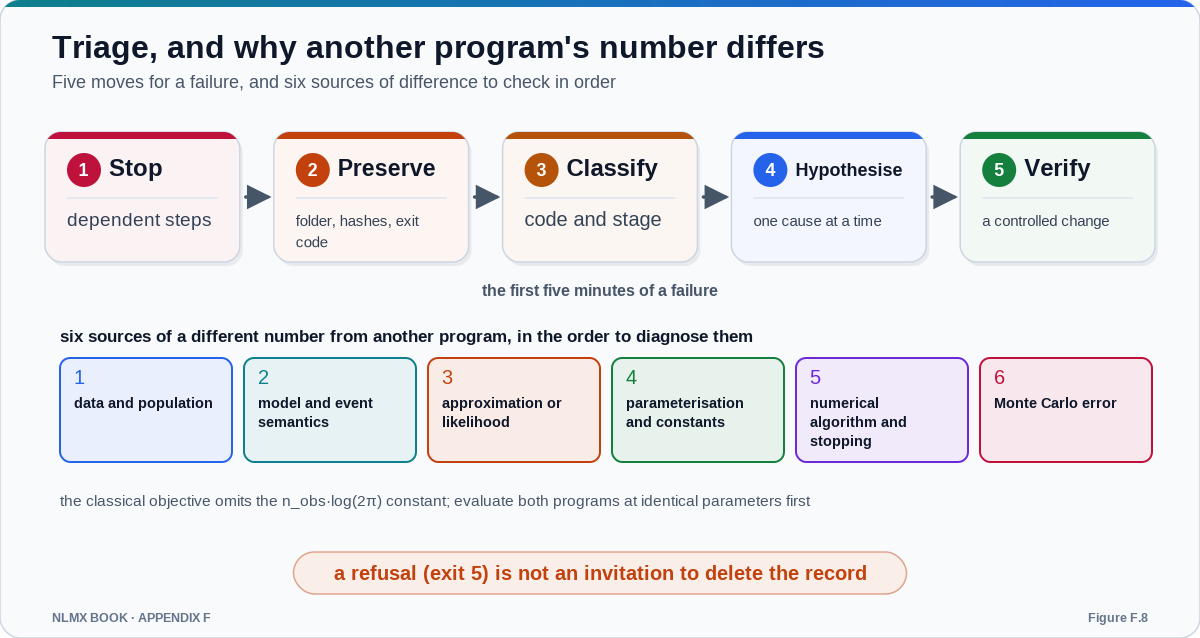
Stop, preserve, classify, hypothesise, verify. Stop dependent steps so that a failed fit is not consumed by a VPC or a report; preserve the folder (read-only, or a copy with hashes) and record the exit code before another command overwrites it; classify the failure by its code and stage; change one causal condition at a time. Do not immediately add --overwrite, loosen tolerances, remove a record or launch many retries.
Read more: 39.2 The first five minutes: a safe triage; 39.1 Reading an nlmx error.
F.8.2 The folder contains results. Did the run finish?
Not necessarily: files are written during the stages. Check the process exit, the final line of the log, the command's own status, the expected inventory and the checksums.
Read more: 39.23 Frequently asked troubleshooting questions; 38.1 Output folders, identities, overwrite, and completion.
F.8.3 Does exit code 0 mean PASS?
It means the process completed. Inspect the QC verdict, the convergence and covariance, failed children or replicates, warnings, exclusions and scientific acceptance. validate without strict mode, QC without --fail-on and an assistant's child requests are examples where 0 hides a semantic outcome.
Read more: 39.3 Warnings, notes, and the meaning of exit 0; 36.35 Exit codes and machine-readable completion.
F.8.4 Can I ignore a warning if the estimates look reasonable?
No. Classify it and record a disposition. An artifact mismatch, a population loss, a covariance failure, a fallback or an omitted figure can be material even when the estimates look plausible.
Read more: 39.3 Warnings, notes, and the meaning of exit 0; 39.23 Frequently asked troubleshooting questions.
F.8.5 Should I increase the iterations or the tolerance?
Only after you have diagnosed the earliest numerical cause. Changing the numerics can change the solution, so justify it and compare with the original run.
Read more: 39.23 Frequently asked troubleshooting questions; 20.31 Nonconvergence, boundary estimates, and local optima.
F.8.6 Can I just delete the subject that causes trouble?
Not as troubleshooting. Verify the source data, the model's domain and any prespecified exclusion policy, quantify the effect, and run a sensitivity analysis when it is justified.
Read more: 39.23 Frequently asked troubleshooting questions; 39.18 Troubleshooting data from raw file to analysis population.
F.8.7 Why is there no log file?
Because the failure came before the output folder was prepared, typically while parsing the command line. Capture the standard error and the shell's exit code. The command says so in its last line.
Read more: 4.4 Exit codes, errors, warnings and notes; 39.23 Frequently asked troubleshooting questions.
F.8.8 Why did resume refuse after a tiny change of settings?
A checkpoint represents an exact computational identity. When the settings, inputs, software or random-number derivation change, begin a new run (exit code 11).
Read more: 39.13 Exit code 11: checkpoint or resume incompatibility; 39.23 Frequently asked troubleshooting questions.
F.8.9 Can I copy a .cov file from another run?
No. That creates an inconsistent run family unless it is demonstrably the same run's artifact; use one coherent, hashed family. Inconsistent artifacts are reported as exit code 6.
Read more: 39.23 Frequently asked troubleshooting questions; 39.8 Exit code 6: inconsistent model artifacts.
F.8.10 The control stream is rejected with exit code 5. Can I delete the record?
A refusal is not an invitation to delete the record. nlmx refuses constructs that change the likelihood or the model and that it cannot execute faithfully (for example $MIX, $PRIOR, $LEVEL, $AES, $INCLUDE, verbatim Fortran, user subroutines and unsupported ADVAN/TRANS), and it notes and ignores some records whose task then does not happen ($DESIGN, $NONPARAMETRIC, $INFN, $SIMULATION, $MSFI).
Read more: 40.20 Unsupported NM-TRAN records and constructs; 39.7 Exit code 5: unsupported model or method feature; 8.5 Unsupported constructs and diagnostic boundaries.
F.8.11 My command worked yesterday and fails today. What changed?
Most often the executable. Before you look at the data or the model, record the version, the path of the executable and its hash. An upgrade can change numerical behaviour, defaults, schemas, file names or supported features: a setting may be rejected (exit 4), a feature newly reported (exit 5), a checkpoint refused (exit 11). Keep the new executable beside the old one, rerun the qualification, compare controlled analyses, and print fresh templates before you migrate settings.
Read more: 39.15 After an upgrade: version changes and requalification; 25.4 The schema command and versioned settings.
F.8.12 What do I include in a bug report?
Expected versus observed behaviour, impact, how often it reproduces, the exit code and stage; the version banner and executable hash, the operating system, the exact command (argv-safe), the working directory, the full unedited log, the settings and resolved settings, the input hashes and the smallest control stream and data that reproduce the problem. Always report exit code 12.
Read more: 39.24 Reporting a problem that can be reproduced.
F.8.13 How does nlmx differ from NONMEM, PsN, PopED and Monolix?
They overlap but have different primary roles, so compare by layer of equivalence (syntax, semantics, objective, numerical result and decision) and ask whether a version can execute the same scientific task with the same mathematical definition and the same acceptance evidence. The tables of Chapter 40 mark each capability as native, delegated, analogue, subset, refused or outside the role of the tool; none of these is a ranking.
Read more: 40.1 How to read a cross-software comparison; 40.2 Five layers of equivalence; 40.15 QC, NCA, EDA, reporting, and assistant scope.
F.8.14 Why is my objective function different from NONMEM's?
Differences come from six sources, to be diagnosed in order: the data and the population; the model and the event semantics; the approximation or the likelihood; the parameterisation and the constants; the numerical algorithms and the stopping rules; and Monte Carlo error. The classical objectives omit the common n_obs log(2π) constant to match NONMEM's documented scale, and SAEM's progress objective is not a reportable likelihood: its reportable value comes from importance sampling. Evaluate both programs at identical parameters first.
Read more: 40.3 Why correct implementations can give different numbers; 40.4 OFV, likelihood, approximation, and constants; 20.33 A defensible NONMEM-to-nlmx reproduction workflow.
F.8.15 How do I move an analysis from NONMEM, PsN, PopED or Monolix?
Treat every migration as a new implementation until the model semantics, the analysis population, the objective and the acceptance evidence agree. Chapter 40 has a playbook for each tool, and the workarounds page says what to do about an unsupported construct.
Read more: 40.16 Migrating a NONMEM analysis to nlmx; 40.17 Migrating a PsN workflow to nlmx; 40.18 Migrating a PopED design evaluation; 40.19 Migrating a Monolix project; 40.21 Workarounds, alternate tools, and honest limits.
F.8.16 What does the validation chapter cover, and who declares the program qualified?
Chapter 42 follows the validation package that ships with the program: requirements, risks and tests (installation, operation, performance and data integrity), the tolerance policy and its origins, reference data sets, failure fixtures, cross-software acceptance matrices and release gates. A package demonstrates the checks it contains; whether the program is qualified for your use is a decision of your site, on your intended use.
Read more: Chapter 42 — Validation and testing; 42.1 What validation does and does not cover; 42.17 Release gates, revalidation and extending the package.
F.8.17 Where do I look when none of this answers my question?
Use the index: by task, by command, by identifier, or the A–Z of every page title and output file. The complete references of Chapters 36 to 40 list every option, setting, output file, error and comparison in one place.
Read more: Appendix E — Index; E.2 Index by task: where to look when you want to do something; Complete index reference: every page and every output file, A–Z.
Review checklist
- Do you preserve the failed folder and the exit code first?
- Do you change one causal condition at a time?
- Do you compare with other software layer by layer?
- Can you assemble a reproducible problem report?
Navigation
See the previous page, the next page, the overview, and the complete FAQ reference.