10.3 Anatomy of the HTML report
Where a command produces report.html, nlmx builds a self-contained document: stylesheet rules, report markup and SVG graphics are embedded rather than loaded from a content-delivery network. A small inline script can support collapsible sections. This structure makes the report convenient to transfer as one file while avoiding runtime dependence on an external plotting service.
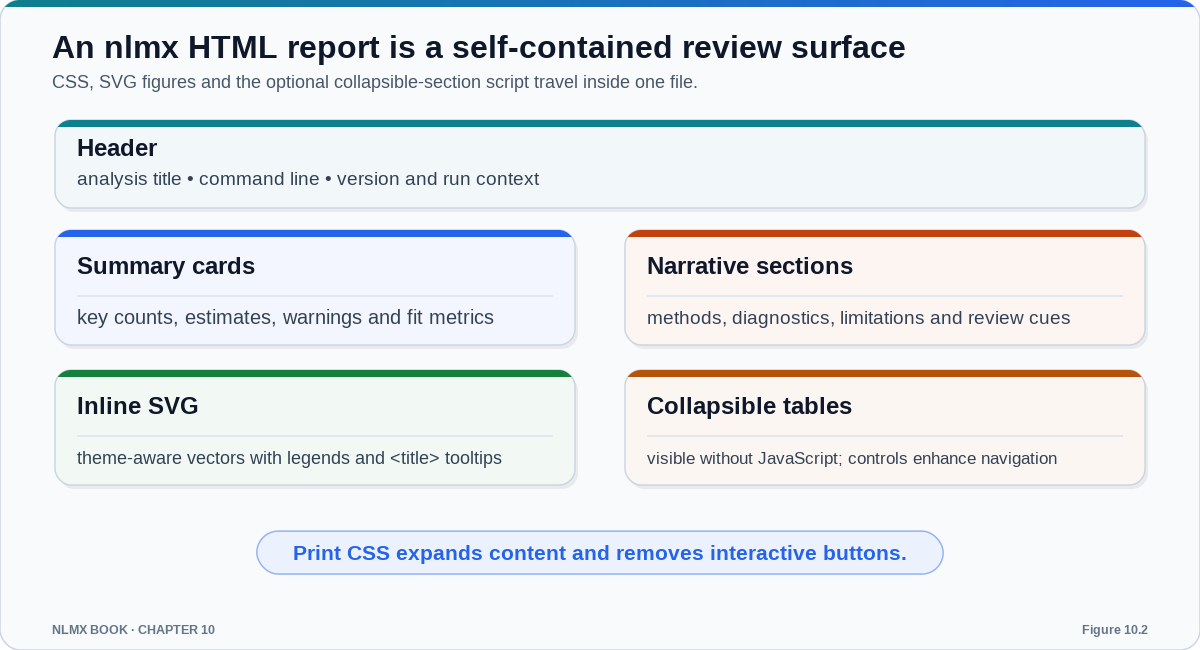
Figure 10.2. The report combines provenance, high-level results, narrative interpretation, tables and inline vector figures.
Header and provenance
Reports expose the command line by default. That is valuable for review, but command text must still be handled carefully if paths or options contain confidential information. A report intended for external sharing needs a disclosure review; deleting the command without retaining an unredacted internal bundle weakens reproducibility.
The report should identify the analysis and organize its most important status information near the top. Reviewers should not need to infer the command or method from a plot filename.
Layout primitives
The report stylesheet provides a centered main area with a maximum width of 1080 pixels, responsive cards and tiles, styled tables, notices, legends and classic chart elements. Responsive layout means the same file can be inspected on a narrower window without manufacturing a second report. It does not guarantee that every dense table becomes readable on a phone; wide tables may still need deliberate navigation or export.
Inline SVG figures
Web figures are inserted as SVG markup. Text remains sharp when zoomed, CSS variables can respond to the report theme, and native SVG <title> elements can provide hover text. Hover content is supplemental: it is unavailable on paper, awkward on touch devices and unsuitable as the only location for a critical value.
Escaping and trust boundary
The report generator escapes special HTML characters in inserted text. That prevents a label such as A < B from becoming markup and reduces the risk that data values become executable HTML. Self-contained does not mean “safe regardless of origin”: reviewers should still open reports from untrusted sources in an appropriately restricted environment.
What self-contained means
| Property | Expected interpretation |
|---|---|
| Inline CSS | Appearance travels with the file |
| Inline SVG | Figures do not require separate image paths |
| Small inline script | Collapsible navigation can work offline |
| No external resources | Normal rendering does not depend on a network fetch |
| One file | Easy transfer, not a substitute for the rest of the bundle |
The report may duplicate information available in CSV or JSON so a reviewer can understand it without running code. That duplication is intentional; it becomes a quality-control opportunity when values are checked across representations.
Common mistakes
- Describing the report as script-free when collapsible controls use inline JavaScript.
- Assuming hover tooltips will survive printing or conversion to PDF.
- Scraping styled HTML instead of reading the corresponding CSV or JSON.
- Sharing a report externally without reviewing command paths and identifiers.
Checklist
- Confirm the title, command and method identify the intended run.
- Open the report offline and at narrow and wide window sizes.
- Compare representative report values with machine-readable output.
- Review embedded provenance for confidential paths or arguments.
Further reading
See interaction and printing, themes and accessibility and CSV output.