43.21 A study from first plan to final report
What you will learn
- A complete path through the suite for one drug.
- What decision each step supports.
- Where the files travel between steps.
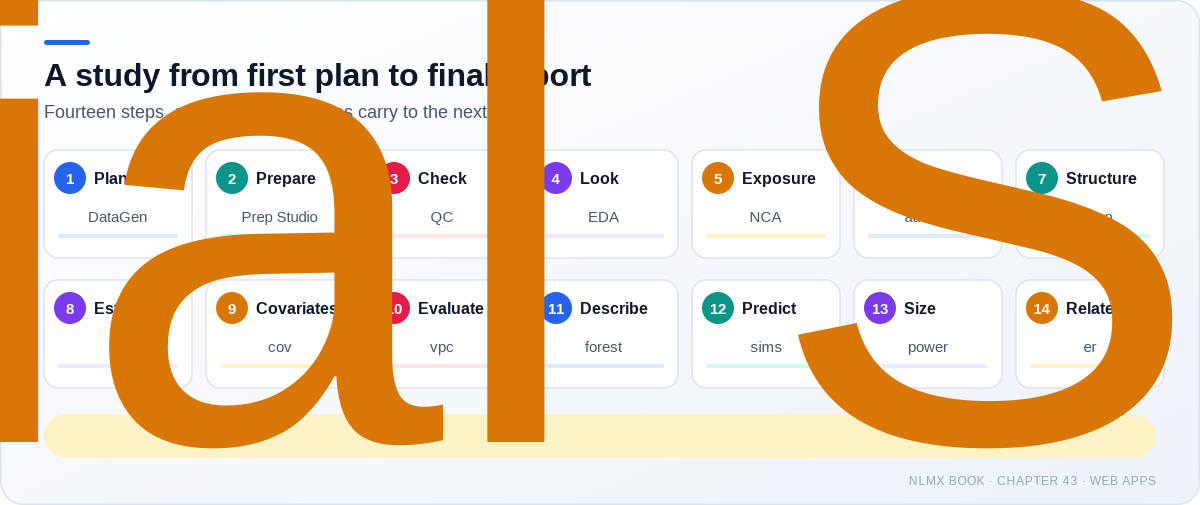
One drug, fourteen runs
Nothing here is a fixed order; each step is a separate run whose files you carry to the next. Together they show how the apps cover an analysis from design to decision.
| Step | App | Command | Decision it supports |
|---|---|---|---|
| 1. Plan | DataGen | generate |
Does the design (doses, sampling times, sample size per arm) give estimable parameters? Practise on data whose truth you know. |
| 2. Prepare | Prep Studio | recipe | Combine raw dosing, concentration and demographic files into one NONMEM-ready dataset with a replayable record. |
| 3. Check | QC | qc-data, qc-nm |
Can I trust the dataset and the model code? Fix the findings; use the corrected control stream. |
| 4. Look | EDA | eda |
Are the profiles plausible? Which covariates are skewed, correlated or missing? Are there BLQ values to handle? |
| 5. Exposure | NCA | nca |
Model-free exposure of every subject and dose; dose proportionality and group comparisons; a cross-check for the model to come. |
| 6. Start | Models | autoinit |
Reasonable initial estimates and OMEGA. |
| 7. Structure | Models | screen |
Number of compartments, lag, transit absorption or TMDD, compared by OFV, AIC, BIC and LRT. |
| 8. Estimate | Models | fit |
Typical values, variability, standard errors; .ext, .cov, .phi. |
| 9. Covariates | Models | cov |
Which covariates on which parameters; the draft covariate model; refit it with fit. |
| 10. Evaluate | Models | vpc |
Does the final model reproduce the data? |
| 11. Describe | Models | forest |
How large are the covariate effects compared with variability? Do any justify a different dose? |
| 12. Predict | Exposure Lab | sims |
Exposures of children, adults or a mixed population on a proposed dose; the share inside the target window. |
| 13. Size | Exposure Lab | power |
Patients needed per arm to detect a covariate effect, with dropout and sparse sampling. |
| 14. Relate | Exposure Lab | er |
The relationship of exposure to efficacy and safety endpoints; the exposure that gives a target response. |
Then:
- BE & DDI Studio for the regulatory questions around the study: bioequivalence verdicts, an interaction assessment, or an impairment analysis.
- Trial Simulator for the program decision: with the exposure-response relationship from step 14, how likely is a phase 3 design to succeed?
- Report for the record.
Walking through it
Plan to check. In DataGen you choose a sparse population design, run it, and send the dataset on. In real work, Prep Studio builds the dataset from raw files; in both cases QC gives a verdict. The QC comparison between the original and the corrected control stream is the evidence for what you changed.
Look and measure. EDA shows profiles, covariate distributions and missing patterns. NCA gives AUC, Cmax and half-life for every subject and dose, and a dose-proportionality estimate, which later serves as a reasonableness check on the model.
Build and check the model. autoinit, screen and fit are three runs in a row with Next step between them. cov tests the candidate covariates without re-running NONMEM, and the draft covariate model is refitted. Compare shows what the covariates changed. vpc evaluates the model, forest expresses the covariate effects against variability. Tag the runs: Base model, Candidate, Final model, Reviewed.
Use the model. sims predicts exposures in the population of interest, with the target window drawn on the box plot. power sizes the next study by FIM and SSE. er relates simulated or observed exposure to response. The _metrics.csv of sims feeds er directly.
Decide. Trial Simulator takes the exposure-response relationship, the design and the decision rule and reports the probability of success and what moves it most. BE & DDI Studio answers the bioequivalence or interaction question for the file. Report assembles figures and tables from the tagged runs into a Word document, PDF and web page.
What the files do
The dataset and control stream go in at every step; the .ext, .cov and .phi of step 8 are read by steps 9 to 14. A model fitted in NONMEM can enter at step 8, and the files of any step can go back to NONMEM.
Doing the same by conversation
In Super, the same path can be driven by words: "check my data", "run an NCA by dose group", "screen model structures", "fit the recommended model", "test covariates", "run a VPC", "simulate children on 5 mg/kg". Every request becomes the same runs, in the same folders, on the same list. A mixed style is typical: forms for the steps that need exact control, conversation for the routine ones.
What this path gives a reviewer
Fourteen tagged runs, each with its exact command, settings, log, inputs and results, and a report assembled from them. A reviewer can open any run, repeat it with Edit and run again, compare it with another, and verify the exports by checksum.
Navigation
See the previous page, next page, and the chapter overview.