41.38 Case 9: one Markdown file, three ways in, and what "done" means
What you will learn
- Produce a report from a Markdown file and a settings file, from text on the command line, and from standard input, and say what each is for.
- Read the settings file of the report command, key by key.
- Separate what a run wrote from what a person verified, using the quality-assurance note of the bundle as the model.
- Explain why exit code 0 and an existing file are not release criteria, with the warning that shows it.
Prerequisites: Chapter 36A, the report command and 41.37.
The question: the analyses of this chapter end in a document. How is a report produced from them, and how does a team know that the document is fit to leave the building?
The evidence: the Chapter 36A bundles full, inline and stdin, with the settings file demo.report, the source demo.md, and the quality-assurance note (QA.md) written when the examples were run. The content is a documentation fixture: its values are illustrative and are not the result of a study.
The source
demo.md is an ordinary Markdown file of 18 blocks with six headings and one footnote. It holds what a pharmacometric report needs and nothing else: a short purpose, a methods section with a typeset equation, a table of three parameter estimates with intervals, an image, a checklist, a quotation, a code block and a provenance note. The equation is the one-compartment oral model:
Writing it in LaTeX inside $ … $ is all the author does. The report command typesets it as a native equation in Word and the PDF, and as MathML in the web page.
Way 1: a settings file
nlmx report -c demo.report -o full
The settings file names the source, the outputs, the document's metadata, the page layout and the style of the web page:
| Section | Keys in demo.report |
What they do |
|---|---|---|
[input] |
file = "demo.md" |
the Markdown source |
[output] |
name, docx, pdf, html |
the base file name, and which of the three formats to write |
[document] |
title, subtitle, author, date, lang |
the title block and the document's metadata |
[layout] |
page_size (Letter), landscape, margin_mm (22), font_size (11), toc, toc_depth (3), page_numbers |
the page geometry, a numbered table of contents, and Page n of N footers |
[html] |
css, embed_images |
a style sheet, and whether the images are embedded in the page |
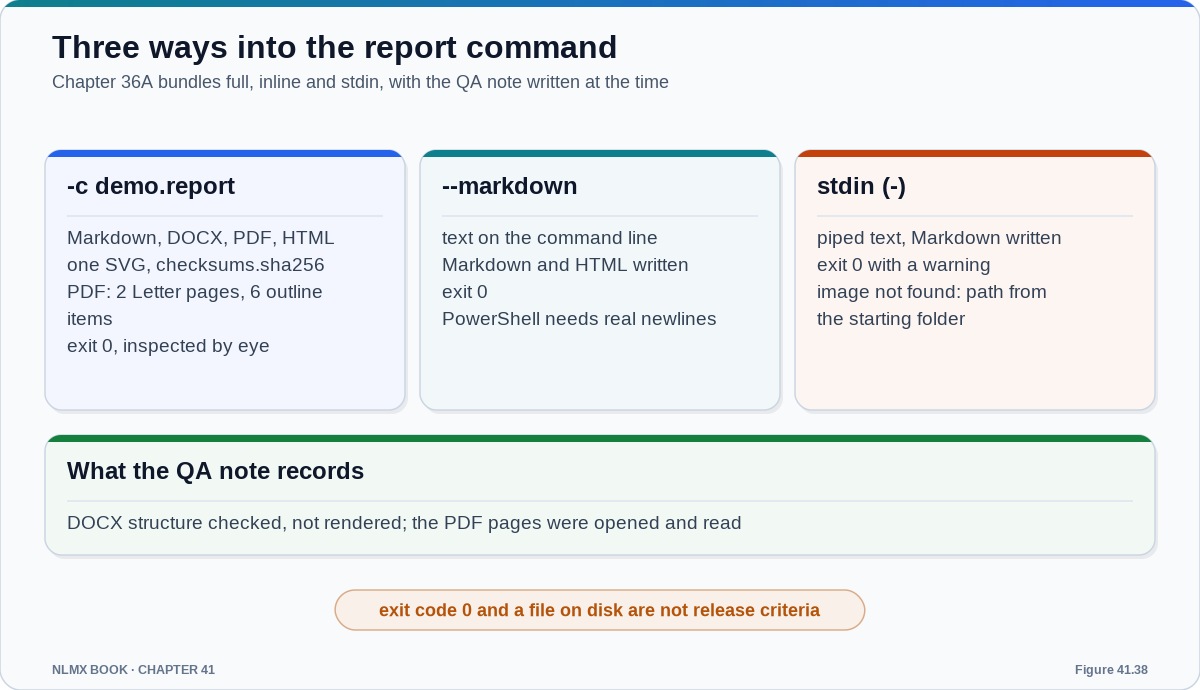
The run reads the source (18 block(s), 6 heading(s), 1 footnote(s)), writes the documents and a checksums.sha256 file, and finishes in 0.18 seconds. The settings file is the second thing to archive with a report, after its Markdown: with it, the page size, the margins and the table of contents are not choices made again by whoever reruns the command.
The outputs named in the QA note are the Markdown source retained, a Word document, a PDF, a web page, one copied SVG, and the checksum file.
Way 2: text on the command line
nlmx report --markdown "# Inline input ..." --file-name inline_demo \
  --html --no-docx --no-pdf -o inline
A short note does not need a file. The text is the argument, the formats are chosen by flags (here the web page only), and the run wrote the Markdown and the HTML (2 blocks, 1 heading, 0.01 s). One practical detail belongs in the book because it fails silently: PowerShell does not turn the two characters \n into a new line. The QA note records that a double-quoted variable was used so that PowerShell's own escape (a backtick followed by n) became an actual line break, and that a single-quoted string would have kept the two characters instead.
Way 3: standard input
nlmx report - --file-name stdin_demo --no-docx --no-pdf -o stdin
The hyphen reads the Markdown from the pipe: the way to put a report at the end of a script. The run wrote the Markdown, exited with code 0, and printed a warning:
[warn] image `report-flow.svg` was not found (looked in .)
The text arrived through a pipe, so it has no folder of its own. The image path is resolved from the folder where the process started, not from the file the text came from. The log counts one block fewer than the same source read from the file (17 against 18), which is consistent with the missing image. The report has been written without its figure.
The lesson is in the QA note, and it is the most useful sentence of the bundle: the warning demonstrates why exit code 0 and file existence are not sufficient release criteria. A script that tests only the exit code would have shipped the report with a hole in it.
What the run wrote and what a person verified
The QA note separates the two, claim by claim.
| Output | What was written | What was verified | By whom or by what |
|---|---|---|---|
| two US Letter pages | text is searchable and selectable; title and author metadata present; six outline items; a numbered contents list; one table; a typeset equation; an SVG figure; a footnote; Page n of N footers | both pages were rendered as images and inspected: no clipping, overlap, missing content or unreadable text | |
| Word | a valid document | structure only: the package parts, a footnotes part, one image, one table, four equation elements, one drawing, a contents field | not rendered: the document renderer required by the procedure was not available, so the file is not claimed as visually verified |
| Web page | a page | contents list, MathML, embedded image data, the supplied style sheet | inspected for those parts |
The source document says the same thing in its own checklist. Its last two boxes are unchecked:
- Source Markdown retained
- Tables and equations rendered
- PDF page images inspected
- Word page images inspected with the qualified document renderer
- Qualified scientific approval recorded
and its quotation is the sentence to remember: document generation proves that the report can be rendered. It does not prove that an analysis, interpretation or decision is correct. A record that shows what was not done is more useful to a reviewer than one that shows only what was. The page does not claim that the Word document is correct; it says what has been checked.
A release check for a generated report
The following list is the QA note turned into a procedure.
- Run it from the settings file, and keep the Markdown, the settings, the transcript and
checksums.sha256with the output. - Read the log for warnings, not only the exit code (the missing image of way 3).
- Open every format that will be sent, and look at every page: clipping, overlap, a missing figure, an equation that is not typeset.
- Test what a reader will do: search for a word in the PDF, follow a link from the contents list.
- Compare the figures and tables with the results they came from (the numbers in the document are text typed or pasted into the Markdown, and no command checks them against the analysis).
- Record what was not done, as the checklist above does.
Step 5 is where a pharmacometric report fails most often, and it is not something the command can do for the author.
The decision
| Question | Evidence | Decision | Reversible? |
|---|---|---|---|
| Can one source produce Word, PDF and web outputs? | full: all three, one copied figure, checksums, 0.18 s |
yes | yes |
| Is the PDF fit to send? | both pages rendered and inspected | yes, for this fixture | yes |
| Is the Word file verified? | structure only; renderer not available | no, until opened in the document renderer | yes |
| Is exit code 0 enough? | standard input: exit 0 with a missing figure | no; read the warnings and open the file | yes |
| Does a report prove an analysis is right? | its own quotation | no; scientific approval is a separate record | yes |
What this case does not show
The source is a two-page fixture with illustrative numbers, so it says nothing about the length of real reports, about large tables or many figures, or about a regulated template. Only one PDF was inspected (two pages), and the Word file, the more demanding format, was not rendered. No command is shown that fills a report from the results of an analysis; the numbers in the table were typed. The standard-input example is a failure of path resolution only and does not exercise the other options of the command.
Review checklist
- Do you archive the Markdown, the settings file, the transcript and the checksums with every report?
- Do you read the warnings of a run, and not only its exit code?
- Have you opened and read every page of every format that leaves the team?
- Can you say, for each format, what was written and what was verified, and by whom?
- Are the numbers in the document checked against the results they were taken from?
Navigation
See the previous page, the overview and the complete case-study reference.