39.15 After an upgrade: version changes and requalification
What you will learn
- Recognize failures and result changes that appear only after a new executable is installed
- Upgrade through a controlled process
- Requalify results affected by a version change
Prerequisites: Chapter 36 exit-code reference, Chapter 38 output completion, and the Chapter 39 overview.
Troubleshooting must preserve the failed attempt: keep its exact command, working directory, log, resolved settings, input/model identities, partial outputs, and process exit code. Correct one causal condition at a time and compare the new evidence with the failed run. Never convert a nonzero exit into success in a wrapper, and never interpret exit 0 as scientific acceptance without the command-native verdict.
A common cause of a command that worked yesterday and fails today is that the executable changed. Before looking for a fault in the data or the model, confirm which executable ran: record nlmx --version, the executable path (Get-Command nlmx in PowerShell, command -v nlmx in POSIX shells), and its hash. Several installations on one computer are a frequent source of this confusion (Section 2.5).
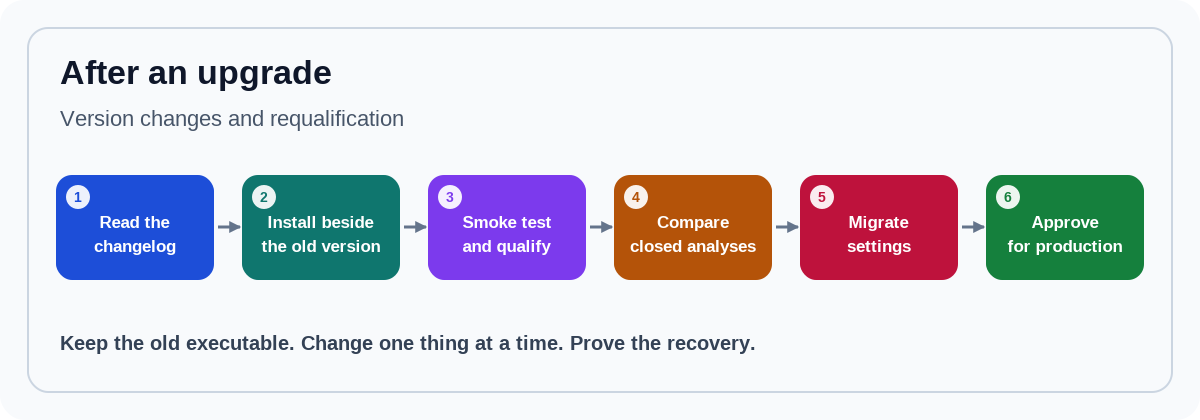
An upgrade can change numerical behavior, defaults, schemas, filenames, or supported features. A setting accepted by the old version may be rejected by the new one with exit 4, a control stream feature may newly be reported with exit 5, and a checkpoint written by the old version may be refused with exit 11. Read the changelog between the two versions before changing anything, then:
- install the new version beside the old one rather than over it;
- run the site's installation qualification and the smoke test of Section 2.4;
- compare controlled analyses within method-appropriate tolerances and keep the differences with the record;
- migrate settings deliberately, using freshly printed templates from the new version;
- resume checkpoints only if compatibility is explicitly accepted; otherwise start fresh;
- approve the new version before production use, and keep the old executable according to policy.
Do not edit result files to make them look like the output of a different version. If an old analysis must be repeated exactly, run it with the executable that produced it.
Page checklist
- Did you retain the exact exit code, stage, message, hint, log, and partial output?
- Did you identify one causal layer before changing anything?
- Did you confirm that the same executable, with the same version, ran both the old and the new attempt?
- Is the recovery a new, traceable attempt with the same intended estimand?
- Did you check command-native and scientific acceptance after process completion?
Navigation
See the previous page, next page, and complete error reference.