15.26 Errors, exit codes, and troubleshooting
The command distinguishes invocation, file, configuration, dataset, and no-result failures. Documented codes are:
| Code | Class | Typical cause |
|---|---|---|
| 2 | Usage | Invalid CLI value or contradictory plot format. |
| 3 | File/output | Missing input, unreadable path, or protected output directory. |
| 4 | Configuration | Unknown .nca key or invalid file value. |
| 7 | Dataset | Missing required column, parse failure, invalid record content. |
| 10 | Nothing analysable | No profile could produce an analysis result. |
Warnings and profile-level skips can occur with a successful process exit. Automation must inspect retained diagnostics as well as the exit code.
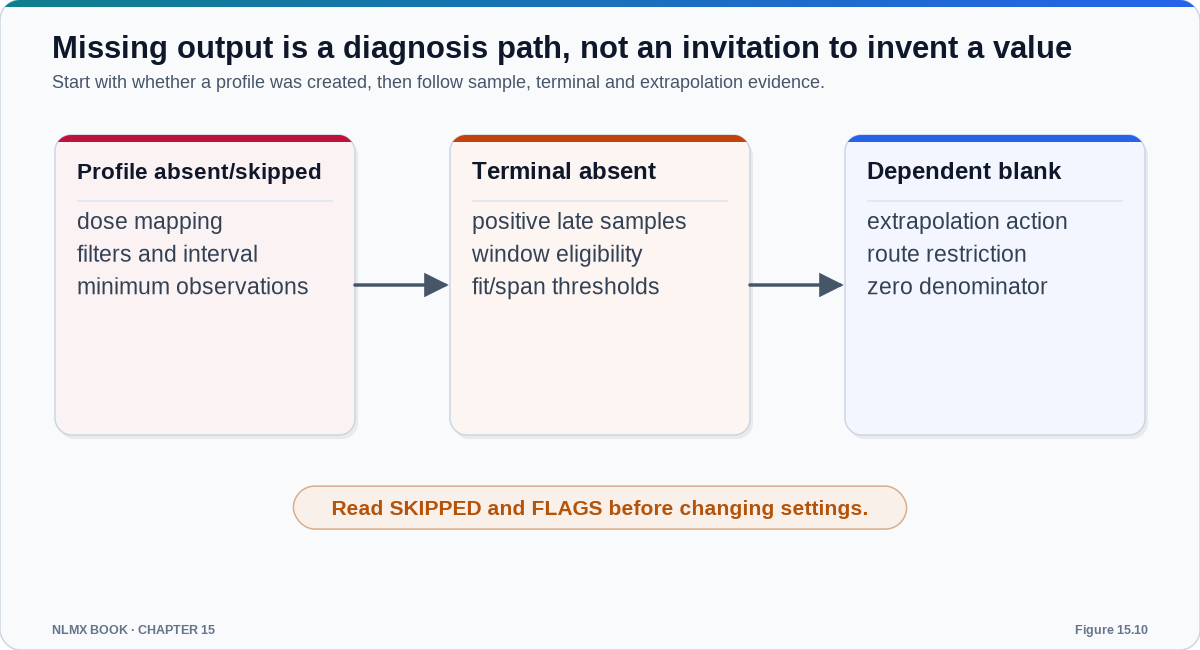
Diagnose from earliest stage
If the command fails before reading counts, inspect executable invocation, paths, configuration syntax, and output permissions. If counts appear but profiles are absent, check dose mapping, filters, route, timing, and interval selection. If profiles are skipped, read SKIPPED and sample status. If only terminal descendants are blank, inspect positive late samples, candidate eligibility, adjusted R², span, extrapolation action, and route restrictions.
For a missing optional comparison file, first establish whether eligible rows exist. Do not toggle output settings until group labels, doses, routes, and endpoints support the comparison.
Safe recovery
Copy the exact command and error. Change one input or setting at a time and use a new output directory. Preserve the failed configuration and, when outputs exist, its log. Avoid “fixing” source data in place; create a controlled corrected dataset or mutation with provenance.
Strict shell pipelines should stop on nonzero exit codes. They should also implement acceptance checks for skipped-profile fraction, required files, flags, and minimum endpoint N.
Common mistakes
- Treating exit code 0 as every profile passing QC.
- Changing several settings simultaneously during diagnosis.
- Converting missing terminal parameters to zero downstream.
- Reusing a directory and mistaking stale files for recovery output.
Checklist
- Capture command, exit code, stdout/stderr, and log.
- Locate the earliest failed stage.
- Read SKIPPED and FLAGS before relaxing rules.
- Rerun one controlled change into a new directory.
- Add scientific acceptance checks beyond process success.
Further reading
See record roles, terminal thresholds, and output provenance.