E.1 How the index is built: names, kinds and sort order
What you will learn
- Read a page name: chapter, running number and slug.
- Tell the four kinds of page apart, and find the chapter-level reference of any chapter.
- Know how the A–Z is sorted, so you can predict where a title will be.
- Follow three lookups from a question to a page.
Prerequisites: the overview.
What a page name tells you
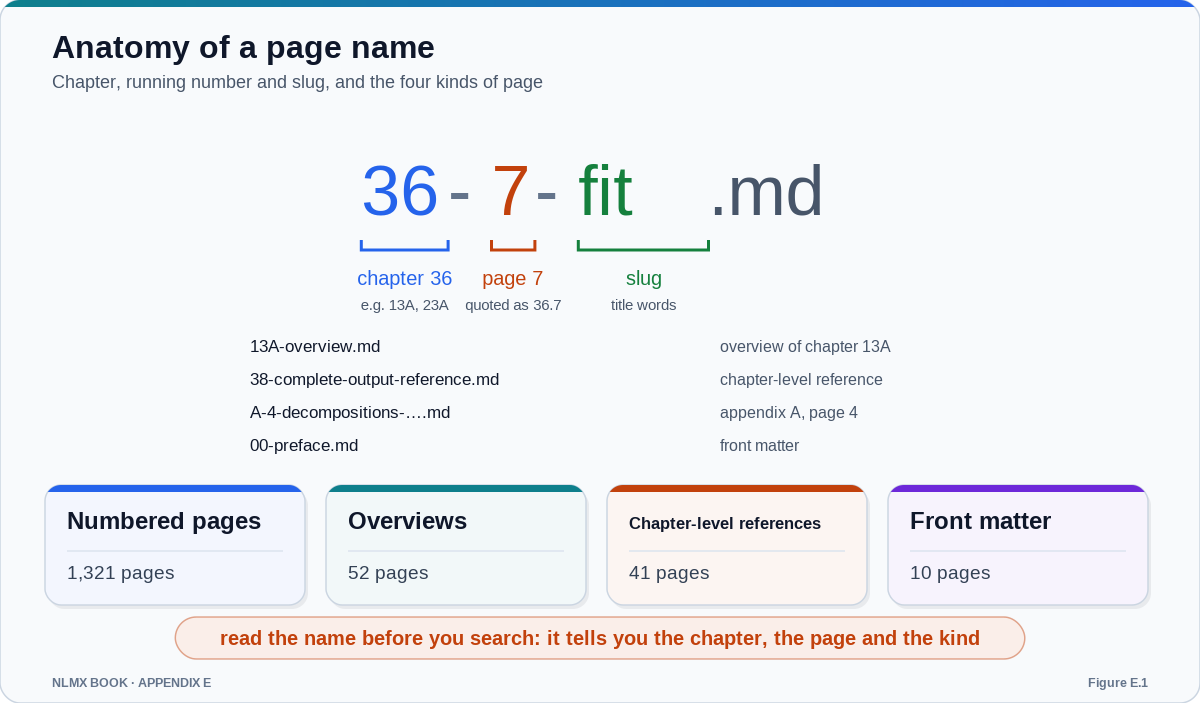
Every page is a Markdown file whose name has the same anatomy. Reading it takes a second and saves a search.
36-7-fit.md             chapter 36, page 7, subject "fit"
13A-overview.md         the overview of chapter 13A
38-complete-output-reference.md   the chapter-level reference of chapter 38
A-4-decompositions-and-positive-definiteness.md   appendix A, page 4
- The chapter is the first part. It is a number, optionally followed by a letter. The lettered chapters (13A, 23A, 36A) are chapters added to the sequence without renumbering the rest; the letter belongs to the chapter, so
13A-3-…is page 3 of chapter 13A. - The second part is the running number, and it is the number that the page quotes in its title (page 36.7 is
36-7-fit.md). Appendix pages follow the same form with a letter in place of the number (A-4-…is page A.4). - The slug is a shortened title and is not stable in the way the number is. Cite a page by its number and title, and link by the file name.
- Two quirks exist in the file names and are kept because links depend on them: chapters 1 to 9 carry a leading zero (
07-overview.md), and chapter 23A is spelled with a lowercasea(23a-overview.md) while 13A and 36A are not. The index resolves each chapter's overview through a case-insensitive match, so a reader is not affected.
The kinds of page
| Kind | How to recognise it | Count |
|---|---|---|
| Overview | the name ends in -overview; one per chapter and appendix |
52 |
| Numbered page | NN-N-slug.md: chapter, a running number, a slug |
1321 |
| Chapter-level reference | no running number; the name says index, complete or reference |
41 |
| Front matter | the name begins 00- |
10 |
| Total | 1424 |
A chapter that documents a command carries one chapter-level reference, and its title usually begins Complete. That page lists every option and setting of the command in one place, and it is the page to open when you know the option and not the section.
The pages of the book, chapter by chapter
The table is the book's map. Pages counts every page of the chapter, including the overview and the chapter-level reference. The right-hand column names the reference of the chapter, where there is one; a chapter without one (Chapters 1 to 10, for example) is a narrative chapter, and its overview lists its pages.
The page counts add to 1424.
Four kinds of entry
The index has four lookup tables, and each has its own kind of entry.
| Entry | Where | What you look up | What you get |
|---|---|---|---|
| Task | E.2 | a sentence that starts with a verb | one to four pages, in reading order |
| Command | E.3 | the command name | five pages (concepts, running, manual, settings, outputs) |
| Identifier | E.4 | an exit code, a check ID, a plot code, a file extension | the page that defines it |
| Title word and file name | A–Z reference | the first word of a title, or an output file name | the page, with its location |
How the A–Z is sorted
The A–Z reference lists every page once, under the first letter of its title after four clean-ups, so that pages are sorted by subject and not by the way a title is introduced:
- A leading Chapter N — is removed (the overview pages of the later chapters carry one).
- A leading page number such as 39.9 or A.4 is removed.
- A leading Complete is removed, so Complete eda command and option index is filed under E.
- Leading punctuation is removed, so $INPUT mapping is filed under I, and .eda settings file under E.
The sort is not case-sensitive, and titles that begin with a digit are grouped first, under 0–9. A page appears once, even when a topic is covered in several chapters; the same subject under different chapters is the reason for entries such as ETA and EPS shrinkage, which appears under both Chapter 18 and Chapter 21 (pages 18.34 and 21.17).
The second section of the A–Z lists output file names, sorted the same way. A file name appears with the page that describes it in Chapter 38, and with every other Chapter 38 page that names it. A name in angle brackets (<stem>.ext) stands for the model's stem; see 4.1.
Three lookups, done step by step
1. "My run ended with exit code 11." The codes are in E.4. The row for 11 reads checkpoint: resume or checkpoint identity or compatibility failed and points to page 39.13 Exit code 11: checkpoint or resume incompatibility. The same page family has one page per code, 39.4 to 39.14, so the answer is one hop away. The general page 4.4 Exit codes, errors, warnings and notes introduces the codes, and 36.35 Exit codes and machine-readable completion is the reference table.
2. "What is the check REC05?" There are two checks with this name: the quality-control command for datasets has REC01–REC20 (record consistency, then infusions and repeats), and the one for control streams has REC01–REC10 (record presence, order and includes). The identifier table in E.4 lists both, with the page of each family: 11.13 Core record consistency: REC01–REC12 and 12.6 Record presence, order and includes: REC01-REC10. The command that printed the code tells you which.
3. "Which file holds the selection probabilities of a covariate analysis?" Search the second section of the A–Z reference for selection. The file selection_probabilities.csv is listed with 38.15 Posterior-stability, both-engine, and resume outputs, the output dictionary of the posterior-stability engine. The method that produces it is explained in Chapter 24 and run in Chapter 25.
When a link is wrong
The index is generated from the list of pages, and every link was checked against that list when this appendix was built: a file name that does not exist stops the build. A reader who finds a broken link has therefore found a page that was renamed after the index was built. Open the overview of the chapter (the table above) and look for the page by title; then report the old and the new name. Do not edit the A–Z by hand; regenerate it.
Review checklist
- Can you read a page name: chapter, running number, slug?
- Do you know that chapter 23A is spelled with a lowercase
ain its file names? - Can you name the chapter-level reference of the chapter you are working in?
- Can you say how Complete eda command and option index is sorted in the A–Z?
- Given a code that two commands can print, do you know to ask which command printed it?
Navigation
See the previous page, the next page, the overview, and the complete index reference.