D.1 The code map: layers, modules and what depends on what
What you will learn
- Name the layers of the program and the job of each module in them.
- Find, for any command, the module that implements it and the modules it leans on.
- Apply the three structural rules that keep the program checkable: one command per module, one shared core, no command calling another.
Prerequisites: Chapter 4, concepts and conventions and Chapter 8, the model engine.
This appendix is for people who maintain the program, or who need to understand it well enough to review a change. It describes how the program is organised and why, at the level of modules, responsibilities and contracts. It does not teach the programming language it is written in, and it does not repeat the user-facing behaviour described in Parts III to XI.
Four layers
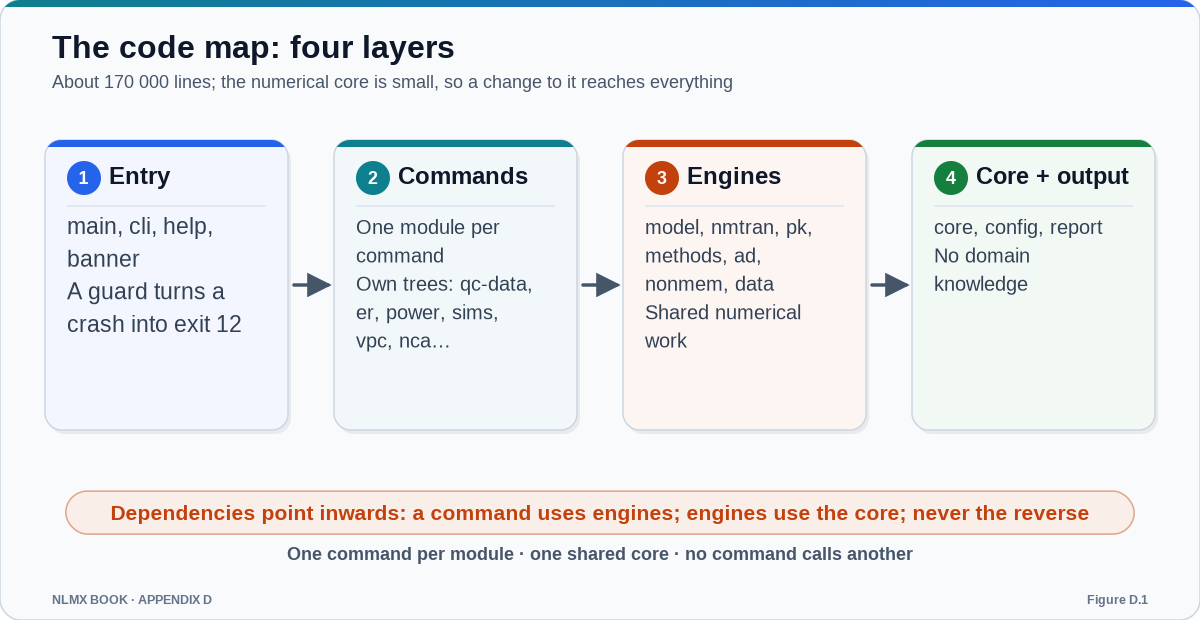
The source is a library plus a thin entry point. Reading from the outside in:
| Layer | What is in it | Modules |
|---|---|---|
| 1. Entry | start-up, option parsing, the guard that turns a crash into an exit code | main, cli, help, banner |
| 2. Commands | one module per command: reads the settings, calls the engines, writes the outputs | commands/ (one file per command), and the self-contained command trees qc-data, qc-nm, eda, custom, report (the mdreport tree), er, power, sims, forest, vpc, nca, screen, autoinit, llm |
| 3. Engines | the numerical and statistical work that several commands share | model (likelihoods, estimation, simulation), nmtran (the control-stream code interpreter), pk (ADVAN/TRANS solvers), methods (frozen and posterior covariate engines), ad (automatic differentiation), nonmem (readers of NONMEM files), data (dataset reading and covariate policy) |
| 4. Core and output | small utilities with no domain knowledge | core (errors, logging, hashing, random streams, linear algebra, statistics), config (settings documents and extensions), report (the output set, summaries, figures, HTML) |
Dependencies point inwards: a command may use an engine; an engine may use the core; the core never uses an engine, and an engine never uses a command. That is why core can be tested without a dataset and an engine can be tested without a command line.
Size, to calibrate expectations
The library holds roughly 170 000 lines. The largest trees are the command families that carry a lot of output: commands (about 18 000 lines), qc-data (13 000), sims (12 000), er and mdreport (11 000 each) and methods, llm and qc-nm (7 000 to 11 000). The numerical core is comparatively small: core is about 1 600 lines, ad about 500, pk about 1 900. A change to the core therefore reaches everything, and is reviewed accordingly (page D.15).
Where each command lives
| Command | Command module | Own tree | Settings extension |
|---|---|---|---|
qc-data |
commands/qc_data |
qc-data/ |
.qcd |
qc-nm |
commands/qc_nm |
qc-nm/ |
.qcn |
eda, custom, report |
commands/eda; custom, mdreport trees |
eda/, custom/, mdreport/ |
.eda, .custom, .report |
nca |
commands/nca |
nca/ |
.nca |
autoinit, screen |
commands/autoinit, commands/screen |
autoinit/, screen/ |
.init, .screen |
fit, vpc, forest |
commands/fit, vpc, forest |
model/, vpc/, forest/ |
.covar, .vpc, .forest |
cov, posterior, resume |
commands/run, resume |
methods/ |
.covar |
sims, power, er |
commands/sims; power, er trees |
sims/, power/, er/ |
.sims, .power, .er |
generate, simulate-study |
commands/generate, study |
– | .gen |
ask |
the llm tree |
llm/ |
.ask |
Most commands have a module that is thin (orchestration: read settings, call, write) and, beside it, a tree that holds the substance. The thin module is the one to read first.
Three structural rules
- One command, one tree. A command's checks, tables and plots live in its own tree, so removing or rewriting one command cannot disturb another. The shared pieces are deliberately few: the output set, the chart engine of
vpc(reused by the others for figures), the reader of datasets, and the R-style expression parser used for filters. - Nothing is silent. A function that can fail returns a result carrying a stable exit code and a message (page D.3); the program never repairs input quietly.
- Options are global, settings are per command. Every command-line option parses after any command (which makes the usage message long); the help of a command lists only its own headings (page D.8). Settings files, by contrast, have one format per command.
A map for reading
If you must review a change to a command, read in this order: the command's thin module (what it reads and writes), its settings file definition (what a user can change), its tests (what is promised), then the engine call it makes. If the change touches core, config or report, widen the review to every command, because those layers are shared.
Review checklist
- Can you name the layer of any module you are about to change, and who depends on it?
- Does the change keep dependencies pointing inwards?
- For a command change, did you read the thin module, the settings definition and the tests?
Navigation
See the appendix overview, the next page and the developer reference.