15.24 nca_lambda_z.csv and nca_profiles.csv: the audit tables
The two audit tables explain how each parameter row was produced. Keep them even when reviewers initially request only final parameters.
Terminal-candidate table
nca_lambda_z.csv lists every regression tried for every profile, not only the winner. Rows identify subject/group/occasion and include candidate point count, start/end times, slope/lambda-z, fit statistics, span, and selected status. Automatic best-fit should show nested candidates; last-n or time-range yields the configured selection path.
Audit by filtering to one profile, sorting candidates in the written order, recalculating adjusted R², and applying the tolerance/more-points tie rule. A difference in final half-life between tools often becomes obvious here: the software selected different observations even though regression formulas agree.
Processed-profile table
nca_profiles.csv lists each sample with original/analysis concentration context: TIME, CONC, CONC_USED, STATUS, IN_LAMBDA_Z, and source-line reference where available. Inserted zero, back-extrapolated C0, BLQ transformation, duplicate aggregation, missing record, and selected terminal status can therefore be reviewed.
Do not interpret CONC_USED without STATUS. A zero can be an observed value, an inserted dose-time boundary, or a BLQ substitution. IN_LAMBDA_Z=1 must correspond to positive used concentrations and the selected regression window.
A practical discrepancy workflow
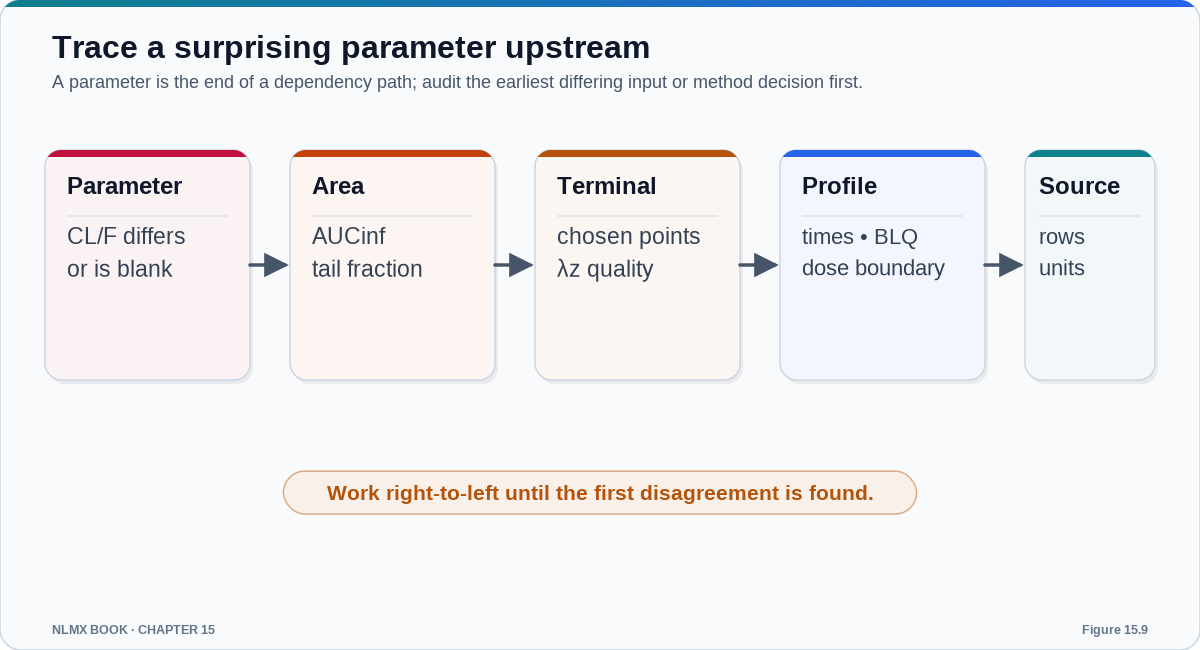
Start at the differing final parameter, compare AUC/tail fields, compare chosen lambda-z candidate, then compare processed observations and source rows. Work upstream until the first difference. Downstream differences after that point are consequences, not independent bugs.
Common mistakes
- Keeping only the selected lambda-z row.
- Treating transformed BLQ concentrations as raw assay values.
- Comparing candidate row numbers rather than actual times.
- Investigating clearance before checking dose, AUC, and lambda-z.
Checklist
- Retain both audit CSVs.
- Review all candidates for flagged/important profiles.
- Reconcile
CONC_USEDwith STATUS. - Confirm selected-point indicators and plot rings.
- Find the first upstream discrepancy.
Further reading
Use terminal controls, subject overrides, and reference reproduction.