4.2 Output folders: what is written, never overwritten, and the log
Every command writes its results into a folder, and every command treats that folder the same way. This section describes the folder: the rule that keeps it fresh, the files that are always there, and the files that let you check or repeat what was done.
4.2.1 One command, one fresh folder
-o (or --output) names the output folder. Each command has a default name (out_fit, out_vpc, … in the
settings, or a folder beside the input), and the rule is the same for all:
- If the folder does not exist, it is created.
- If it exists and is empty, or holds nothing but
log_*.txtfiles, the command writes into it. - If it holds anything else, the command refuses, with exit code 3, before it does any work.
$ nlmx qc-nm models/run101.ctl -o out_qcn
   0.00s error FAILED during stage `startup`: output directory `out_qcn` is not empty
   0.00s error exit code 3 (file discovery or I/O failure)
   0.00s error hint: pass --overwrite to write into it, or choose a fresh --output directory
The reason is traceability. A folder that two runs have written into holds files of both, and nothing says which file
belongs to which. With a fresh folder, everything in it came from one command line, and the checksums and the log (below)
describe all of it. --overwrite lifts the rule for the cases where you do want to write into an existing folder (a
rerun that you accept replaces files of the same name; files the new run does not write stay as they were, so it is a
tool for iteration, not for results you will report). One further refusal has no override: the output folder may not be
the folder that holds the model's own files (--model-dir), "to avoid writing beside the source artifacts".
Your inputs are never modified. qc-nm corrects a copy of a control stream, fit writes a final control stream into its
output folder, and cov writes draft_model.ctl there; the input control stream and the dataset are only read.
4.2.2 Anatomy of an output folder
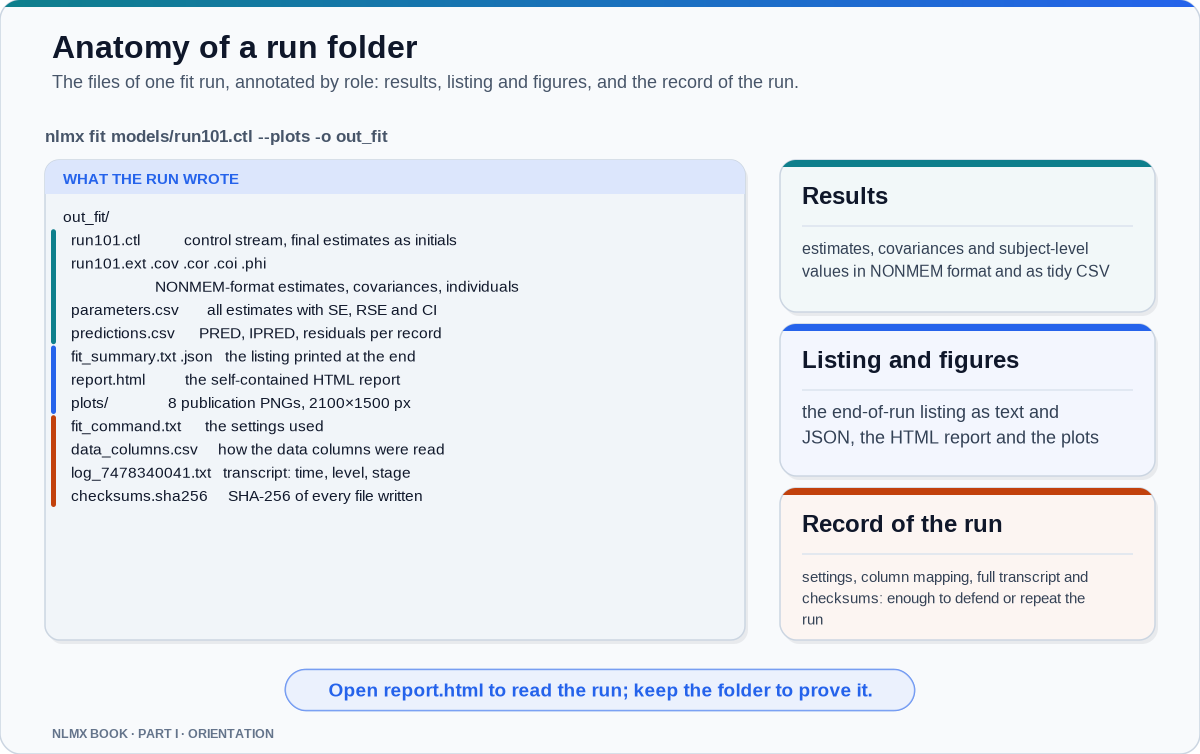
Three groups of files appear in every folder, whatever the command.
The result files. These differ by command and are listed at the end of the command's console output (the "Outputs" or
"Files" block you have seen throughout Chapter 3). They are tables (CSV), a summary (*_summary.txt, *.json), the plots in
plots/ and a self-contained report.html.
The transcript. log_<id>.txt holds everything the command printed, with the time of each line, at a more detailed
level than the console. It begins with a header that records the version, the full command line, the start time and the
path of the log, and it continues with one line per event: [ 0.00s] [info ] [-] …, where the third field is the stage
([-] before the first stage). <id> is a number in the file name, so that the transcripts of two runs written into the same folder have different names. The console is a view of the log: -v and -vv raise the detail on the
console (to the debug and the trace level), -q shows errors only, --suppress-console 1 silences the console, and the log file
is not changed by any of them. --log-file FILE puts the transcript elsewhere.
The checksums. checksums.sha256 lists the SHA-256 hash of every file the command wrote, in the format that
sha256sum reads. It does not list itself or the transcript. To verify a folder, change into it and run
sha256sum -c checksums.sha256 # on Windows: certutil -hashfile, or Get-FileHash, for each line
and every line must say OK. This catches a copied folder that lost or changed a file, and it is the evidence you file
beside a report: the hashes of the results of the run you are reporting.
4.2.3 Rerunning exactly
A result should be reproducible from what the folder says about it. nlmx gives you the means in three ways, which differ by command.
The settings echo. Commands with a settings file write the settings they used, with every default written out, into the output folder:
normalized_config.covarforcov,<stem>_settings.simsforsims,ask_settings.askforask. The first lines of the file say how to use it. Forsims:# Settings of this sims run, as a configuration file: rerun with # nlmx sims -c sims_settings.sims --output <new folder> # (paths are absolute; the seed and every default are written out)(The file itself is called
run101_settings.sims, after the run; the text in its first line uses a generic name.)The command file.
fitwritesfit_command.txt, a comment and the one command line that repeats the estimation with every estimation setting spelled out (the content of--print-options):# The estimation settings of this fit, every one written out (nlmx fit --print-options). # Running this line again repeats the estimation. nlmx fit models/run101.ctl --approximation foce-i --max-iterations 300 --gradient-tolerance 0.001 --cov-step --cov-matrix rsraskwritescommands.txtwith the commands that Maxson ran.The command line in the log. In every case, the header of the transcript has the full command line.
For a covariate analysis there is one more file: input_manifest.json records the engine version, the run stem, how the
input was found, the settings file and the SHA-256 of every input file (control stream, .ext, .cov, .cor, data):
{
  "configuration_sha256": "a6fda26e…",
  "engine": "nlmx 4.2.1",
  "files": [
    { "path": ".../models/run101.ctl", "role": "control_stream", "sha256": "3b3f40ce…" },
    { "path": ".../models/run101.ext",  "role": "ext",           "sha256": "0835b21b…" },
    …
The hash of an input answers the question that comes a year later: was it this version of the dataset? If the hash of the file on disk differs from the one in the manifest, the answer is no.
4.2.4 What the folder does not hold
The option --keep-subject-ids exists because nlmx hashes subject identifiers in some outputs by default; with the option they are written as they are. A folder is not a
validated record by itself: the checksums show that files are unchanged since the command wrote them, not that the
command was the right one. Section 4.4 describes how a command ends and what its exit code says.
Common mistakes
- Using
--overwriteto keep going in one folder. Stale files from an earlier run stay and look current. Prefer a new folder per run, named for the run (out_fit102). - Deleting
checksums.sha256or the log to tidy up. They are the record of the run. - Sending a folder by e-mail after editing a file in it.
sha256sum -cwill say so, and so will your reviewer.
Checklist
- A new
-ofor each run, named for what it holds. -
sha256sum -c checksums.sha256passes for the folders you report from. - The settings echo, the command file or the manifest is kept with the results.
Further reading
Chapter 10 (reports and output files), Chapter 38 (the file reference), Section 4.3 (why a rerun gives the same files).