Typographic conventions, command grammar, and callouts
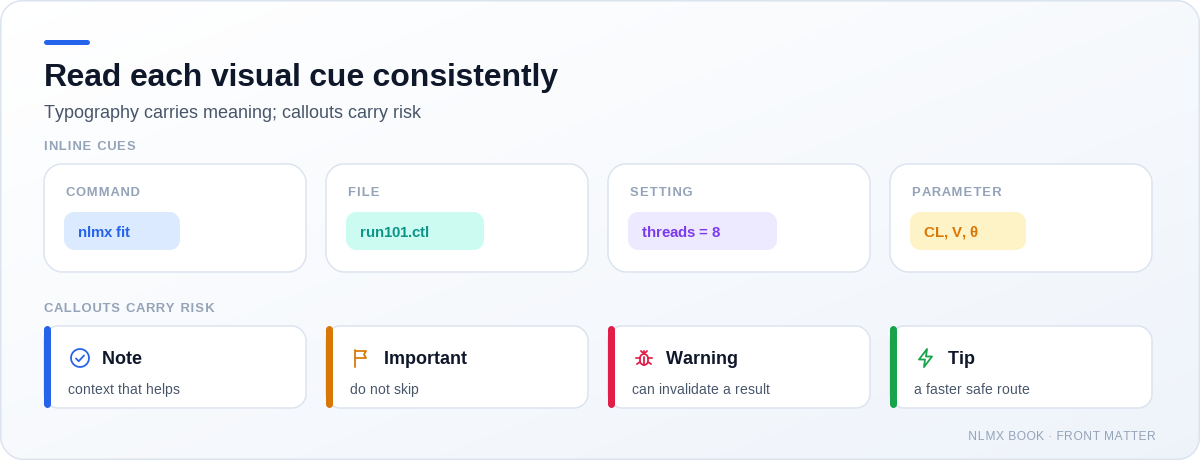
Typography in this book carries meaning. Reading it consistently prevents common novice mistakes such as typing placeholders literally, confusing a settings key with a command option, or treating example output as a command.
Inline conventions
| Appearance | Meaning | Example |
|---|---|---|
monospace command |
text typed in a terminal | nlmx fit run101.ctl |
--long-option / -c |
command-line option | --retry, -c nlmx.fit |
COMMAND |
subcommand when discussed generically | fit, vpc, report |
file.ext |
literal filename or pattern | run101.ctl, *.ext |
folder/ |
directory | fit_output/ |
section.key or key = value |
settings path or TOML assignment | threads = 8 |
$RECORD |
NONMEM/NM-TRAN record | $THETA, $ESTIMATION |
PARAMETER |
model/data symbol or column | CL, WT, EVID |
<PLACEHOLDER> |
replace with your value; omit angle brackets | <CONTROL_STREAM> |
[OPTIONAL] |
optional syntax in a synopsis | [DATASET] |
| `A | B` | choose one alternative when used in a synopsis |
... |
omitted or repeatable material, not literal text unless stated | --files FILE ... |
Bold text marks an important term or conclusion, not something to type. Italics identify titles or ordinary emphasis. Quoted messages reproduce or paraphrase user-visible output; verify the exact installed wording if a test depends on it.
Command blocks
nlmx fit <CONTROL_STREAM> --retry 3 --output <OUTPUT_DIRECTORY>
Replace <CONTROL_STREAM> and <OUTPUT_DIRECTORY> with real paths. A code block labelled text may show a command, configuration, output, or file content; the preceding sentence tells you which. Blocks labelled powershell, bash, toml, json, or another language use that syntax.
Long commands may be displayed on one line to remain shell-neutral. If a page shows a continuation, use the correct character for the shell: PowerShell backtick, POSIX shell backslash, or a script/argument array. Copying a POSIX continuation into PowerShell is a common source of false errors.
Paths and operating systems
Windows examples may use C:\work\project; POSIX examples may use /work/project. nlmx options accept paths according to the platform. Quote paths containing spaces:
nlmx fit "C:\PK Project\run101.ctl" --output "C:\PK Project\fit output"
Do not add quotes to a stored value unless its syntax requires them. Do not assume a path is relative to the terminal's current folder; settings-file-relative and input-file-relative rules are command-specific and are explained in Chapter 7 and the command chapter.
Settings notation
The book distinguishes:
- a command option:
--threads 8; - a TOML assignment:
threads = 8; - a conceptual value: “eight worker threads”;
- a resolved setting: the effective value after defaults, file, and command-line overrides.
Never infer precedence from typography. The program resolves built-in defaults, settings files, command-line options, and command-specific rules as documented in Chapter 7. Retain the resolved-settings output because the original settings file may not show overrides.
Admonition types
Block quotes with a bold label carry a stable risk meaning.
Note
Adds context or a clarification. Missing the note should not normally create immediate risk, but may reduce understanding.
Tip
Suggests an efficient or convenient practice. A tip is optional and does not override a controlled procedure.
Warning
Identifies a plausible route to an incorrect result, lost evidence, unsafe interpretation, or failed run. Stop and check whether the condition applies.
Regulatory
Identifies a traceability, validation, change-control, privacy, audit, or approval consideration. It is not legal or regulatory advice; apply your organisation's procedures and applicable requirements.
Limitation
States an unsupported feature, reduced scope, approximation boundary, or condition under which the described conclusion should not be generalized.
The visual label matters more than colour. Figures and callouts must remain understandable when printed in grayscale or viewed with colour-vision deficiency.
Requirement language
The book uses these words deliberately:
- must — required for the described command, invariant, safety/evidence control, or logical validity;
- should — strong recommendation; deviations need thought and often documentation;
- may — permitted or possible;
- can — capability, not permission or guarantee;
- default — value used when no higher-precedence choice changes it;
- recommended — preferred starting choice, not universally optimal;
- refused — the program stops rather than applying the requested behavior;
- ignored — input is not acted on; inspect whether the intended analysis still occurred;
- warning — execution may continue but interpretation requires attention.
Examples, expected output, and tolerances
An output snippet may use ... to omit lines. Do not compare abbreviated prose byte for byte. A numerical expected value should identify whether the check is exact, rounded, relative, absolute, distributional, or decision-based. “Close” without a scale or tolerance is not an acceptance criterion.
The book distinguishes:
- illustrative values, chosen to teach a relationship;
- executed values, produced by a named nlmx version and fixture;
- reference values, independently derived or produced by a qualified comparator;
- acceptance values, paired with a prespecified tolerance and disposition rule.
Cross-references
“Chapter 20” points to the chapter as a whole. “Section 20.4” points to a numbered Markdown page when that chapter uses one page per section. “Fig. 20.3,” “Tab. 20.2,” and “Ex. 20.4” are conceptual labels defined on the numbering page. A filename such as 20-4-...md is the repository address, not necessarily a print-page number.
A copy-before-run checklist
Before running a copied command:
- verify the page and installed software versions;
- identify every placeholder and replace it;
- confirm the current directory and resolved input paths;
- generate current help or configuration when options matter;
- choose a fresh, safe output folder;
- preserve the command in a script or transcript;
- read the exit status, warnings, and resolved settings afterward.
Navigation
See the book map, continue to mathematical notation and version stamps, or consult Chapter 4 for runtime conventions.