Book map, chapter anatomy, and navigation
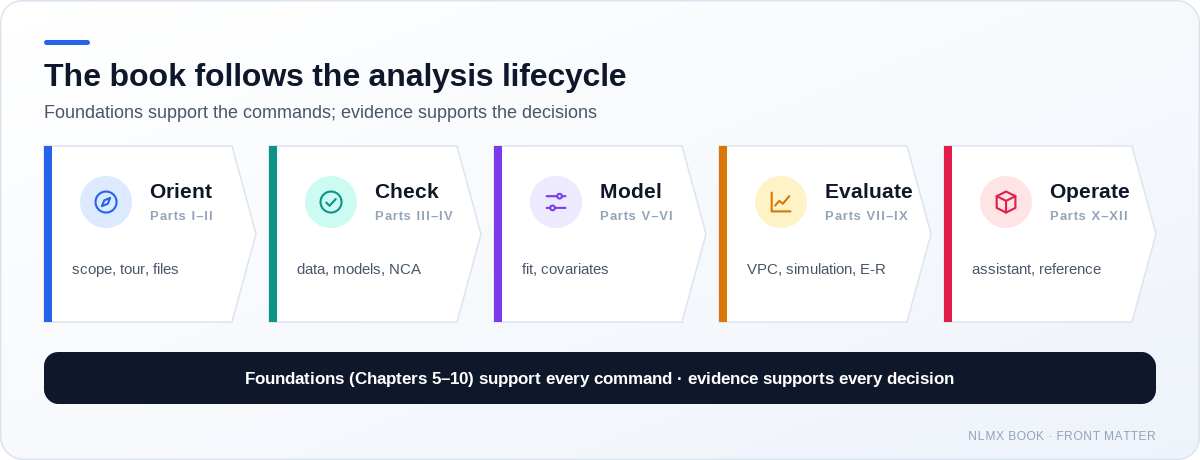
The book follows the lifecycle of pharmacometric evidence: orient the user, establish shared foundations, check data and models, fit and evaluate models, simulate decisions, and retain auditable outputs. The manifest controls the displayed order. These ten front-matter pages are the first category, immediately before Chapter 1.
Parts of the book
| Part | Chapters | Purpose | Current status |
|---|---|---|---|
| Front matter | — | edition, licence, audience, paths, conventions, notation, companion evidence, errata | complete in ten Markdown pages |
| I — Orientation | 1–4 | scope, installation, guided tour, shared user conventions | present |
| II — Foundations | 5–10 | NONMEM files, datasets, settings, model engine, numerics, outputs | present |
| III — Checking data and model | 11–13A | qc-data, qc-nm, eda, and custom |
present |
| IV — Non-compartmental analysis | 14–15 | NCA theory and nca operation |
present |
| V — Building and fitting | 16–21 | initialization, screening, estimation, fit, diagnostics |
present |
| VI — Covariate modelling | 22–26 | concepts, frozen, SCM, posterior stability, commands, forest plots | present |
| VII — Model evaluation | 27 | VPC and NPC workflows | present |
| VIII — Simulation and trial design | 28–31 | study simulation, generation, theory, power |
present |
| IX — Exposure-response | 32–33 | E-R concepts and er |
present |
| X — Maxson assistant | 34–35 | concepts, guardrails, audit trail, practical use | present |
| XI — Reference | 36–40 | commands, report, settings, outputs, errors, comparisons/limits | present |
| XII — Case studies and validation | 41–42 | integrated cases and formal validation | present |
| XIII — The hosted web apps | 43 | the browser apps built around the program, from data preparation to reporting | present |
| Appendices | A–F | mathematics, glossary, bibliography, developer guide, index, frequently asked questions | present |
“Present” means the Markdown pages are included in the manifest; it does not mean every page is timeless or that every example matches a different installed release. Check the version scope on the page and consult the changelog. “Planned” means the outline exists but the content must not be cited as if published.
Typical chapter anatomy
A detailed command chapter usually contains:
- an overview with learning objectives and prerequisites;
- a complete command and option index;
- input requirements and automatic discovery rules;
- processing order, settings precedence, and method choices;
- detailed pages for each important option or method;
- output files, schemas, plots, and reports;
- worked examples with expected checkpoints;
- warnings, errors, troubleshooting, limitations, and validation;
- a complete settings reference where the command supports one.
Concept chapters emphasize definitions, equations, assumptions, interpretation, and method comparison. Reference chapters optimize for lookup. Cross-links are intentional: a command page should not duplicate all estimation theory, and a theory page should not pretend to be the installed CLI help.
How page titles work
Markdown filenames are stable navigation identifiers. For example, 20-overview.md is the fit chapter overview and 20-1-...md is the first numbered page. A suffix such as 13A or 36A inserts an important command chapter without renumbering every later citation. The reader-facing title is stored in manifest.json; a filename and title should agree but serve different purposes.
The book uses relative links so an offline copy remains navigable. If a link is broken, record the source page, visible link text, expected target, edition, and platform in an erratum.
Four ways to find an answer
By task
Use the reading-path table or the part map above. Command chapters are named after the command. Concept chapters usually precede the command that applies them.
By command syntax
Use Chapter 36 or nlmx <command> --help. Installed help wins for the exact installed binary. Use the command's chapter for interpretation.
By setting or output file
Use Chapter 37 for settings and Chapter 38 for outputs. The matching command chapter provides context and examples.
By problem
Use Chapter 39 for messages and troubleshooting, then return to the method page that owns the failed assumption. Do not tune an optimizer to hide a data or model error.
Navigation links on every page
Each front-matter page ends with a navigation section. Detailed technical pages usually link to the previous and next page, their chapter overview, and a complete reference/index. The manifest remains the definitive display order even if a hand-authored previous/next link is stale.
When reading locally:
- use the book application's sidebar for manifest order;
- open links in the same book root so relative figures resolve;
- use text search for commands, options, warning fragments, filenames, or symbols;
- return to the chapter overview before assuming a single page supplies all prerequisites;
- consult the source's
docs/guide when installed behavior is newer than the page.
Page counts in this project
The word “page” usually means one Markdown document, not one fixed sheet of paper. Printed length varies with renderer, paper size, font, code wrapping, and figures. When this book says a chapter contains 26 pages, it means 26 Markdown entries in the manifest. The front matter contains exactly ten such entries.
Status cues
- Current scope identifies the nlmx version described.
- Since X.Y.Z identifies the first documented release of a feature; it does not mean the text applies unchanged forever.
- Planned identifies material that must not be treated as present.
- Conceptual example explains reasoning but is not an executed reference result.
- Worked example should provide executable steps and checkpoints.
- Validated/reference fixture should identify expected values, independent derivation, and tolerances.
A novice navigation exercise
Suppose you want to understand fit --retry. Start at Chapter 20's overview, locate its complete option index, read the retry concept and qualification pages, then check installed help. Follow output links into Chapter 38 and error links into Chapter 39. If comparing the recovered run with NONMEM, add Chapter 40. This route is safer than searching for retry and reading one isolated paragraph.
Navigation
See the reading paths, continue to typography and callouts, or begin Chapter 1.