F.1 Getting started, settings and output folders
What you will learn
- Find a short, checked answer to 14 common questions about getting started.
- Follow the link after each answer to the page that explains it and shows the evidence.
- Recognise the mistakes that these questions come from, so that you do not make them.
Prerequisites: none.
Questions that every new user asks in the first week: what to run first, what a run leaves behind, and how settings files and options combine.
Commands named on this page: qc-data, qc-nm, eda, nca, autoinit, screen, fit, cov, posterior, resume, inspect, validate, sims, generate, simulate-study, schema.
How to read an answer. Each answer restates what the book says, in a few sentences, and ends with Read more: the page that explains it, with its evidence. The answers are short on purpose. When a decision depends on one, open the linked page.
The 14 questions on this page
- What should I run first on a new project?
- Do I need a project file?
- What is a run family and a stem?
- Is there a web version of nlmx?
- nlmx stopped with exit code 3 and said that the output directory is not empty. What now?
- What does every output folder contain?
- Does a command ever change my dataset or control stream?
- My settings file says one thing and my command line says another. Which wins?
- How do I get a settings file to start from?
- Why does a settings file give exit code 4?
- What are the extensions of the settings files?
- Where do I find the options of a command?
- Where does the output go on the screen, and where in the log?
- What do the exit codes mean at a glance?
Answers
F.1.1 What should I run first on a new project?
Start with the checks, then look, then build. qc-data tells you whether the dataset is fit to model, eda and nca describe it, and autoinit, screen and fit build the model. Chapter 3 is a guided tour of the commands on a demonstration project that generate creates for you, and the command map in Chapter 1 shows the seven stages.
Read more: A first hour with nlmx: a guided tour; 3.1 The demo project and what is in it; 1.2 What is inside: the command map; E.3 The command matrix: command, chapter, reference, settings and outputs.
F.1.2 Do I need a project file?
No. A project in nlmx is only a folder layout that you keep: the program has no project file and no registry. Every path you give is taken relative to where you run the command, and a control stream's $DATA is resolved relative to the control stream, as NONMEM does.
Read more: 4.1 Projects, run families and stems.
F.1.3 What is a run family and a stem?
NONMEM names the results of a run after its control stream. For run101.ctl the stem is run101, and the run family is every file with that stem: .ext, .cov, .cor, .coi, .phi and, when present, the listing and tables. The covariate commands read a run family, and they stop (exit code 3) if the family is ambiguous.
Read more: 4.1 Projects, run families and stems; 5.4 Artifact discovery and ambiguity.
F.1.4 Is there a web version of nlmx?
Yes. Chapter 43 describes the web apps that are built around nlmx and what each one is for. The rest of the book documents the command-line program, and the apps follow the same methods.
Read more: The nlmx web apps.
F.1.5 nlmx stopped with exit code 3 and said that the output directory is not empty. What now?
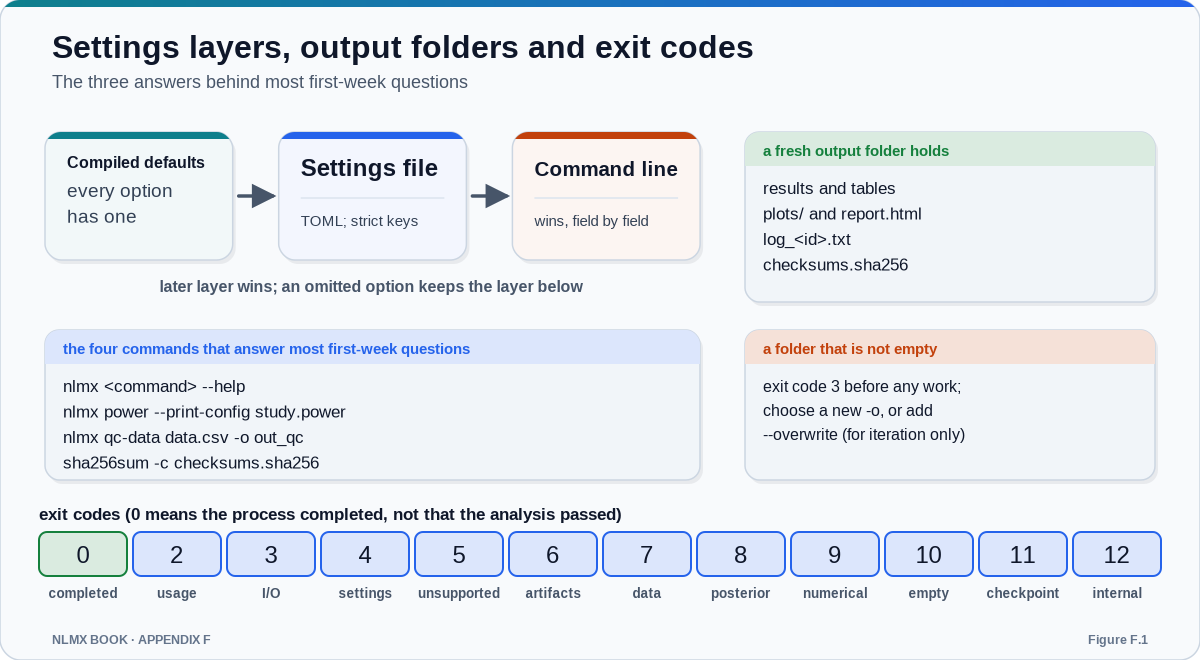
Every command writes into a fresh folder: it creates the folder if it is missing and writes into it if it is empty or holds only log_*.txt files; otherwise it refuses, before doing any work. Choose a new -o folder. --overwrite lifts the rule, but files that the new run does not write stay as they were, so use it for iteration and not for results you will report.
Read more: 4.2 Output folders: what is written, never overwritten, and the log; 39.5 Exit code 3: discovery, files, output, and server I/O.
F.1.6 What does every output folder contain?
Three things: the result files of the command (tables, a summary, plots/, report.html), a transcript log_<id>.txt with the time of each event, and checksums.sha256 with the SHA-256 hash of every result file the command wrote (it lists neither itself nor the transcript). To verify a folder, change into it and run sha256sum -c checksums.sha256.
Read more: 4.2 Output folders: what is written, never overwritten, and the log; 10.16 Manifests, checksums and output contracts.
F.1.7 Does a command ever change my dataset or control stream?
No. Inputs are only read. qc-nm corrects a copy of a control stream, fit writes a final control stream into its output folder, and cov writes draft_model.ctl there. The output folder may not be the folder that holds the model's own files.
Read more: 4.2 Output folders: what is written, never overwritten, and the log; 12.1 Your first qc-nm run.
F.1.8 My settings file says one thing and my command line says another. Which wins?
The command line. The effective configuration is built from three layers, compiled defaults, then the settings file, then explicit command-line options, merged field by field: an omitted option does not erase the file value, and an omitted key leaves the default. A repeated or list option can replace a list rather than append to it.
Read more: 7.1 Configuration layers and precedence; 7.2 Command-line overrides and effective values.
F.1.9 How do I get a settings file to start from?
Use the command's --print-config FILE. It writes an annotated template with the right extension and stops without running anything. It refuses to replace an existing file unless you add --overwrite. For the covariate commands, nlmx schema prints the annotated .covar reference, as text, TOML, JSON or a JSON Schema.
Read more: 7.5 Generating templates with --print-config; 25.4 The schema command and versioned settings.
F.1.10 Why does a settings file give exit code 4?
Settings files are read strictly. An unknown key, an unexpected table, a value that is not allowed or a wrong file extension is exit code 4, and the message lists the keys that are valid. For example, a misspelled methdo is answered with the list of the accepted keys of [power]. Generate the template again rather than copying a key from another command.
Read more: 7.6 Unknown keys, types and range validation; 39.6 Exit code 4: invalid settings.
F.1.11 What are the extensions of the settings files?
Each command has its own (.qcd, .qcn, .eda, .custom, .report, .nca, .init, .screen, .vpc, .forest, .sims, .power, .er, .gen, .ask), and one, .covar, serves seven: cov, posterior, inspect, validate, resume, fit and simulate-study. The content is always TOML.
Read more: E.4 Identifiers: exit codes, check IDs, plot codes and file extensions; 7.4 Command-specific extensions.
F.1.12 Where do I find the options of a command?
nlmx <command> --help shows them grouped under headings (Core, Input selection, Method, QC, NCA, Fit, VPC and so on). Chapter 36 lists every option, command by command. An option given to a command that does not use it is accepted and ignored, so one set of options can be kept in a script for several commands.
Read more: 4.5 Command-line grammar; 36.2 Finding help and the authoritative interface.
F.1.13 Where does the output go on the screen, and where in the log?
The progress lines go to the standard error stream and to the log; the summary that ends the command goes to the standard output, so nlmx sims … > summary.txt captures the summary and leaves the progress on the screen. -q shows errors only, -v and -vv raise the detail, and none of them changes the log file.
Read more: 4.4 Exit codes, errors, warnings and notes; 9.14 Logging, stages and verbosity.
F.1.14 What do the exit codes mean at a glance?
0 completed, 2 usage, 3 file or I/O, 4 settings, 5 unsupported model feature, 6 inconsistent artifacts, 7 data validation, 8 posterior reconstruction, 9 numerical or learner failure, 10 nothing evaluable, 11 checkpoint or resume incompatibility, 12 internal error. Zero means the process completed, not that the analysis passed.
Read more: 4.4 Exit codes, errors, warnings and notes; 36.35 Exit codes and machine-readable completion; E.4 Identifiers: exit codes, check IDs, plot codes and file extensions.
Review checklist
- Do you run each command into a fresh folder?
- Do you know that the command line overrides the settings file field by field?
- Can you generate a template with
--print-config? - Do you keep the log and the checksums with every result?
Navigation
See the previous page, the next page, the overview, and the complete FAQ reference.