2.2 Installing the executable
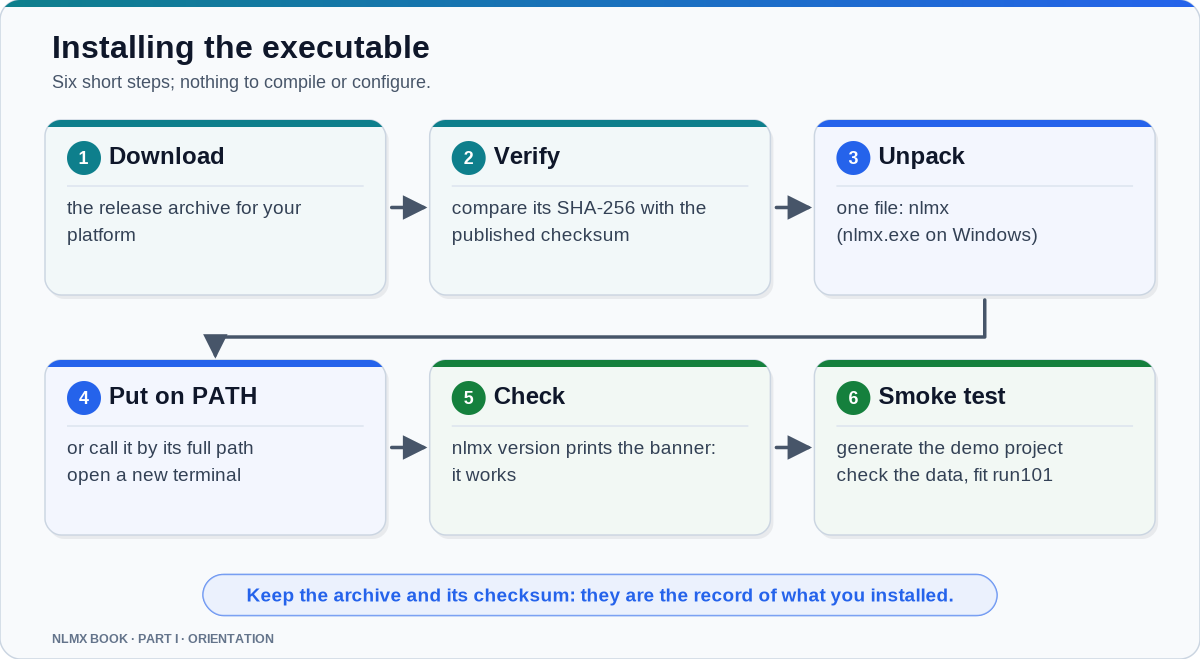
nlmx is one file. Installing it means putting that file in a folder and, if you want to type nlmx from any folder,
telling your system where the folder is. This section gives the steps for each system, explains the one optional extra
(the model file of the assistant), and lists the platforms.
2.2.1 What you need
| Requirement | Detail |
|---|---|
| The release archive | the archive for your platform (Section 2.1), checked against its checksum |
| A terminal | a terminal on Linux and macOS, PowerShell on Windows |
| Disk | the executable is a single file of a few tens of megabytes; analyses write their results into the folders you choose |
| Network | none. nlmx runs offline; the only place where it speaks HTTP is ask, to a model server whose address you give (Chapter 34) |
| Other software | none. The fonts for the figures and the manual that the assistant searches are inside the program |
2.2.2 The steps, by system
Windows. Unpack the .zip (right-click, Extract All) into a folder of your choice, for example
C:\Tools\nlmx. To run nlmx from any PowerShell window, add that folder to your user PATH, then open a new window:
$old = [Environment]::GetEnvironmentVariable("Path", "User")
[Environment]::SetEnvironmentVariable("Path", "$old;C:\Tools\nlmx", "User")
nlmx version
Linux. Unpack the archive, make sure the file is executable, and put it on the PATH (for example in
~/.local/bin):
tar xzf nlmx-<version>-<platform>.tar.gz
chmod +x nlmx-*/nlmx
mkdir -p ~/.local/bin && cp nlmx-*/nlmx ~/.local/bin/
nlmx version
macOS. The same commands as on Linux. If macOS refuses to open a downloaded executable because it comes from the
internet, remove the quarantine flag once, with xattr -d com.apple.quarantine ./nlmx, or allow it in System
Settings → Privacy & Security.
You can also skip the PATH altogether and call the executable by its full path (.\nlmx.exe or ./nlmx); every
example in this book writes nlmx for whichever way you call it.
2.2.3 The model file of the assistant
The assistant Maxson (Chapters 34 and 35) needs a language model. nlmx runs it inside the program, so ask works
offline once you supply a model file (a GGUF file of about 2 GB) in a folder called models next to the executable, or
at a path you give. Alternatively, ask can talk to a model server running on your computer (such as Ollama or a
llama.cpp server). The model file is never part of the executable; Chapter 34 says where to put it. Every other command
runs without it.
2.2.4 Platforms
Table 2.2.1. Platforms for which executables are provided.
| Platform | Executable |
|---|---|
| Windows x86-64 | nlmx.exe |
| Linux x86-64 | nlmx |
| Linux ARM64 | nlmx |
| macOS Intel | nlmx |
| macOS Apple silicon | nlmx |
Every recording in this book was made on Linux x86-64. A run on another system may differ in the last digits of some results; the program promises reproducibility on a given version and platform (Section 4.3).
2.2.5 First run
Open a new terminal and run:
nlmx version --no-color
If it prints the banner of Figure 2.1.1, the installation works. If your system says the command is not found, the folder
is not on the PATH (open a new terminal after changing it, or call the executable by its full path). Section 2.4 runs
the smoke test on the demo project.