7.4 Command-specific extensions
nlmx 4.3.0 assigns each settings family a distinct extension. The content remains TOML; the extension identifies the intended command and prevents a valid-looking file from being fed to the wrong parser.
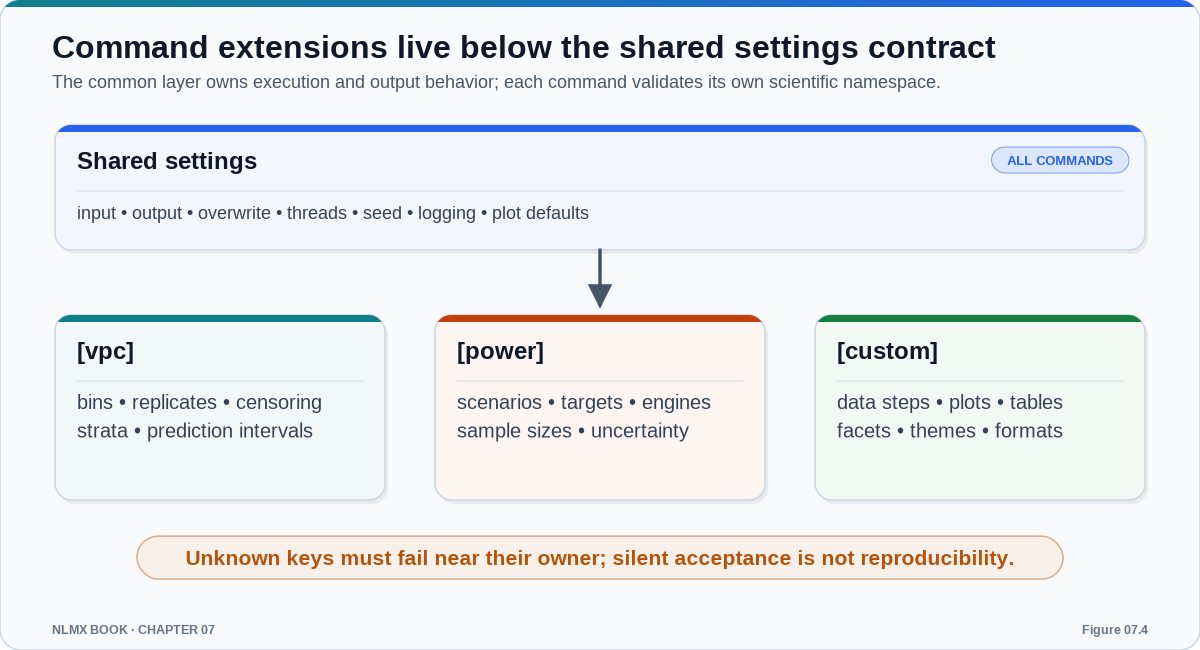
Figure 7.4. Shared execution/output settings form the common contract, while each command owns and validates its scientific namespace. The extension is the first type check for that ownership.
Table 7.1. Live extension registry
| Extension | Commands |
|---|---|
.covar |
cov, posterior, inspect, validate, resume, fit, simulate-study (and compatibility entry run) |
.qcd |
qc-data (and alias qc) |
.qcn |
qc-nm |
.eda |
eda |
.custom |
custom |
.nca |
nca |
.init |
autoinit |
.screen |
screen |
.vpc |
vpc |
.forest |
forest |
.sims |
sims |
.er |
er |
.power |
power |
.gen |
generate (and example) |
.ask |
ask |
The registry is versioned behavior. In particular, 4.3.0 includes .custom; older planning material that omits it is incomplete. Generic .txt is not a settings extension. A text file can still serve other roles, such as an explicit artifact list, where the command documents that role.
Enforcement
Reading a file with the wrong extension is a configuration failure. Asking --print-config to write the wrong extension is invalid CLI usage. The captured command
nlmx power --print-config documents/ch07/wrong.txt
exited 2 and suggested wrong.power, explicitly noting that the content stays TOML. Extension comparison is case-insensitive, but consistent lowercase names improve portability and review.
Shared .covar does not imply that every listed command consumes every possible key. It denotes a related configuration family. Run command-specific help and validation for the operation you intend.
Why the extension matters
The suffix is a lightweight type marker. It helps reviewers distinguish a power design from an NCA setup, makes file associations unambiguous and catches accidental cross-command reuse before analysis begins. It is not a claim that the format is proprietary or binary.
Common mistakes
- Renaming every settings file to
.tomlbecause the content is TOML. - Using
.txtbased on an obsolete example. - Assuming
.covarmeans all commands accept identical keys.
Checklist
- Select the extension from the installed version's registry.
- Keep one command purpose per settings file.
- Treat a rename suggestion as a type correction, not a content conversion.
Further reading
See template generation, error anatomy and review/versioning.