12.0 Complete qc-nm command and option index
This is the authoritative orientation page for command-line use. It lists options that qc-nm actually consumes. The shared top-level help may also show flags for fitting, VPC, simulation and other commands; those unrelated flags do not affect control-stream QC.
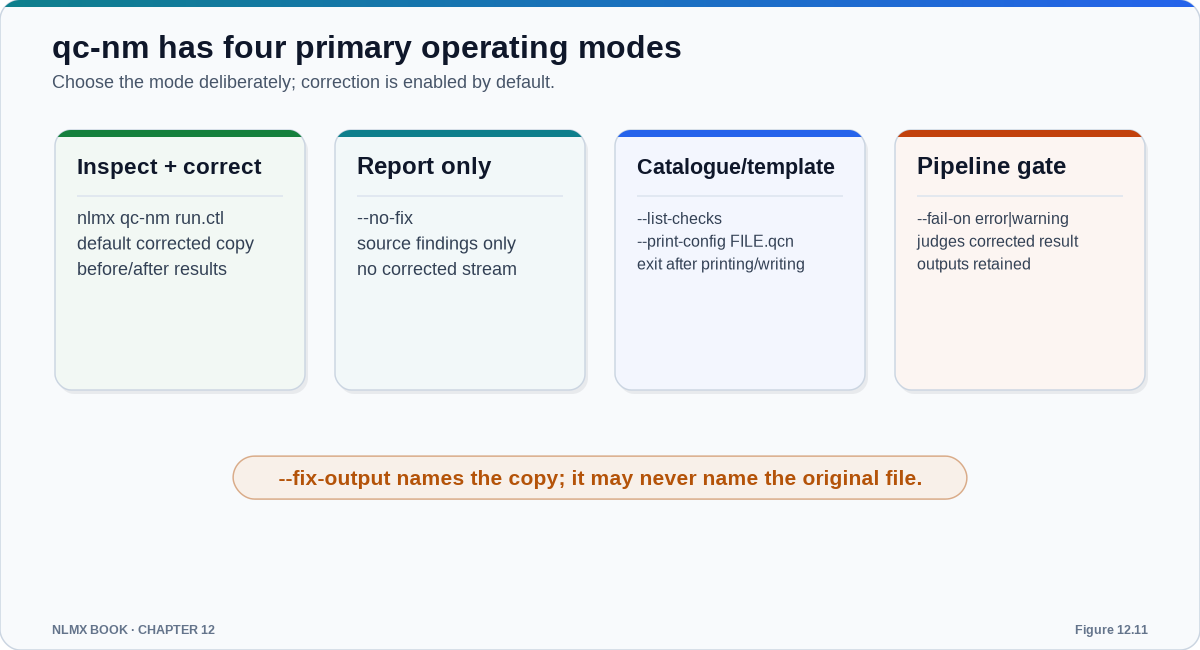
Figure 12.3. Default correction, report-only, catalogue/template and pipeline-gate modes cover the normal ways to invoke qc-nm.
Command forms
| Purpose | Command |
|---|---|
| Check and correct a control stream | nlmx qc-nm run1.ctl |
| Give the control stream by option | nlmx qc-nm --ctl run1.ctl |
| Run from settings | nlmx qc-nm -c review.qcn |
Override the $DATA file |
nlmx qc-nm run1.ctl --data data/pk.csv |
| Report without correction | nlmx qc-nm run1.ctl --no-fix |
| List 81 checks and 24 corrections | nlmx qc-nm --list-checks |
| Write annotated settings | nlmx qc-nm --print-config review.qcn |
| Show installed help | nlmx qc-nm --help |
Input precedence is positional control stream, then --ctl, then [input].control_stream. The command implementation chooses the positional value before --ctl when both are present; do not supply conflicting routes.
Inputs and NONMEM compatibility
| Option | Default | Explanation |
|---|---|---|
CONTROL_STREAM / --ctl FILE |
required by one route | .ctl or .mod source checked read-only |
--data FILE |
$DATA path |
Dataset used for $INPUT, $DATA, CMT and selection checks |
--no-data-check |
off | Do not open the dataset; dataset-dependent checks become N/A |
--delimiter DELIM |
auto |
Dataset delimiter: auto/comma/tab/space/semicolon |
--nm-version VERSION |
7.5 |
Target 7.2–7.6; affects feature/limit checks |
The .qcn file additionally controls maximum dataset rows, line/label/condition limits, extra site-specific records and detailed code/parameter policies.
Correction controls
| Option | Default | Explanation |
|---|---|---|
--no-fix |
correction enabled | Report only; no corrected stream |
--fix-output FILE |
<stem>_qc<ext> |
Name/path of corrected copy; cannot be original |
--skip-fixes LIST |
none | Comma-separated correction names to omit |
All 24 correction names are listed in the correction catalogue. Individual correction booleans, header comment and inserted $PROBLEM text can also be set under [fix].
Check and pipeline controls
| Option | Values | Explanation |
|---|---|---|
--skip-checks LIST |
IDs/categories | Turn selected checks off |
--only-checks LIST |
IDs/categories | Run only selected checks |
--fail-on LEVEL |
never, error, warning |
Exit 6 after outputs based on the corrected result when a copy exists |
--list-checks |
flag | Print check/correction catalogue and exit |
Severity overrides, finding caps and most scientific thresholds are .qcn settings rather than individual CLI flags.
Configuration, output and execution
| Option | Default | Explanation |
|---|---|---|
-c, --config FILE.qcn |
none | TOML settings; relative paths resolve from its folder |
-o, --output DIR |
<stem>_qc_nm |
Evidence directory |
--overwrite |
off | Permit nonempty output; does not remove stale files |
--threads N |
available cores | Configures worker pool; retained result should not depend on it |
--print-config FILE.qcn |
— | Write installed template and exit |
Logging controls
--suppress-console 0|1, --log-file FILE, --no-color, repeated -v/--verbose, and -q/--quiet affect the transcript. --license prints licensing information and exits. These do not change which control-stream findings are scientifically present.
Configuration-only controls
The CLI deliberately does not expose one flag for every policy. .qcn controls known external variables, protected functions/zero-risk denominators, THETA bound margin, OMEGA CV range, label requirements, default MAXEVAL/TOL, covariance text, required table diagnostics/options, each individual correction, severity overrides, HTML/JSON/diff/table outputs and finding/example caps.
Common mistakes
- Assuming every globally displayed option affects
qc-nm. - Forgetting corrections are enabled by default.
- Using
--no-data-checkand still claiming$INPUT/dataset reconciliation. - Supplying the original path as
--fix-output.
Checklist
- Read this index before the check catalogue.
- Generate the installed
.qcntemplate. - Decide report-only versus correction mode explicitly.
- Retain command, settings and installed version.
Further reading
See first run, settings, input/data choices and correction selection.