D.8 Adding a command: the checklist
What you will learn
- List, in order, everything a new command needs before it can ship.
- Place each piece: the command variant, the dispatch arm, the thin module, the tree, the settings extension, the template, the help headings, the assistant's lists.
- Use the checklist as a review tool for someone else's change.
Prerequisites: D.2, D.4 and D.6.
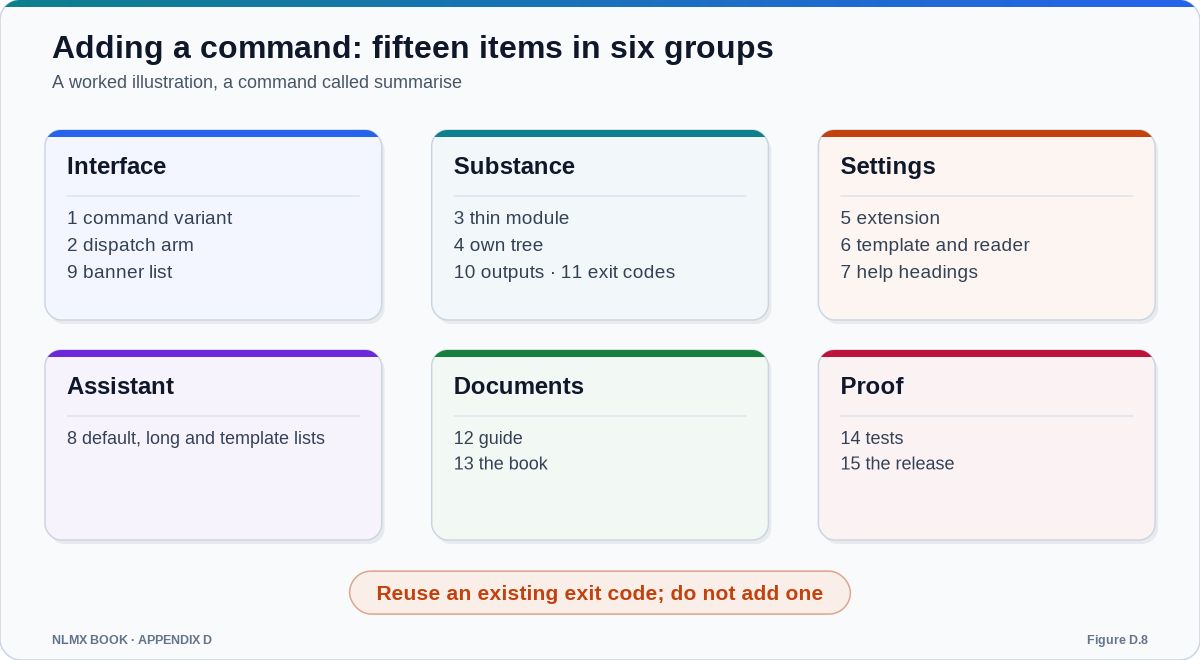
Adding a command is a MINOR change (page D.13) and touches more places than any other. The list below is the whole of it. It is written for a hypothetical command named summarise; the places are real.
The checklist
| # | Item | Where | Notes |
|---|---|---|---|
| 1 | The command variant | the command enumeration in the command-line definition | its description (the doc comment) is the first thing a user reads in nlmx --help; give it a one-sentence first line that says what it takes and what it writes. If it takes a dataset or a control stream, declare the positional argument |
| 2 | The dispatch arm | the dispatcher | one line that calls the command's function (page D.2) |
| 3 | The thin module | commands/ |
follows the eleven-step skeleton: early exits for --print-config, banner, threads, settings, resolved values, output folder and transcript, work, outputs through the output set, summary and checksums, exit |
| 4 | The tree | a folder beside the others | the substance: readers, computations, tables, figures, the report. Keep it independent of other commands' trees (page D.1) |
| 5 | The settings extension | the extensions table | a new row: extension, what the file is, the command names. Choose an extension that is short, distinct and not used by NONMEM |
| 6 | The template and reader | the tree's settings module | the four artefacts of page D.4, with strict sections |
| 7 | The help headings | the heading table of the assistant's catalog and the options' headings | so nlmx summarise --help lists the command's own options |
| 8 | The assistant | the assistant's settings and template lists | see below |
| 9 | The banner list | the banner module | the list of commands it prints |
| 10 | Outputs | through the output set | including checksums.sha256; name every file in the output reference |
| 11 | Exit codes | page D.3 | reuse an existing code; do not add one |
| 12 | The guide | docs/SUMMARISE.md |
purpose, inputs, options table, outputs, settings, worked example, limits |
| 13 | The book | a chapter, and the generated references | the command-line reference (Chapter 36), the settings reference (Chapter 37) and the output reference (Chapter 38) |
| 14 | Tests | unit tests in the tree, end-to-end tests | page D.11: the help, the template and the errors, a run on the example project, the exit codes |
| 15 | The release | page D.13 | a new minor version, the changelog entry, the documentation version lines, the archive |
Item 8, the assistant, in detail
The assistant (Maxson) is the easiest piece to forget, because nothing fails when it is missing: the command simply does not exist for it. The relevant lists are all in the assistant's tree:
| List | Question it answers | Decide |
|---|---|---|
| the default commands | may the assistant run it at all? | usually yes for an analysis; no for anything that should be started by a person |
| the long commands | does it take long enough that, under confirm = "long", a yes is asked first? |
yes if a run can last minutes |
| the commands with their own template | is the settings file written by nlmx COMMAND --print-config? |
yes for a command with a settings file |
| the commands whose template is exactly their defaults | can the assistant write the template and add -c without changing what the command does? |
yes if the template holds the defaults; no for a template that is a design of its own |
| the headings table | which help headings belong to the command? | the same as item 7 |
The assistant's catalog (what it tells the model about commands and options) is built from the command-line definitions themselves, so items 1 and 7 are enough for it to list the command and its options correctly. The assistant may never start itself (ask is absent from the default list on purpose; Case 9 of Chapter 41 shows the refusal, page 41.37).
Three checks of your own work
- Run the help.
nlmx summarise --helpmust show the options of the command and none of another's, andnlmx --helpmust list the command with its sentence. - Round-trip the template. Write it with
--print-config, run the command with it, and compare the echo of the run with the template's defaults. - Ask the assistant. In the plan-only mode, ask it to plan an analysis with the new command: if it does not know the command, item 8 or item 1 is missing.
What a reviewer should refuse
- A command whose options are not in its help, or whose settings file has an unchecked key.
- A command that writes a file outside the output set.
- A command that can fail with a code that is not in the table, or with no message.
- A command with no end-to-end test of its errors.
- A command whose guide and book pages come "later".
Review checklist
- Are all fifteen items done, or consciously not applicable?
- Does the command's help list only its own options?
- Can the assistant plan with it, and is it allowed and confirmed as intended?
- Are the guide, the book pages and the generated references updated in the same release?
Navigation
See the previous page, the next page and the developer reference.