7.3 TOML syntax, tables, arrays and comments
Every nlmx settings file uses TOML content, irrespective of its filename extension. TOML represents scalar values, arrays, named tables and repeated array-of-table entries without relying on indentation.
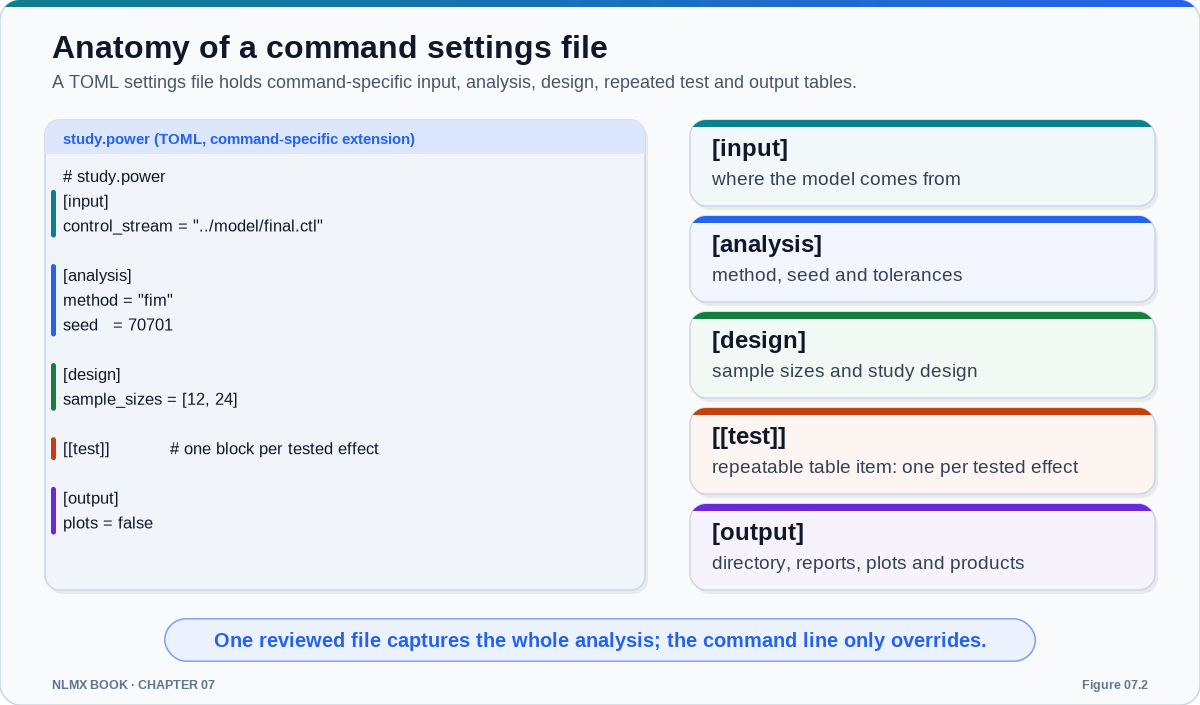
# A comment starts with #.
[analysis]
method = "fim"
alpha = 0.05
seed = 70701

[design]
sample_sizes = [12, 24]

[[test]]
name = "WT exponent"
theta = "THETA(4)"
value = 0.55
[analysis] opens a table. Keys that follow belong to that table until another header begins. [[test]] creates one item in a repeated list; another [[test]] begins another test. Strings require quotes, booleans are true or false, and numeric values are unquoted.
Types are significant
threads = 4 is an integer; threads = "4" is a string. [12, 24] is an array; "12,24" is one string. TOML parsing and serde deserialization enforce the expected representation before nlmx performs domain validation.
Inline comments follow a value:
threads = 1 # freeze parallelism for a comparison
Do not place units inside a numeric value. If a field expects hours, write the numeric value in hours and document the unit in a comment or study README.
Strings and Windows paths
Basic double-quoted TOML strings interpret backslash escapes. A Windows path such as "C:\new\trial" can therefore be surprising because \n is special. Prefer forward slashes or literal single-quoted strings:
file = 'C:\studies\trial01\data.csv'
# or
file = "C:/studies/trial01/data.csv"
Relative paths are usually more portable and are resolved from the settings file's directory.
Start from a template
TOML permits many valid structures that a particular command does not accept. Generate an annotated template to obtain the expected table names, key spelling, value types and comments for the installed version. TOML validity is necessary, not sufficient.
Common mistakes
- Using YAML-style indentation or
key: valuesyntax. - Quoting numbers or booleans.
- Writing a single
[test]table when the command expects[[test]]. - Forgetting backslash escaping in double-quoted Windows paths.
Checklist
- Use
=assignments and exact table headers. - Preserve expected scalar and array types.
- Generate a current template before hand-authoring a large file.
Further reading
See command extensions, template generation and validation.