43.2 The app suite at a glance
What you will learn
- Which app answers which question.
- How the single-purpose apps, the combined workspaces and the assistants relate.
- How to choose where to start.
Three families
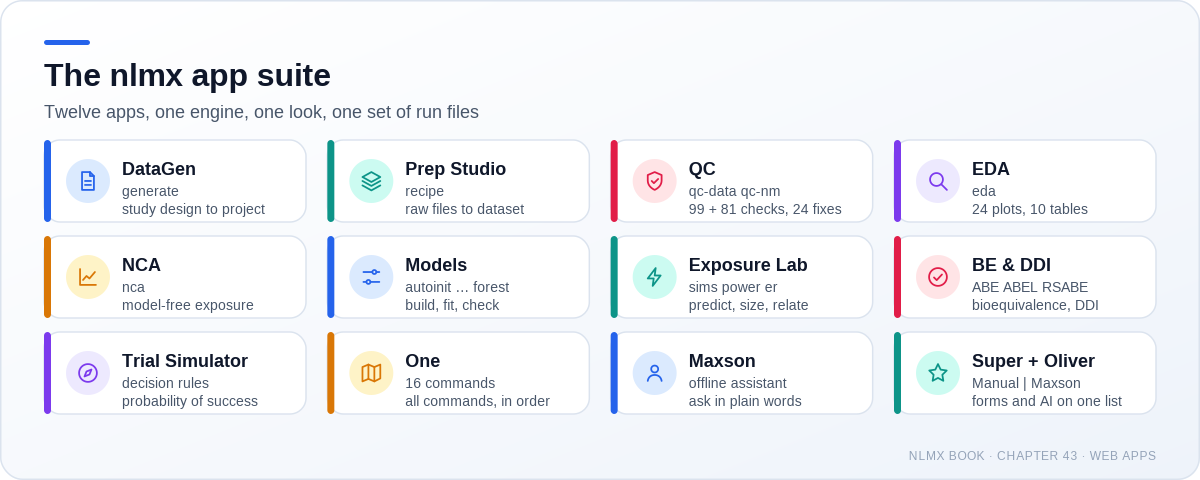
Single-purpose apps each turn a group of commands into a focused workspace: DataGen, QC, EDA, NCA, Models and Exposure Lab. They are the best place to learn a step, and the quickest way to do one.
Three newer studios cover tasks that sit beside the population workflow: Prep Studio builds a NONMEM-ready dataset from raw files with a replayable recipe; BE & DDI Studio answers the regulatory questions around bioequivalence, drug interactions and special populations; Trial Simulator turns a design and an exposure-response assumption into a probability of success.
Combined workspaces put all sixteen engine commands in one place: One in nlmx (forms), Maxson in nlmx (conversation) and Super in nlmx, which offers both on one shared list of runs.
From question to command to app
| The question | Command | App |
|---|---|---|
| What would data from a dose-escalation, a sparse population or an IV infusion study look like? | generate |
DataGen |
| Do the raw dosing, concentration and demographic files combine into a clean dataset? | recipe | Prep Studio |
| Does the dataset have dosing, time-order, BLQ, covariate or duplicate errors? | qc-data |
QC |
| Does the control stream match the dataset, and can mistakes be fixed? | qc-nm |
QC |
| What do profiles, covariates and missing data look like? | eda |
EDA |
| How much drug did each subject get, with no model? | nca |
NCA |
| Where should the initial estimates start? | autoinit |
Models |
| One, two or three compartments? Lag? Transit absorption? TMDD? | screen |
Models |
| What are the typical values, variability and uncertainty? | fit |
Models |
| Which covariates explain clearance, volume and absorption? | cov |
Models |
| How large are the covariate effects on exposure? | forest |
Models |
| Does the model reproduce the data? | vpc |
Models |
| What exposure will children, adults or a mixed population reach? | sims |
Exposure Lab |
| How many patients detect a covariate effect? | power |
Exposure Lab |
| Is response related to exposure? | er |
Exposure Lab |
| Do the covariate methods find the true effects? | simulate-study |
Exposure Lab |
| Are two formulations bioequivalent? What does an inhibitor do to AUC? | statistics | BE & DDI Studio |
| How likely is the program to succeed? | simulation | Trial Simulator |
Why so many apps?
A small app is easy to learn and quick to open. Each one has exactly the options its commands need, a library of examples for its task, and result views designed for its outputs. The combined workspaces exist for the opposite need: when a project runs through many commands, one list of runs, one set of tags and one place to compare is more valuable than a focused page. Both views read and write the same kinds of files, so no one has to choose permanently.
Choosing where to start
- No data yet? Begin in DataGen to practise on data whose truth you know.
- Raw files from several sources? Start in Prep Studio.
- A dataset in NONMEM layout? QC first, then EDA and NCA.
- A model to build? Models, in the order autoinit, screen, fit, cov, vpc, forest.
- A decision to support? Exposure Lab for exposure, power and response; Trial Simulator for the program.
- A regulatory question on one study? BE & DDI Studio.
- A whole project? One in nlmx, or Super if you also want assistants.
What every app shares
The same layout (form, command preview, console, results), the same viewers, the same example-library idea, the same Compare feature, the same R and plotting tools, and the same sealed exports. The next pages describe these shared parts once, so the app pages can focus on what is specific.
Navigation
See the previous page, next page, and the chapter overview.