D.11 Writing an end-to-end test: a worked example
What you will learn
- Use the helpers of the end-to-end test file: run, expect success, expect a given exit code, shared example projects and scratch folders.
- Read a real test of a settings template, line by line, and see what each assertion protects.
- Write the happy-path test and the error test of a new option.
The helpers
All end-to-end tests live in one file and share a small kit. They run the real executable with -q --no-color added, in a scratch folder, and look at what it did.
| Helper | What it does |
|---|---|
ok(args) |
run the command; fail the test, printing standard output and standard error, unless the exit code is 0; return the standard output |
fails_with(args, code) |
run the command; fail unless the exit code is exactly code; return the standard error for assertions on the message |
example() |
the example project, generated once per test run and shared by every test that needs it (so it costs seconds once, not per test) |
example_of(kind) |
a smaller project of another model kind (for example with between-occasion variability or censored observations), also generated once |
scratch(name) |
a clean folder for this test's outputs |
read_csv, col, json_f64, png_info |
read a result file and pick a column, a number or the size of a figure |
The two assertions, ok and fails_with, express the program's contract: success has exit code 0; every failure has a specific code (page D.3).
A real test, annotated
The test of the qc-data settings file is typical. In prose, step by step:
- Make a defective dataset in a scratch folder (a helper writes a small file that triggers many checks).
- Write the template with
--print-configinto a new file with the right extension. Assert that it parses as valid TOML, that it contains every section of the settings file ([data],[columns],[file], …,[output],[figures]) and that a sample of check IDs (the first of a category, the last of another) appear in the severity section. - Refuse to overwrite. Writing the template again to the same path fails with exit code 3; with
--overwriteit succeeds. A template to a file with the wrong extension fails with exit code 2. - The template is itself a valid configuration. Run the command on the dataset with
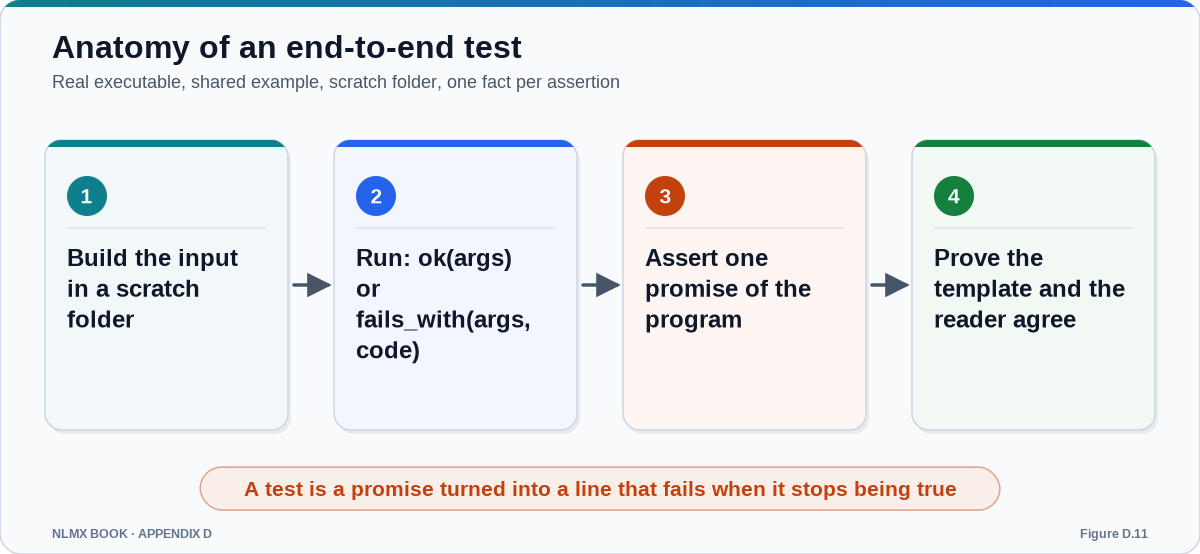
-cthe template: exit 0. (This is the strongest assertion in the test: it proves the template and the reader agree.) - A file's settings are used. Write a small settings file that turns one check off, skips a category and sets
fail_on = "error". Run: the command fails with exit code 7, and the checklist shows the switched-off check as not applicable. - The command line wins. Run again with an option that contradicts the file; the result follows the command line.
Nothing in the test is clever. Each assertion is one promise of the program (page D.4) turned into a line that fails if it stops being true.
The recipe for a new option
Illustration: the --max-findings option of page D.6.
| Test | Assertion |
|---|---|
| Happy path | run the defective dataset with --max-findings 3; the summary has three findings and qc_findings.csv has every finding |
| Settings key | write a settings file with [output] max_findings = 3; the same result; the echo of the run contains the key |
| Precedence | the file says 3, the command line says 5: the summary has five |
| The error | --max-findings 0 fails with exit code 2 and the message names the option and the hint says what to use |
| The unknown key | a settings file that misspells the key fails with exit code 4 and the message names the misspelled key |
| Default unchanged | without the option, the output is the same as before the change (compare a known count) |
Six tests is typical for one option, and each takes a few lines.
What a good test does not do
- It does not assert the whole of a long output, which would break at every unrelated change. It asserts the one fact it exists to protect: a count, a status, a column, an exit code.
- It does not depend on the order of other tests, on the user's folder, or on the time of day. It writes in its own scratch folder and builds its own inputs.
- It does not assert that "something failed".
fails_withdemands the code, and the message is checked where the message is the point. - It is not slow without need: one small project, generated once.
When a test fails
Read in this order: the exit code and message the helper printed (did the program fail for the reason expected?); the transcript in the test's scratch folder (the program's own account); then the assertion. A test that fails intermittently is a determinism defect, not a test defect (page D.12).
Review checklist
- Does the change have a happy-path test and an error test that asserts the exit code?
- Does the test use the shared example project, and write only into its scratch folder?
- Does it assert one fact at a time?
- Does it prove that the template and the reader agree?
Navigation
See the previous page, the next page and the developer reference.