35.2 Installing and selecting the embedded backend
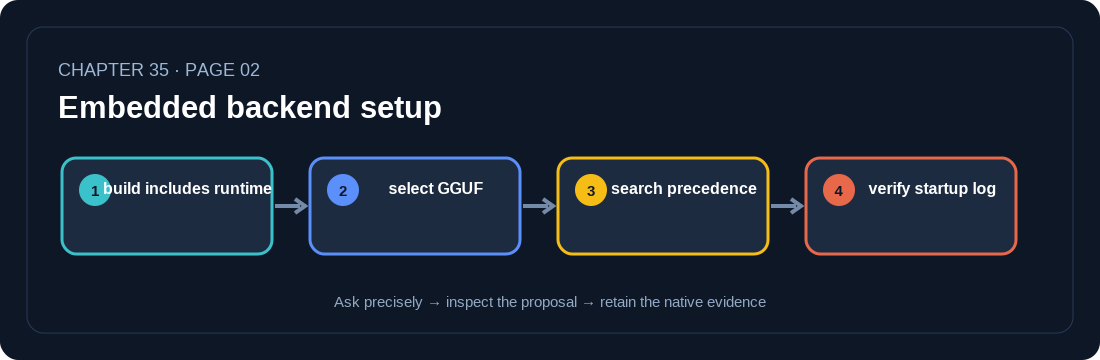
The default nlmx build includes llama.cpp. The model weights remain a separate GGUF file, so the same executable can use a different qualified model without rebuilding. Embedded processing keeps prompts and result summaries on the machine and needs no model server.
How to use it
Selection precedence is: --llm-model; [model] path; NLMX_MODEL; then first alphabetic .gguf in models beside nlmx, beside the executable itself, models under the start directory, then the start directory. The startup log reports the chosen source. An absent model produces exit code 2 and lists searched folders.
Practical interpretation
Use an explicit file path in controlled deployments rather than relying on “first alphabetically.” Verify file integrity and permissions, ensure the model license permits the use, and retain the hash. Paths in .ask resolve relative to that file; CLI and environment paths resolve from the starting context as documented.
Step-by-step embedded setup
- Obtain an approved GGUF model from a controlled source and record its filename, license, cryptographic hash, and provenance.
- Put it in a deliberate location outside transient download folders. An explicit
--llm-modelor[model] pathis easier to audit than discovery. - Run
nlmx ask --print-config -c site.askbefore a scientific request. Confirm thatbackend,path, generation controls, policy, and limits resolve as expected. - Start with
--plan-onlyor guide mode and a harmless request. Confirm that the startup message identifies the expected backend and model source. - Archive the resolved
ask_settings.askandsystem_prompt.txtfrom the session.
If discovery is used, remember that “first alphabetically” is operational convenience, not model governance. Adding or renaming a GGUF can silently change selection. File presence also does not prove the file is intact or compatible; failures during loading should be investigated from the exact log rather than worked around by trying arbitrary weights.
A safe novice workflow
- Start with the narrowest backend, policy, files and command set that can answer the request.
- Name exact inputs and decisions; use guide or plan-only before granting execution.
- Inspect the normalized command and complete settings file, not only Maxson’s explanation.
- Read request end state, native command result, warnings, outputs and checksums.
- Preserve the session and record the qualified person’s interpretation and disposition.
Review and pitfalls
Do not confuse “embedded” with “weights compiled into the executable.” The runtime is compiled in; the GGUF is external. Chapter evidence uses mock scripts and does not depend on any installed GGUF.
- A session exit code of zero does not prove that every proposal ran or succeeded.
- Model fluency, structured JSON, and policy approval do not establish scientific validity.
- Settings and commands are reproducibility inputs; they still require versioned software and frozen data.
What to retain
Retain .ask, backend/model identity, system prompt, request, raw/normalized replies, transcript, JSONL events, settings versions, commands, child logs/outputs, checksums, exceptions, and reviewer conclusions.
Navigation
See the previous page, next page, and complete ask command and settings index.