42.13 Data integrity and reproducibility
What you will learn
- List the eleven data-integrity tests and the property each defends.
- Read a
checksums.sha256file and verify it with the package's inspector tool.- See, with a computed example, why a one-bit change is always caught.
- Separate tamper evidence from reproducibility, and test both.
- Say which Part 11 controls the program provides, and which the organisation must.
Prerequisites: 42.2 The lifecycle and Chapter 38.1 Output folders, identities, overwrite, and completion.
A numerically perfect program is still unusable in a regulated setting if you cannot show what was run, on what, with what result, and that nothing changed since. The data-integrity (DI) tests defend exactly that. They are High-risk almost across the board: seven of the eleven have a High class, because a missing or overwritten record is as damaging as a wrong number (the register's maximum score of 18 is held by overwrite protection and reproducibility, RK-22 and RK-24).
The eleven tests
| Test | Property | Evidence |
|---|---|---|
| DI-001 Transcript | Every command writes a transcript with the program version, the full command line and time stamps | The audit record of the run |
| DI-002 Checksums | Every command lists the SHA-256 of every file it wrote, and the list verifies | Verified for 15 commands |
| DI-003 Tamper detection | A change to an output file after the run is detected | Verification fails after a one-bit change |
| DI-004 Overwrite protection | Existing results are never overwritten without --overwrite; logs are retained |
Exit 3 and unchanged hashes for 12 commands; two transcripts after --overwrite |
| DI-005 Input protection | No command modifies its inputs | Hashes of data, control streams and settings before and after 15 commands, including qc-nm which proposes corrections |
| DI-006 Reproducibility | Same inputs, settings and seed give identical results | Numerical result files byte-identical; transcripts and HTML reports (which carry times) excluded |
| DI-007 Seed sensitivity | A different seed gives a different random result | Files differ (otherwise the seed would be ignored) |
| DI-008 Thread independence | Results do not depend on the number of worker threads | Result files byte-identical with 1 and 4 threads |
| DI-009 Line endings | Results do not depend on LF versus CRLF in the data file | Predictions and phi identical |
| DI-010 Resume | An interrupted posterior-stability run, resumed from its checkpoint, gives the result of an uninterrupted run | Result tables byte-identical |
| DI-011 Resume binding | A run is not resumed after its settings changed | Exit 11 with the reason; the checkpoint is not used |
The record: transcript, manifest, checksums
Three files make a run auditable.
- Transcript (
log_*.txt): version, full command line, time stamps. This is the contemporaneous part of ALCOA+: what ran, and when. It does not record the user name: the account, the project folder and the time in the transcript tie the run to a person through the operating-system or storage audit log, which is why personal (never shared) accounts are a procedural control. It is never overwritten;--overwriteretains earlier logs and adds a new one (DI-004). - Input manifest (
input_manifest.json, for multi-file analyses): the SHA-256 of every input.check_input_manifest.pyrecomputes them. - Checksum list (
checksums.sha256): the SHA-256 of every file the command wrote. Each row is a 64-hexadecimal-character digest, two spaces and a relative path—the familiarsha256sumlayout—so it can be checked with any standard tool or with the package's portableverify_checksums.py, the inspector's tool. Two exclusions matter: the list does not contain its own digest, and it leaves out the active top-levellog_*.txttranscript, so the transcript's identity and hash must be retained separately in the enclosing evidence system (Chapter 38.3).
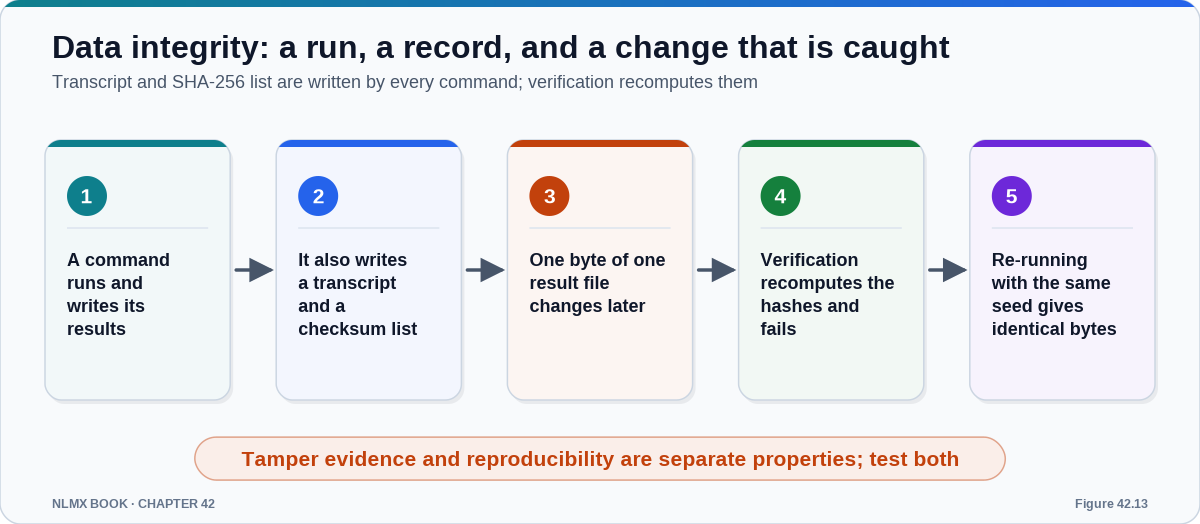
Taken together: inputs hashed in, outputs hashed out, command line and times in a transcript. A reviewer who has the three can verify months later that a result is the result of that command on those inputs.
Why a single flipped bit is always caught
A cryptographic hash is designed so that any change to the input produces an unrelated output. A computed example makes this concrete. Take a three-row data file:
ID,TIME,DV
1,0.5,1.93
1,1,2.41
1,2,2.17
Its SHA-256 is
d4660cf548b6d8cb5496766fd72684341a86954bcdfb6abc949a213bafeed985
Now flip a single bit in the byte at offset 17—the character 1 (0x31) becomes 0 (0x30), so 1.93 reads 0.93. The SHA-256 of the altered file is
8f16cc6a7ef057de431e66f81a3ddeb3c70faa4c5c7ac01c647f6405920864ba
The two digests share no visible resemblance: 128 of the 256 bits differ, as expected for two unrelated 256-bit strings. That is the property tamper.py exploits in DI-003: it changes one bit of one file, and the test passes only if the verification then fails (a negated check). The altered value is a plausible concentration, which is the point—a tamper-evidence test must not rely on the change being visible to a human.
Tamper evidence is not reproducibility
The two properties are different and need different tests.
| Tamper evidence | Reproducibility | |
|---|---|---|
| Question | Did a file change after the run? | Does re-running give the same answer? |
| Mechanism | Hash comparison | Seeds, deterministic summation, no dependence on threads or line endings |
| Tests | DI-002, DI-003, DI-005 | DI-006 to DI-009 |
| Failure looks like | a hash mismatch | two runs that differ in the last digits |
A program could pass one and fail the other. Parallel floating-point summation is the classic case: summing in a different order changes the last bits, so a naive parallel run is tamper-evident (hashes work) and not reproducible (the hashes differ between runs). DI-008 forces the issue by comparing 1 thread with 4 and requiring byte-identical .ext, .phi, .cov, predictions, parameter tables and VPC bin tables.
Reproducibility is a contract on three things
For a result to be reproducible by someone else, three things must be held fixed, and the tests each hold one:
- Inputs — including their line endings (DI-009): a data set made on Windows (CRLF) and one made on Linux (LF) must give identical predictions.
- Settings and seed — including the seed (DI-006) and the proof that the seed is used (DI-007).
- Computation — including the thread count (DI-008) and interruption (DI-010): a posterior-stability run killed after its first checkpoint and resumed must produce the same tables as an uninterrupted one. The test uses a helper that starts the command and terminates it after the first checkpoint, so the interruption is real.
The same logic extends to your own analyses: store the command line, the settings and the seed with the result, and re-running on another computer should reproduce the files to the byte.
What the program does and does not provide (Part 11)
The program is analysis software. The package's clause-by-clause assessment separates what is technical and tested from what the organisation must supply:
| Control | Provided by | Evidence |
|---|---|---|
| Accurate, complete copies in readable form (11.10(b)) | the program: plain text, CSV, JSON, HTML, PNG/SVG, and DOCX/PDF via report |
OQ tests |
| Protection of records (11.10(c)) | the program (checksums, no silent overwrite) and the organisation (storage, backup, retention) | DI-002 to DI-004 |
| Audit trail of what was run and when (11.10(e)) | the program (transcript) and the organisation (operator identity) | DI-001 |
| Operational checks on sequencing (11.10(f)) | the program: missing inputs, wrong checkpoint for resume, unsupported features refused |
OQ tests, DI-011 |
| Input checks (11.10(h)) | the program: strict parsing, qc-data, qc-nm, validate |
OQ tests |
| Access control and authority checks (11.10(d), (g)) | the organisation: operating-system accounts, permissions, controlled workstation | named SOP |
| Operator identity | the organisation: personal accounts, no shared accounts; the execution record names the tester | named SOP |
| Electronic signatures (11.50, 11.70, 11.100–11.300) | the organisation: its validated document system or handwritten signatures | named SOP |
Two consequences follow. Results created with the program must not be "signed" inside it, and its output must not be described as electronically signed. Approvals of analysis reports and validation documents are made on paper or in the organisation's own validated system—the SHA-256 of the signed file may be written on the signature page to link the two. And the closed-system assumption holds only while records stay inside the organisation: if they leave electronically, the open-system controls (encryption, digital signatures) are the organisation's.
Running the integrity tests
python tools/nlmx_validate.py run --nlmx <exe> --tester "<name>" --section 07_data_integrity --label di
Allow about two and a half minutes on the supplier's two-core machine: the integrity tests are the slowest section because they repeat many commands to compare their outputs. To inspect any output folder yourself, with no package at all:
python tools/verify_checksums.py <output folder>
Review checklist
- Does every output folder in your project hold a verifiable
checksums.sha256, and is it filed with the record? - Can you reproduce a result from its stored command line, settings and seed?
- Is the operator-identity control named and owned, rather than assumed from the program?
- Do approvals happen outside the program, with the file's SHA-256 linked to the signature?
Navigation
See the previous page, the next page and the complete validation reference.