D.2 One command from start to finish: qc-data, traced
What you will learn
- Follow one real command through every stage, from the process start to the exit code.
- Recognise the same skeleton in every other command.
- Say where in the skeleton a new behaviour belongs.
Prerequisites: D.1 and Chapter 11, qc-data.
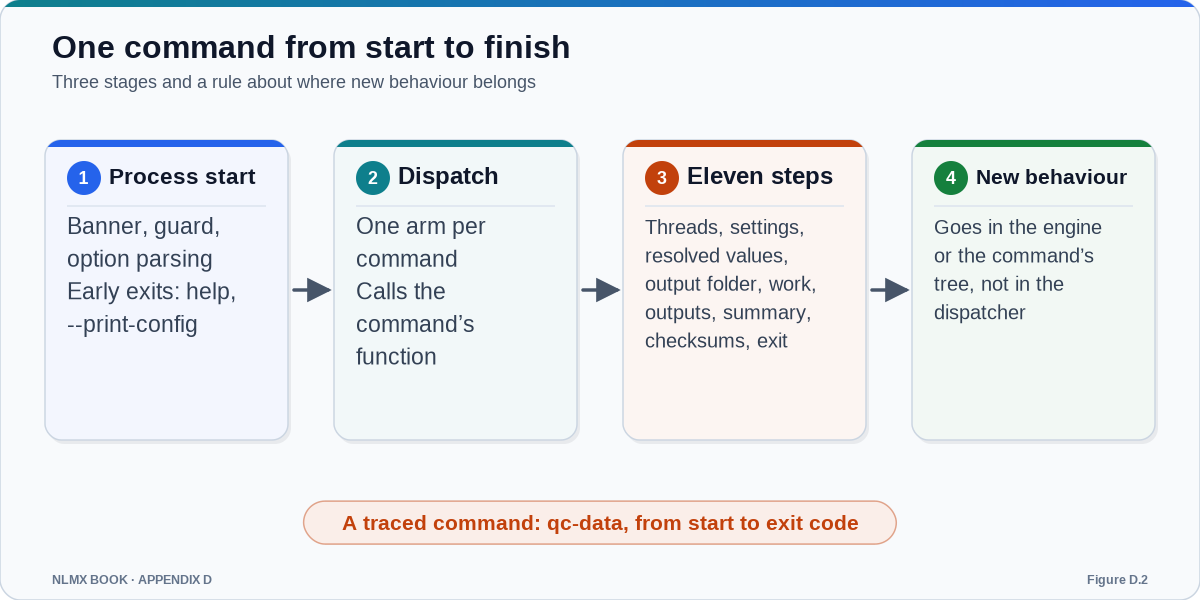
The best way to learn the program is to follow one command all the way. qc-data is the example: it is self-contained, its outputs are simple files, and Case 1 of Chapter 41 (41.3) shows what it produces. The trace below is of the code path, in the order things happen.
Stage 1: the process starts
The entry point does three things before any command runs.
- It starts the real work on a thread with a very large stack (hundreds of megabytes). On some systems the main thread's stack is only one megabyte, and the option parser and the long call chains of estimation can exceed it. The memory is only used when needed.
- It answers
--version,--licenseand the help of one command (nlmx qc-data --help) before the option parser runs, so that these work even when the rest of the line would be refused. - It parses the options, configures the console, colour and log level, and hands over to the dispatcher inside a guard. If any code panics (a bug), the guard turns the panic into a normal failure with exit code 12 and the usual transcript, rather than the language's raw abort message (page D.3).
Stage 2: dispatch
The dispatcher is one match on the command. A few commands share an implementation (cov and posterior with the dry-run flag run the validation instead), and an option that belongs to one command only is refused for the others (--ctls belongs to fit). For qc-data the match arm calls the command's function with the parsed options. Nothing else happens in the dispatcher: a command is one function that receives the parsed options and returns success or a failure.
Stage 3: the command function
The function has a fixed order. Reading commands/qc_data:
| Step | What happens |
|---|---|
| 1. Early exits | --print-config FILE writes the annotated settings template and returns; --list-checks prints the catalogue of checks and returns |
| 2. Banner and threads | the banner of four lines (command, settings file, output) is printed; the worker-thread count is set |
| 3. Settings | the settings file, if any, is read with deny_unknown_fields semantics; the data section is refused if it asks to modify the dataset in this command |
| 4. The dataset path | positional argument, then --data, then the settings file, in that precedence; a missing file is exit code 3 |
| 5. Resolved settings | options and file are merged (command line wins) into one settings value |
| 6. The output folder | --output, else the settings, else <dataset folder>/<stem>_qc_data; the folder is created and the transcript is attached to it |
| 7. Read and filter | the dataset is read into a table; the row filters are applied |
| 8. Check | analyse runs every check of the catalogue and returns results, findings and tables; the verdict is computed from them |
| 9. Write | each output is written through the output set: the checklist, the findings, the tables, the NONMEM statements, the flagged copy of the dataset, the web report and the PNG/SVG figures |
| 10. Summary and checksums | qc_summary.txt (starting with the command line) and qc_summary.json, then the output set writes checksums.sha256 for everything it wrote |
| 11. Exit | --fail-on decides: never, error (any failed check) or warning (any failed or warned check). A failure returns exit code 7 with a message that names the summary file |
Every other command follows this skeleton, with its own check, fit or simulation in step 8. If you can read this function, you can read any command's.
Two details worth understanding
The transcript is attached early. Step 6 happens before reading the dataset, so a failure in steps 7 to 8 is already written to the transcript in the output folder. Commands that learn the folder only later (from the settings) use a second, late attachment. Either way, a failing run leaves a transcript behind.
The exit code is the contract. The failure at step 11 is not an afterthought: the same run writes every file first and then returns 7. A gate in a pipeline (Case 1, page 41.5) can therefore both stop on the code and show a human the complete report.
Where a new behaviour belongs
| You want to… | Put it in |
|---|---|
| change what a user can set | the settings definition (step 3, page D.4) |
| add a question the QC asks of data | the checks (step 8, page D.7) |
| add an output file | step 9, through the output set, and the output-file reference |
| change when the run fails | step 11, and the exit-code table |
| change how an engine computes | the engine layer, never the command module |
Review checklist
- Can you name the eleven steps from memory?
- For a change you are reviewing, can you say in which step it acts?
- Does a failure leave a transcript and, where applicable, the complete outputs?
Navigation
See the previous page, the next page and the developer reference.