Feedback, errata, and update policy
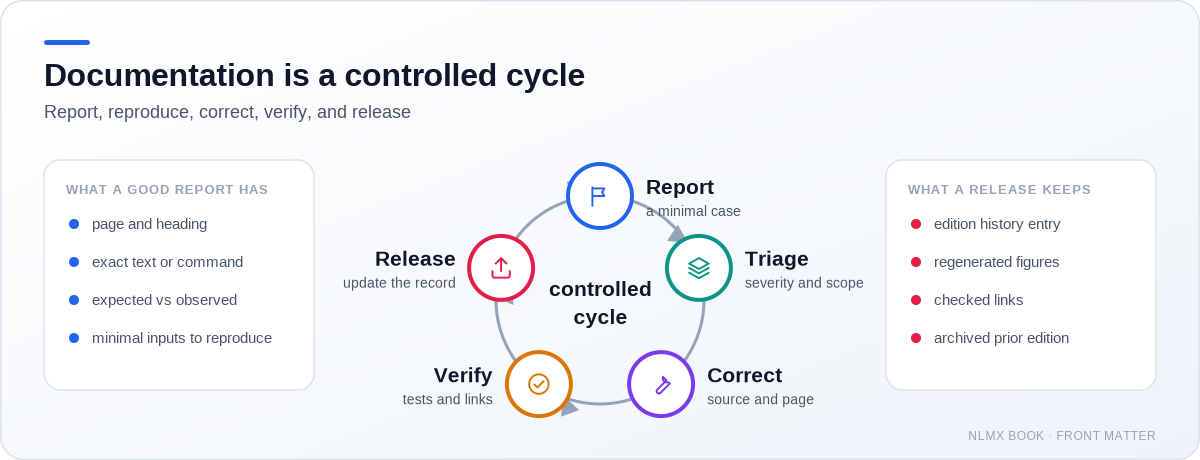
Technical documentation is part of the software's scientific interface. An incorrect default, stale command, broken link, mislabeled equation, or ambiguous limitation can affect decisions even when the program code is correct. Corrections therefore need the same habits as software changes: a reproducible report, scoped impact, controlled correction, verification, version record, and retained history.
What to report
Report any of the following:
- a command, option, setting, default, output filename, or schema that differs from the stated nlmx version;
- an equation, definition, unit, parameter transformation, threshold, or statistical interpretation that may be wrong;
- an example that cannot be reproduced from its stated inputs and command;
- a figure/table whose data, labels, axes, units, legend, or caption are misleading;
- a broken link, missing page, missing image, duplicate manifest ID, or navigation error;
- a limitation, warning, privacy risk, or validation boundary that should be more visible;
- inaccessible typography, colour dependence, clipped content, or unreadable rendering;
- inconsistent terminology or version stamps across pages;
- a gap that prevents a novice from completing the described task.
A feature request is different from an erratum. An erratum says the documentation is incorrect, incomplete, or misleading for its stated scope. A feature request proposes new software or book capability. Both should explain the intended use and consequence, but they follow different release decisions.
Minimum erratum report
Copy and complete this template:
Summary:
Book edition and nlmx version:
Page/file and heading:
Exact text, command, figure, or table involved:
What you expected and why:
What occurred:
Minimal reproducible inputs and command (if applicable):
Operating system/platform:
Exit status, warnings, and relevant log excerpt:
Potential scientific or operational impact:
Suggested correction (optional):
May the maintainers retain/share the supplied fixture? yes/no/conditions
Do not send patient identifiers, confidential study data, credentials, proprietary model code, or restricted output. Replace private material with a minimal synthetic fixture that preserves the problem. If the defect cannot be demonstrated without restricted material, use an approved secure channel and state the data-handling constraints before transfer.
Triage priorities
| Priority | Meaning | Examples | Target disposition |
|---|---|---|---|
| P0 — critical | likely to cause a materially wrong scientific, clinical, safety, or compliance conclusion | wrong equation or option meaning, unsafe data interpretation, omitted material limitation | stop publication/use of affected instruction; assess releases and notify users |
| P1 — high | reproducibility or workflow correctness is materially impaired | command cannot run as written, wrong default, missing critical warning | correct in the next controlled update; provide immediate workaround |
| P2 — medium | explanation is incomplete or confusing but a careful user can recover | ambiguous wording, incomplete table, stale cross-reference | schedule with related documentation work |
| P3 — low | editorial, navigation, or cosmetic issue with little decision impact | typo, minor formatting, noncritical broken link | batch into routine maintenance |
Priority is based on impact and likelihood, not the number of words changed. A one-character unit error may be P0; a missing paragraph may be P2. Triage should identify affected versions, commands, pages, outputs, and previously issued analysis guidance.
Correction workflow
- Reproduce against the stated book edition and software release.
- Classify as documentation defect, software defect, version mismatch, unsupported use, environment issue, or requested enhancement.
- Assess impact on scientific interpretation, commands, outputs, validation evidence, and prior releases.
- Correct the source of truth and every derived page, figure, table, index, or template.
- Verify links, manifests, generation, visual rendering, examples, and relevant automated tests.
- Record the correction in the appropriate changelog or edition history.
- Release and communicate according to priority and affected-user risk.
If the prose exposed a software defect, do not merely rewrite the prose to match unintended behavior. File and assess the code defect. If behavior is intentional but surprising, improve both the explanation and a test that preserves the intended contract.
Update policy
The book follows the nlmx release it describes. When the changelog changes, maintainers should perform an impact assessment rather than global search-and-replace:
- identify new, changed, deprecated, and removed commands/options/settings;
- compare schemas and generated help;
- inspect output names, columns, semantics, and warnings;
- review equations, algorithms, defaults, limits, and performance claims;
- rerun worked examples and validation fixtures affected by the change;
- regenerate figures/tables from source data;
- update version stamps, source hashes, inventory, manifest, and edition history;
- retain or tag the prior edition when it supported controlled work.
A release that changes only documentation or validation assets still deserves an edition decision. A changelog entry may state that program behavior is unchanged while validation-package evidence changes; a reviewer needs both facts.
Errata mapping to releases
Each resolved erratum should state:
- the first affected book/software version, if known;
- the last affected version;
- the corrected edition;
- whether program behavior, documentation only, or validation evidence changed;
- whether prior analyses require reassessment;
- any interim workaround;
- verification evidence and reviewer.
Do not silently edit a controlled PDF or archive. A web edition may be corrected rapidly, but the corrected page should expose its edition and the release record should preserve the prior state.
Contact and permission
Project and permission contacts listed by the software are obianom.com, LinkedIn, and Google Scholar. Use the project's active issue or support channel when one is provided with the distribution. Include the reproducible details above rather than sending only a screenshot.
Before leaving the front matter
- I know which nlmx and book versions I am using.
- I understand that accuracy and decision equivalence precede speed claims.
- I know where installed syntax, quick guides, theory, output references, and troubleshooting live.
- I can distinguish a placeholder from literal command text.
- I know the core symbols \(\theta\), \(\eta\), \(\epsilon\), \(\Omega\), and \(\Sigma\).
- I know that “page” means a Markdown document unless a frozen rendered artifact is named.
- I will preserve inputs, settings, versions, warnings, and outputs for review.
- I know how to report an error without disclosing sensitive material.
Navigation
See numbering and companion files. Then begin Chapter 1: What nlmx is, and when to use it.