F.2 Data, events, BLQ and quality control
What you will learn
- Find a short, checked answer to 15 common questions about data and quality control.
- Follow the link after each answer to the page that explains it and shows the evidence.
- Recognise the mistakes that these questions come from, so that you do not make them.
Prerequisites: Chapter 6 is helpful but not required.
How the dataset is read, how doses and censored values are coded, and what the two quality-control commands do and do not promise.
Commands named on this page: qc-data, qc-nm, nca, autoinit, screen, fit, vpc, sims, power.
How to read an answer. Each answer restates what the book says, in a few sentences, and ends with Read more: the page that explains it, with its evidence. The answers are short on purpose. When a decision depends on one, open the linked page.
The 15 questions on this page
- Which rows does nlmx treat as observations and which as doses?
- What if my dataset has no EVID or MDV column?
- How do
ADDLandIIwork, and what happens to an observation at a dose time? - Does an occasion number reset the model state?
- How do I tell nlmx that a value is below the limit of quantification?
- Is
MDV=1the same as a BLQ observation? - Is there one BLQ rule for the whole program?
- How should I handle missing covariates?
- What is the difference between
$DATA IGNORE/ACCEPTand a command filter? - What do PASS, WARN, FAIL, COMMENT and N/A mean in
qc-data, and what is the verdict? qc-datafound failures but exited with code 0. Is that a bug?- How do I find the row behind a finding?
- What does
qc-nmchange in my control stream? - Can
qc-nmorqc-databe my only release gate? - How many checks are there, and what do the letters of an ID mean?
Answers
F.2.1 Which rows does nlmx treat as observations and which as doses?
A row is an observation only when EVID=0 and MDV=0. EVID=1 and EVID=4 are dose events; EVID=2 is another event and EVID=3 is a reset. Values outside 0–4 are rejected. AMT, RATE, SS, II and ADDL must be zero on EVID 0, 2 and 3 rows.
Read more: 6.5 EVID, MDV and CMT.
F.2.2 What if my dataset has no EVID or MDV column?
nlmx infers them: a row is a dose if AMT is nonzero (or it is a steady-state constant infusion), another event if MDV is nonzero, and an observation otherwise. A missing MDV defaults to 0 for EVID 0 and 1 for every other EVID. Explicit columns are easier to audit, and a cross-software comparison should not rely on inference.
Read more: 6.5 EVID, MDV and CMT.
F.2.3 How do ADDL and II work, and what happens to an observation at a dose time?
ADDL=k schedules k extra doses at TIME + II, TIME + 2×II and so on, with the same amount, compartment, lag and bioavailability; ADDL>0 needs II>0. An observation exactly at an implied dose time is evaluated after that dose, and the log warns about it. For a pre-dose trough, use a time just before the dose or explicit dose rows.
Read more: 6.7 ADDL, II, SS and resets; 8.14 ADDL, steady state, resets and model events.
F.2.4 Does an occasion number reset the model state?
No. A crossover or washout needs a deliberate reset record: EVID=3 resets the system and EVID=4 resets and then doses. A reset clears compartment amounts, active infusions and pending doses, and it permits the next TIME to be smaller than the previous one.
Read more: 6.7 ADDL, II, SS and resets.
F.2.5 How do I tell nlmx that a value is below the limit of quantification?
Three ways, depending on the command: a nonzero flag column such as BLQ or CENS, a constant LLOQ in the settings or on the command line, or (for vpc and qc-data) a per-record LLOQ column. Declaring the censoring and choosing what to do with it are separate decisions.
Read more: 6.11 BLQ coding, flags and quantification limits.
F.2.6 Is MDV=1 the same as a BLQ observation?
No. MDV=1 removes the record from an ordinary likelihood, as an M1-like action does. Keeping MDV=0 with a BLQ flag leaves the record available to model code or to a command that understands censoring. A flag alone does not change the fit's likelihood: the control stream must implement it, commonly through F_FLAG.
Read more: 6.11 BLQ coding, flags and quantification limits.
F.2.7 Is there one BLQ rule for the whole program?
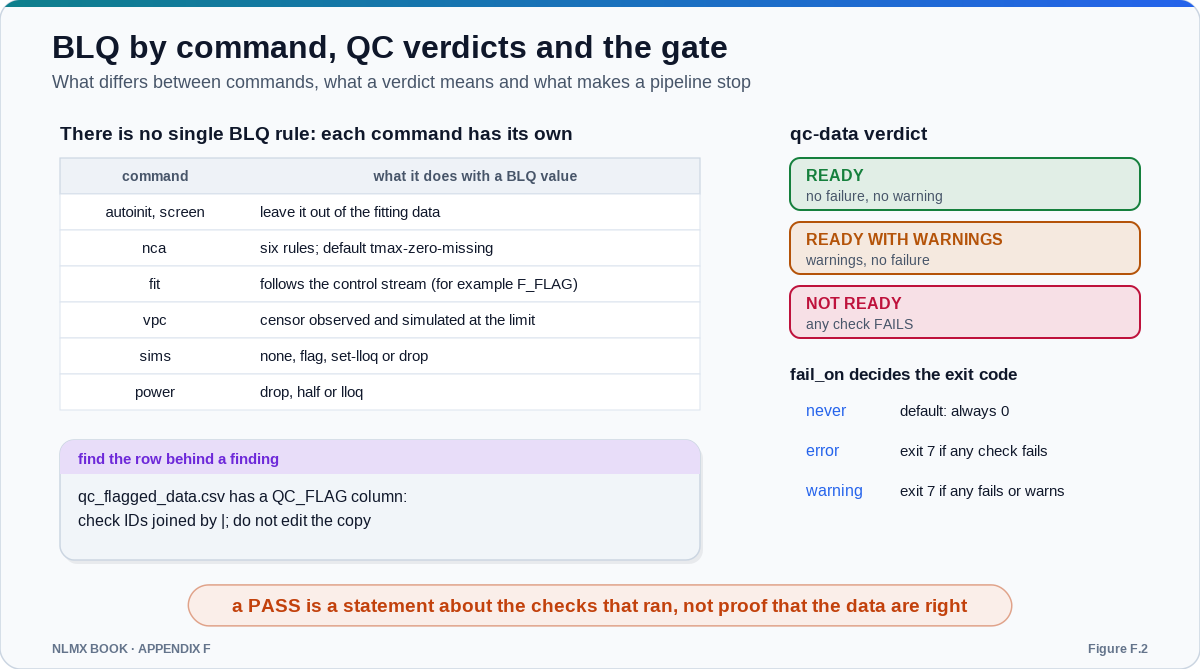
No; each command has its own job. autoinit and screen leave censored values out of the fitting data; nca offers six replacement rules; fit follows the control stream; vpc censors observed and simulated values at the limit; sims offers none, flag, set-lloq and drop; power offers drop, half and lloq. Compare tools by the operation, not by the option name.
Read more: 6.12 BLQ behavior by command.
F.2.8 How should I handle missing covariates?
Choose a policy: error stops when any analysed subject lacks a baseline value (the safe default), drop_subject removes them with a warning, and median imputes the median (the most frequent level for a categorical covariate). Empty, ., NA and NAN count as missing; declare sentinels such as -99 in missing_codes, or they will distort the median or create a spurious category.
Read more: 6.10 Missing-covariate policies and carry-forward.
F.2.9 What is the difference between $DATA IGNORE/ACCEPT and a command filter?
$DATA filtering happens before the numeric records are built and follows NONMEM's rules: .EQ. compares as characters, .EQN. as numbers, and nlmx warns when 1 and 1.0 differ as characters because that commonly explains a row-count mismatch with NONMEM. Command filters are R-style expressions such as EVID == 0 & DVID == 1 or SITE %in% c("A", "B").
Read more: 6.13 Row and observation filters.
F.2.10 What do PASS, WARN, FAIL, COMMENT and N/A mean in qc-data, and what is the verdict?
PASS: the check ran and found nothing. COMMENT: information. WARN: a suspicious condition to investigate and document. FAIL: a blocking problem to correct. N/A: the check did not apply or was turned off. The verdict is NOT READY when any check fails, READY WITH WARNINGS when there are warnings but no failure, and READY otherwise. A PASS is not universal approval.
Read more: 11.3 PASS, WARN, FAIL, COMMENT, N/A and verdicts.
F.2.11 qc-data found failures but exited with code 0. Is that a bug?
No. By default fail_on is never, so that you receive the whole report for a defective dataset. For a pipeline gate set fail_on = "error" (nonzero when a check fails) or "warning" (when any check fails or warns). The command then returns exit code 7 after writing its outputs, and the outputs should be kept, because they explain why the gate stopped.
Read more: 11.9 Exit status, fail_on and pipelines; 39.9 Exit code 7: data validation failure.
F.2.12 How do I find the row behind a finding?
Enable [output].flagged_dataset to write qc_flagged_data.csv: the dataset as read, with a QC_FLAG column that lists the check IDs of each row separated by |. Line numbers are physical lines of the file you supplied, so they shift if the file is re-exported. Do not correct the flagged copy; correct the source, version it and rerun.
Read more: 11.25 Line numbers and the flagged dataset; 11.27 Triage, correction and rerun.
F.2.13 What does qc-nm change in my control stream?
Nothing in the original. It checks the control stream, applies enabled corrections to a new copy (<stem>_qc.ctl, with a CSV and a unified diff), and checks that copy again. Review every changed line before promoting an edit into a controlled revision. --no-fix turns the corrections off, --skip-fixes skips named ones, and --fix-output chooses the file name.
Read more: 12.1 Your first qc-nm run; 12.18 Correction philosophy and complete catalogue; 12.23 Controlling corrections: no-fix, skip-fixes and fix-output.
F.2.14 Can qc-nm or qc-data be my only release gate?
No. qc-nm is a static check of the source, and a corrected READY state must not bypass compilation, a target NONMEM run, numerical acceptance tests, dataset checks and independent review. For qc-data, a verdict of READY is a statement about the checks that ran, not proof that the data are right.
Read more: 12.26 fail-on, exit status and automation; 11.2 What qc-data can and cannot prove.
F.2.15 How many checks are there, and what do the letters of an ID mean?
qc-data has 99 checks in ten families and qc-nm has 81 in ten. An ID is a three-letter family and two digits (REC05). The same three letters can be used by both commands with different meanings (REC, SUB, FIL), so read the check's name, and note which command printed it.
Read more: E.4 Identifiers: exit codes, check IDs, plot codes and file extensions; qc-data: quality control of a dataset; 12.2 What is checked and in what order.
Review checklist
- Do you code EVID, MDV and CMT explicitly?
- Do you know which BLQ operation each command applies?
- Do you set
fail_onfor a pipeline, and keep the outputs of a failed gate? - Do you correct the source, and not the flagged copy?
Navigation
See the previous page, the next page, the overview, and the complete FAQ reference.