4.4 Exit codes, errors, warnings and notes
A command ends in one of two ways: it succeeds, or it stops and says why. This section describes how it stops (the exit code, the one-line reason, the stage and the hint), what a warning is, and how a warning differs from a note. The section ends with the life cycle of one command, which shows where each of these appears.
4.4.1 The life cycle of a command
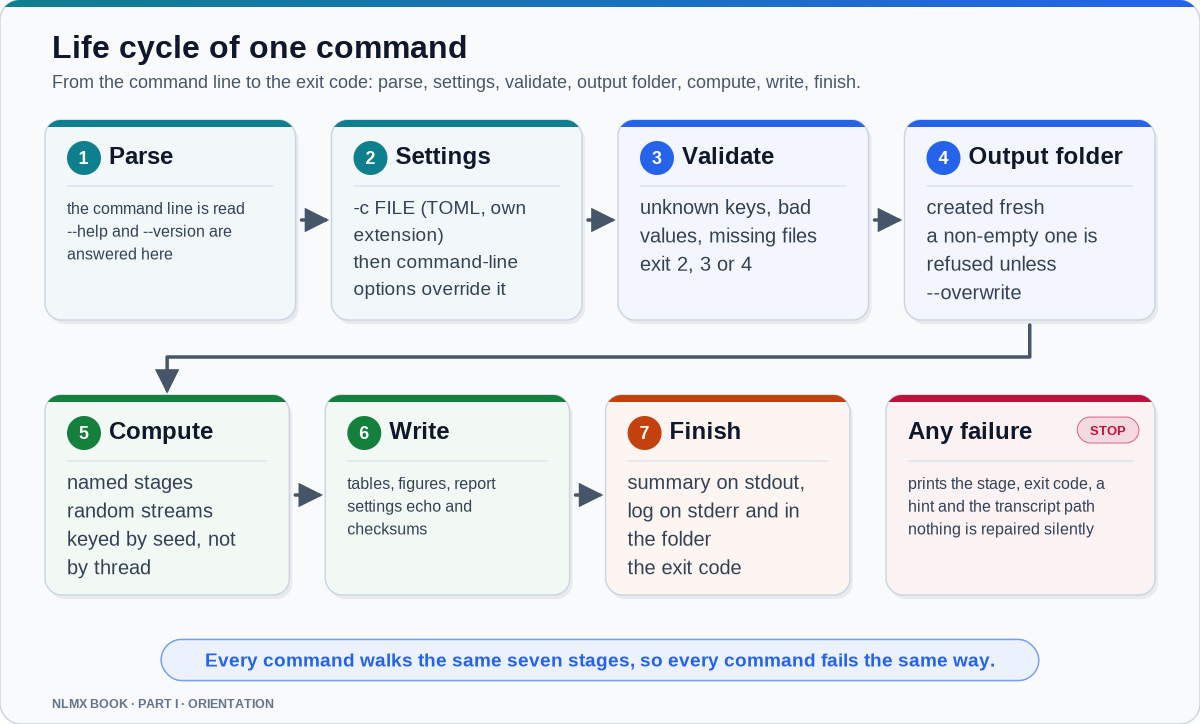
Every command goes through the seven stages of the figure, in the same order.
- Parse. The command line is read. An unknown or misplaced option stops here, with exit code 2; the message comes
from the argument parser and usually suggests the option you meant (
--bogusis answered with "a similar argument exists").--helpand--versionare answered here. - Settings. The settings file, if any, is read, and the command line overrides it. The files are read strictly: a key that does not exist, or a file with the wrong extension, is exit code 4.
- Validate. The files named are found and read, and the dataset, the control stream and the settings are checked against each other: exit code 3 (a file is missing or unreadable), 5 (a feature the model uses is not supported), 6 (files that do not fit together) or 7 (the data fail a check).
- Output folder. The folder is prepared under the fresh-folder rule of Section 4.2. From here on the log is written in the folder.
- Compute. The work itself, in named stages (
stage parsing the control stream,stage reading the dataset, …). Failures here are mainly 9 (a numerical failure) and 10 (nothing could be evaluated). - Write. Tables, figures, the report, the settings echo and the checksums.
- Finish. The summary is printed,
… complete — total elapsed …closes the log, and the exit code is returned.
Two streams carry the output. The progress (the info, ok and stage lines) goes to the standard error stream and
to the log; the summary that ends the command goes to the standard output. So nlmx sims … > summary.txt captures
the summary and leaves the progress on the screen, which is convenient in scripts.
Because the output folder is prepared in stage 4, a command that stops earlier has no log file, and says so in its last line ("no log file was attached (the failure preceded output-directory preparation)"). A command that stops later tells you where the transcript is ("full transcript retained at …").
4.4.2 Exit codes
Table 4.1. The exit codes of nlmx.
| Code | Meaning | Typical cause and what to do |
|---|---|---|
| 0 | success | — |
| 2 | invalid command-line usage | a missing argument (eda without a dataset) or an unknown option; read the hint, or --help |
| 3 | file discovery or I/O failure | a file that does not exist, an output folder that is not empty, an ambiguous run family; choose a fresh folder or name the file |
| 4 | invalid configuration | an unknown key, a wrong extension, a value that is not allowed; the hint says how to get the annotated template |
| 5 | unsupported model feature | the control stream uses something nlmx does not interpret; Section 1.4 and Chapter 40 list them |
| 6 | inconsistent NONMEM artifacts | files of a run that do not agree; also qc-nm --fail-on on a control stream that fails |
| 7 | data validation failure | qc-data --fail-on on a dataset that fails the level you set |
| 8 | posterior reconstruction failure | the posterior engine could not rebuild the individual posteriors |
| 9 | numerical or learner failure | an estimation or a learner that could not be completed |
| 10 | no evaluable relationships | the covariate analysis had no candidate it could evaluate |
| 11 | resume or checkpoint incompatibility | resume on a checkpoint made by another derivation or another configuration |
| 12 | internal invariant violation | a bug in nlmx; a panic on any thread also ends here, with the message and its source location in the log. Report it with the command line and the log |
The exit code 101 that some programs give to a crash is not used: an internal failure ends with 12. Scripts may depend on the numbers. A pipeline that must stop on a failing dataset can use --fail-on, as the exit code 7 shows:
$ nlmx qc-data data/analysis.csv --fail-on warn -o q_fail
   0.03s error FAILED during stage `writing outputs`: the dataset has 0 failed and 4 warned check(s) (--fail-on warning); see q_fail/qc_summary.txt
   0.03s error exit code 7 (data validation failure)
   0.03s error full transcript retained at q_fail/log_6129483760.txt
Note that the outputs of that command were written first (so the reason can be read), and then the command ended with an error: a non-zero exit code does not mean that the folder is empty.
4.4.3 Reading an error
An error has up to four parts, and each helps with a different question.
   0.01s error FAILED during stage `reading the dataset`: unknown likelihood approximation `fo2`
   0.01s error exit code 4 (invalid configuration)
   0.01s error hint: use auto, fo, foce, foce_i or laplace
   0.01s error full transcript retained at /tmp/o4/log_9345371742.txt
- The stage (
reading the dataset) says where in the life cycle the command was. The earlieroklines in the same transcript say what had succeeded. - The reason says what is wrong, with the value that is wrong, quoted.
- The exit code, with its name, is for scripts and for Table 4.1.
- The hint, when there is one, says what to do. Not every error has one: if the reason is complete ("dataset
nofile.csvwas not found"), the hint would repeat it.
The misspelled key of a settings file shows how specific the reason can be. The parser stops at the line and lists the keys that exist:
   0.00s error FAILED during stage `startup`: VPC configuration `/tmp/bad.vpc`: TOML parse error at line 7, column 1
  |
7 | sampls = 500
  | ^^^^^^
unknown field `sampls`, expected one of `type`, `samples`, `seed`, `idv`, `filter`, …
   0.00s error exit code 4 (invalid configuration)
   0.00s error hint: write the annotated reference with `nlmx vpc --print-config vpc_template.txt`
The rule behind it is that nothing is silently repaired: an unknown key, a value out of range or a column that cannot be read stops the command, because a result computed from a guessed setting looks the same as one computed from the right one. Chapter 39 lists the common errors and what to do.
4.4.4 Warnings and notes
Not everything that deserves your attention stops a command. Two kinds of message report what happened without stopping.
- A warning says that something may affect the result and that you should look: a covariate that was left out, a
convergence that took the maximum iterations, a dataset check that returned
WARN. Warnings are printed on the console (warn) and written to the log. - A note says what the program decided on its own, so that the decision is visible: the route that
ncadetected, the$INPUTitems that the generator ofsimswrote as zero, the table items left out because they are not in the model, the seed that was a default. A note is information, not a problem. (In the listings of Chapter 3 you sawNotelines insimsandinfolines innca.)
The distinction is a working one: a warning asks you to act or decide; a note asks you to know. If you want a pipeline to treat every warning as a failure, --strict promotes every
warning to an error.
The words on the console are the levels of the log: error, warn, info (the default), ok (a stage completed), and,
with -v and -vv, debug and trace. stage lines mark the start of a stage. The same words begin the lines of the
transcript in the output folder.
Common mistakes
- Treating a non-zero exit code as "nothing was written". Check the folder and the log;
--fail-onwrites first. - Looking for the log of a command that stopped at startup. It has none; the console is the record.
- Ignoring a warning because the command succeeded. Success means that the command finished, not that the result is fit for use.
Checklist
- Scripts test the exit code, not the text of the messages.
- A failure is reported with the command line, the exit code, the stage and the log.
- Warnings of a reported run have been read and each has a line in the analysis notes.
Further reading
Chapter 39 (errors, warnings and troubleshooting), Chapter 11 (--fail-on and the checks).