10.11 CSV: quoting, missing values and numeric conventions
CSV is nlmx's principal rectangular interchange format. Its apparent simplicity hides edge cases that can silently change columns or values when a downstream parser uses different assumptions.
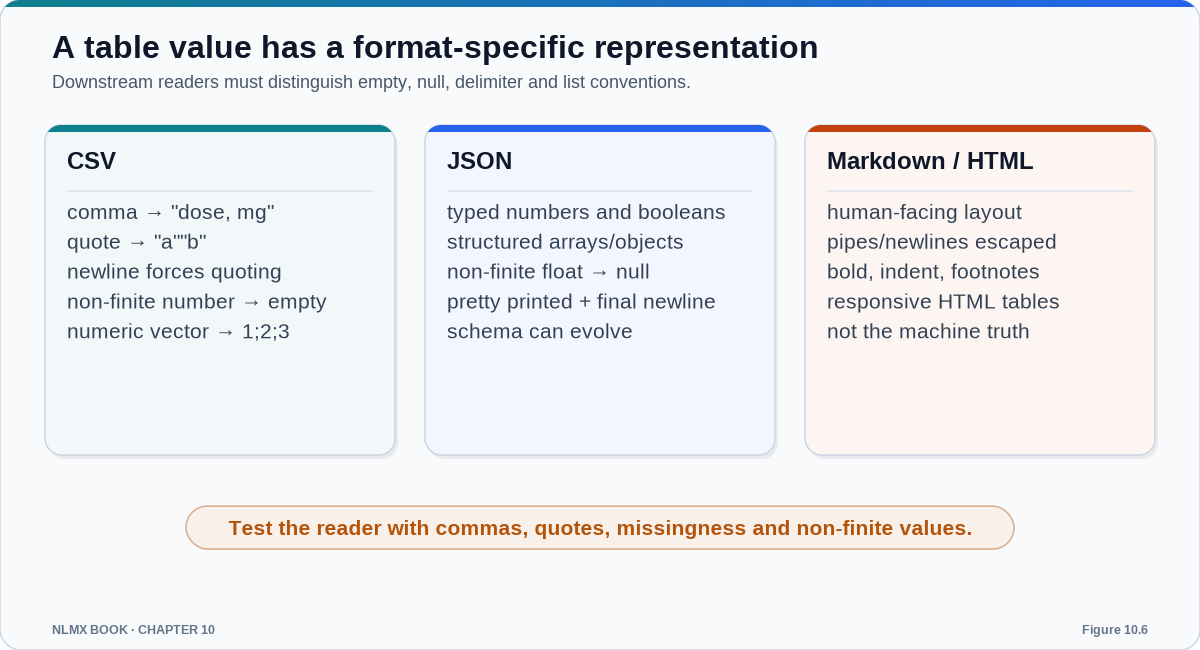
Figure 10.6. The same conceptual value has format-specific escaping, typing and missingness rules.
Field quoting
The shared CSV helper surrounds a field with double quotes when it contains a comma, a double quote or a newline. Quotes inside a quoted field are doubled. Thus:
| Logical value | CSV field |
|---|---|
oral |
oral |
dose, mg |
"dose, mg" |
a"b |
"a""b" |
| two text lines | one quoted field containing the newline |
Rows are comma-joined and end with a newline. Readers should use a standards-aware CSV library rather than splitting strings on commas. A quoted newline means one logical record can occupy several physical text lines.
Numeric and missing output
Finite floating-point values are formatted as decimal strings by the shared helper. Non-finite values—NaN and positive or negative infinity—become empty fields. Option<f64> with no value also becomes empty. Therefore an empty numeric cell can mean unavailable, undefined or non-finite unless the file schema defines a more specific reason.
Vectors passed through the shared vector helper are encoded inside one field with semicolons, for example 0.1;0.2;0.3. That is an application convention, not a nested CSV structure. If vector elements can themselves be missing, the consumer needs the file-specific schema.
Round-trip hazards
Spreadsheet software can convert identifiers to numbers, dates or scientific notation, remove leading zeros, and rewrite precision. Never use a spreadsheet save operation as an invisible transport step for a canonical CSV. Import columns with explicit types and export to a new reviewed artifact.
Locale-aware tools may expect semicolon-delimited files or comma decimal marks. nlmx output uses comma field delimiters and dot decimal notation. Record any conversion before supplying data to a regional application.
Schema discipline
Consumers should validate the header, required columns, unique keys, row count, allowed missingness and units. Additional columns should be handled deliberately: reject them when a locked schema is required, or ignore by name when compatible evolution is intended. Positional imports are especially risky when new diagnostic columns appear.
Common mistakes
- Splitting each line at commas.
- Treating every empty numeric field as zero.
- Allowing a spreadsheet to auto-convert IDs or dates.
- Assuming a semicolon inside a field is a row delimiter.
Checklist
- Parse with a CSV library that supports quotes and embedded newlines.
- Validate named columns and keys before analysis.
- Define empty-cell meaning for each nullable column.
- Hash the canonical file before any office-tool conversion.
Further reading
See dataset quoting, JSON output and multi-format tables.