43.3 Anatomy of an nlmx app
What you will learn
- The layout every nlmx app uses.
- What happens, step by step, between pressing Run and reading results.
- Why what you see is what runs is a design rule, not a slogan.
One page, four zones
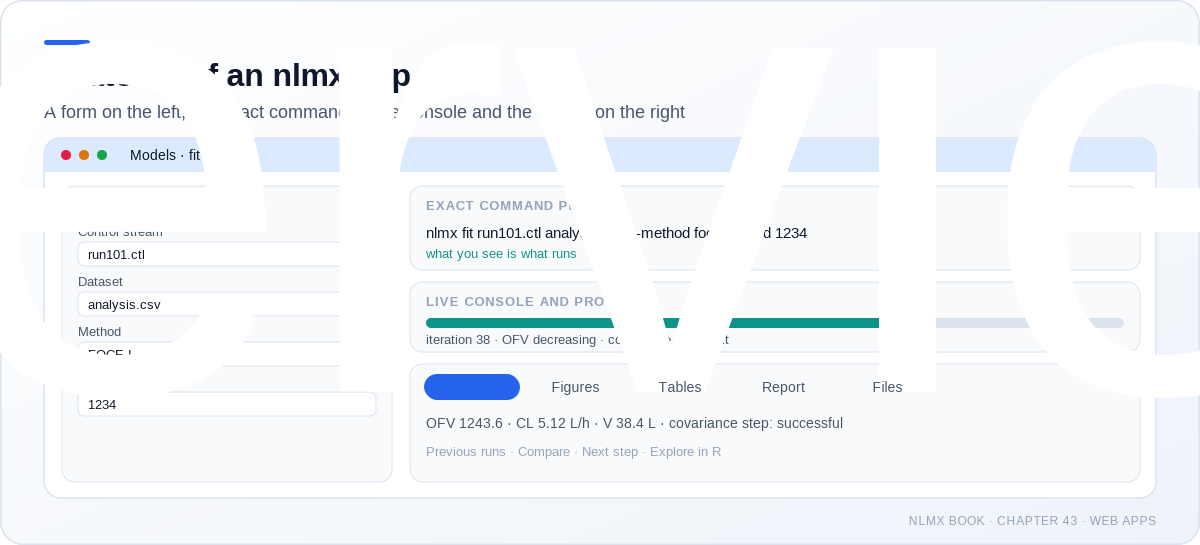
Every engine-driven app has the same page:
- The form on the left: inputs (a dataset, a control stream, earlier results) and every option of the command, grouped and explained. Empty boxes are never sent, so nlmx uses its own default.
- The exact command preview and a list of what still fails the checks, on the right. The preview is the command that will run, copyable, and for options that exist only in a settings file it shows that file too.
- The live console and progress bar. The log streams while the run is going. The bar follows the counts nlmx reports, such as
3/25 replicatesor the iteration number. When nlmx reports no count, the app shows the iteration and a moving stripe rather than an invented percentage. - The results, below: an Overview, Figures, Tables, the nlmx report, and Files, with extra tabs for particular commands.
Light and dark themes, a phone-friendly layout, and state kept in the browser mean the page you left is the page you return to: what you typed, the open panels and the filters are restored.
What happens when you press Run
- The browser describes the run as data, the form values and the files, never as a command line.
- A shared module turns the form into the nlmx argument list and, where a command takes options only from a file, the settings file. The same module builds the live preview in the browser and the run on the server, so the preview and the run cannot differ.
- The server validates every field again, creates a run folder, stores the uploaded files and the settings file in it, and starts nlmx with the values passed as separate arguments and no shell. A value therefore cannot be read as a command.
- The server streams nlmx's output to the page as events. The page parses the counts into the progress bar and colours the log.
- When the run ends, the page lists the files and opens the summary and tables nlmx wrote, the figures and the report, each in a viewer made for it. A result view never recomputes anything: it displays what nlmx wrote.
Forms generated from one table of options
In the NCA app, for example, the command line, the settings file, the validation and the form are all generated from one table of options. That is why they never disagree. A mistake such as an odd combination of options is reported in the form, with a note, before a run is started.
Example libraries
Every app has a library of simulated datasets with control streams, estimates and settings, each with a description and what it is good for. One click fills the whole form. The libraries are generous: six simulated datasets in QC and EDA (two QC sets carry planted problems), six scenarios in DataGen, 15 simulated datasets in NCA (oral, IV bolus, infusion, multiple dose, crossover, dose proportionality, bioavailability, heavy BLQ and incomplete profiles), six datasets with 19 one-click uses in Models, and 15 examples with 47 one-click uses in Exposure Lab. The point is that a new user can see a full analysis before bringing their own data, and a method developer can test against data whose truth is known.
Safety by construction
- The browser never sends a command.
- File access is limited to the run's folder; path traversal is refused.
- Reports are shown in a sandboxed frame.
- Runs are private to the visitor, with limits on simultaneous runs and runs per hour set by the service.
Why this matters
The same anatomy in every app is a speed feature: a user who has used one app knows where the preview, the console and the results are in all the others. It is also an audit feature: the preview, the stored settings and the retained command are always the same thing, so any run can be reconstructed from its folder.
Navigation
See the previous page, next page, and the chapter overview.