42.17 Release gates, revalidation and extending the package
What you will learn
- State the six acceptance criteria that release a validated system and apply them to a result.
- Choose the minimum set of tests to repeat for each kind of change.
- Recognise a regression and know what it blocks.
- Run change control and the periodic review.
- Extend the package for a new intended use without breaking its seal.
Prerequisites: 42.2 The lifecycle and 42.16 Running the package.
A validation is a statement about one executable on one kind of computer. It does not travel: a new build, another operating system or a new intended use each reopens the question. This page is the set of rules that decide how much of the question reopens.
The six acceptance criteria
The plan accepts a validation when all six hold:
- Every installation-qualification test passes. There is no "mostly installed".
- Every High-risk OQ, PQ and data-integrity test passes. No exception, no deviation route.
- Every Medium- or Low-risk test passes, or each failure has a documented deviation, with a risk assessment showing the intended use is unaffected and a corrective action decided.
- Every requirement is covered by an executed test, and every manual check is performed and signed. The traceability matrix has no gap, and no test is left pending.
- No deviation remains open without a QA-approved disposition.
- The summary report is signed by the validation lead and by quality assurance.
The asymmetry between criteria 2 and 3 is the risk-based idea of page 42.4 in operational form: a High-risk failure is a stop; a Low-risk failure is a decision with a paper trail.
Applying the criteria: a worked example
Suppose a run of the full package ends with 112 automatic passes, 6 pending and one failure: a hypothetical Low-risk check on the legend wording of a plot.
| Criterion | Status | Reason |
|---|---|---|
| 1 IQ passes | open | IQ-003 and IQ-008 are pending (manual) |
| 2 High-risk pass | met | no High-risk test failed |
| 3 Medium/Low | open | the failed Low-risk check needs a deviation, risk assessment and decision |
| 4 coverage and manual checks | open | six manual checks unsigned |
| 5 deviations | open | one deviation, not yet dispositioned |
| 6 signatures | open | nothing to sign yet |
Five of six criteria are open, yet only one thing is wrong with the program. The rest is paperwork the validation lead can finish in an afternoon: perform and sign the six manual checks, write the deviation (cosmetic; legend wording differs from the documentation; no effect on any number), obtain a QA disposition—"accept with a documented limitation; correction requested from the supplier"—then sign. This is why the plan separates a failed test from a failed validation: the first is information, the second is an unmet criterion. (The failure is hypothetical, to show the pattern; it is not a result from a particular run.)
What counts as a regression
A regression is a test that passed in the previous validation and fails now, on an executable you intend to release. It has three consequences:
- it is a deviation, handled on the page before;
- the new version is not released until it is resolved, however small the failure looks;
- the previous validated executable stays in service (kept read-only with its validation record) so analyses already in progress can be reproduced.
A test that has always failed on this computer is a different problem (an environment or a test defect), and the first step is to compare with the supplier's reference run on a validated machine.
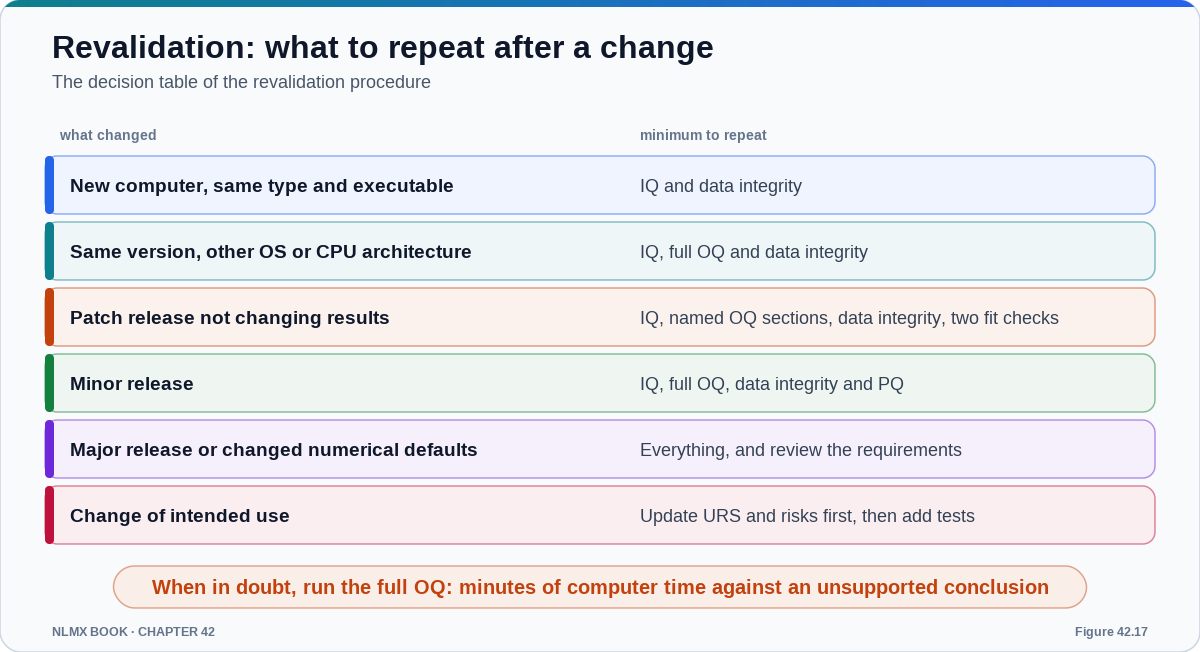
The revalidation decision table
How much to repeat depends on what changed. The table is the package's own decision aid; the third column gives the reasoning.
| What changed | Repeat at least | Why |
|---|---|---|
| Same executable, new computer of the same type and image | IQ and the data-integrity section | the program is unchanged; prove the file is intact and the file system behaves |
| Same version, different operating system or CPU architecture | IQ, the full OQ, and data integrity | numerical results can differ in the last digits; the tolerances allow for it, so show they do |
| Patch release described as not changing results | IQ, the OQ areas of the commands the change log names, data integrity, and the two base-fit tests (OQ-FIT-001 and 002) | a targeted change, a targeted test, plus the canary fits |
| Minor release | IQ, the full OQ, data integrity, and PQ | new capability can interact with old |
| Major release, or any change of estimation algorithm, numerical default or output format | the full package, and a review of the requirements | the intended behaviour itself may have moved |
| Security update or language-runtime update | IQ; the full OQ if the update touches the C/C++ runtime or the file-system driver; otherwise at the periodic review | low-level change, indirect effect |
| Change to the package (a test case or reference data) | the changed tests, then rebuild the traceability matrix | the tester must test the tester |
| Change of intended use (e.g. a new command in submission analyses) | update the URS and risk assessment first, add tests through change control, then execute | you cannot test a use you have not specified |
When in doubt, run the full OQ. It takes minutes; an unsupported conclusion in a submission takes months.
Reading the table: three scenarios
- The IT department moves the program to a new virtual machine, same image. Row one. Run IQ and the eleven integrity tests (about two and a half minutes for the integrity section on the supplier's two-core machine). File the run folders under the change number.
- A colleague wants the same executable on a Linux server. Row two. The server's floating-point library may differ from Windows in the last bits, so a stochastic or iterative test might land at a slightly different value. Run the full OQ. If a deterministic test with a tight tolerance fails by a unit in the 10th digit, that is a tolerance question—page 42.6—to be answered by change control with a documented origin, not a silent widening.
- The supplier releases a patch for an issue in
vpc. Row three. Read the change-log entry for each release between yours and the new one, run the VPC OQ section, data integrity and the two base-fit canaries, and approve. If the same patch also touched the optimiser, the entry would say so, and the scope would widen.
Change control
A change is made only after it is requested, assessed, approved, tested in proportion to the risk, documented and released. The seven steps:
- Request on the change-control form: what changes, why, which build.
- Impact assessment: read the supplier's change log between the validated and the new build; compare with the requirements and the risk register; choose the test scope from the table above.
- Approval by the system owner and quality assurance before installation in the validated environment.
- Install in a test location, record the executable's SHA-256 (the runner records it for you).
- Test the scope decided; IQ always. Record deviations.
- Review and release: update the summary report with the new build identity; QA approves; only then is the build released for GxP use, and the previous one is kept read-only with its validation.
- Communicate the new build and any restriction to users, and update training.
Changes to the package itself follow the same path: edit; rebuild the traceability matrix and the protocols; review; seal the package again; record the new manifest hash on the change form; keep the previous sealed package.
Emergency changes. If a defect threatens data integrity, stop using the affected function, record a deviation, and run the procedure retrospectively within the number of working days your SOP states (the template suggests five).
The periodic review
At an interval the plan fixes (the template says twelve months) and after any security or operating-system change, quality assurance and the validation lead confirm that:
- the executable's SHA-256 still equals the validated one (no unreviewed change);
- every deviation is closed;
- the intended use is unchanged;
- the package seal verifies;
- training is current.
The review is short because the hash check carries most of the weight: if the file is the same bytes, the validation of those bytes still stands.
The evidence bundle to file for each release
| Item | Source |
|---|---|
| Build identity (version string and executable SHA-256) | the execution record of the run |
| Change-log entries since the previous validated build | supplier release notes |
| Impact assessment and test-scope decision | the change-control form |
Run folders for every test executed, with RESULTS_MANIFEST.sha256 |
10_results/ |
| Run register (one line per run) | 10_results/run_register.csv |
| Deviation reports and closures; anomaly log | 09_templates forms |
| Summary report, signed; signature page quoting the report's SHA-256 | make_summary_report.py + your quality system |
| Sealed package manifest | PACKAGE_MANIFEST.sha256 |
| Traceability matrix showing no gap | 08_traceability/RTM.md |
Extending the package
Your intended use will outgrow the supplied tests: a new command, a model structure no fixture covers, a site rule such as the qc-data gate of page 42.3. The extension procedure keeps the evidence chain intact.
- Write the requirement first, in testable form (one verb, one number or one behaviour), with a criticality.
- Score the risk (S × P × D) and put it in the register; the class sets the depth of testing.
- Choose the source of truth (page 42.5): a closed form, an independent calculator, a known truth, or a property. Write the expected value before running the program, and record where it came from.
- Write the test case in the
testcases.jsonformat (page 42.9) with a tolerance and its origin (page 42.6). - Rebuild the traceability matrix. It refuses a requirement with no test, which is the guard against an untested requirement.
- Regenerate the human-readable protocols, review, seal again and record the new manifest hash on the change form.
- Execute the new tests and the area they touch, because a new test can expose an old problem.
Keep your additions in a clearly named folder or file of your own so that a supplier update of the base package merges cleanly: your tests are yours, and the package's seal covers whatever you finally approve.
Known limits of the package
State them in your summary report; an inspector who finds an undeclared limit trusts the rest less.
- It validates the program, not your model or your data (page 42.1): fitness of a model for a purpose is the analyst's qualification, not the package's.
- Cross-software agreement (page 42.15) holds only for the fixtures: a pass on a one-compartment oral model says nothing about a three-compartment ODE model with lag.
- Visual outputs (plots, Word and PDF layout) and the language-model assistant's content are reviewed by humans; the package tests the guardrails, not the wisdom.
- The program provides no user authentication, operator identity, e-signatures or protection of files against deletion; the organisation supplies them (page 42.13).
- Out of scope unless added by change control: clinical-decision support for individual patients; use as an electronic records or signature system; reliance on assistant content without review.
- Stochastic tests carry a calculated false-failure probability (page 42.11): a rare failure on an otherwise clean run is expected at that rate, and the response is to repeat the test under a deviation, not to ignore it.
Review checklist
- Can you point to each of the six acceptance criteria and its evidence?
- Does your change-control form cite the revalidation-table row it relies on?
- Is the previous validated build still available, read-only, for reproducing earlier analyses?
- Does your periodic review begin with the SHA-256 comparison?
- Do your additions have a requirement, a risk score, an independent expected value and a seal?
Navigation
See the previous page, the overview and the complete validation reference.