E.3 The command matrix: command, chapter, reference, settings and outputs
What you will learn
- Go from a command name to its concepts, its manual page, its settings and its outputs.
- See which commands share a settings format or an output page.
- Place each command in the seven stages of an analysis.
Prerequisites: Chapter 1 for the commands and Chapter 36 for the command-line reference.
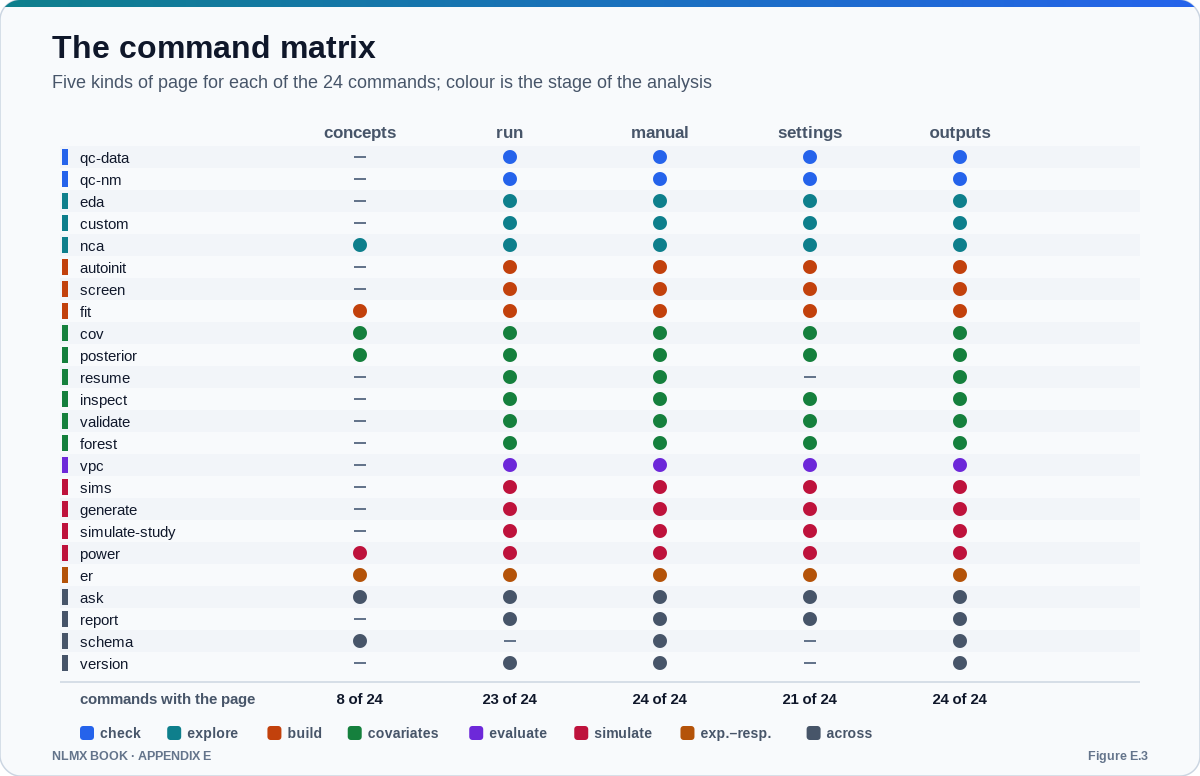
nlmx has 24 commands, and the book gives each of them the same five kinds of page. Chapters 1 to 4 count 22 commands and do not list custom and report, which have chapters of their own (13A and 36A); this page counts the 24 command pages of Chapter 36 (36.5 to 36.28). The table puts the pages next to each other, so that a reader who knows the command can go straight to the one they need.
| Command | What it does | Reads | Concepts | Run | Manual | Settings | Outputs |
|---|---|---|---|---|---|---|---|
qc-data |
99 checks of a NONMEM-style dataset | dataset | — | 11 | 36.12 | .qcd | 38.5 |
qc-nm |
81 checks of a control stream, and a corrected copy | control stream, dataset | — | 12 | 36.13 | .qcn | 38.6 |
eda |
exploratory plots and tables | dataset | — | 13 | 36.14 | .eda | 38.7 |
custom |
your own plots and tables from any dataset | dataset | — | 13A | 36.15 | .custom | 38.7 |
nca |
non-compartmental analysis | dataset | 14 | 15 | 36.11 | .nca | 38.17 |
autoinit |
initial estimates from the data alone | dataset | — | 16 | 36.9 | .init | 38.9 |
screen |
structural-model screen | dataset | — | 17 | 36.10 | .screen | 38.10 |
fit |
estimate a control stream (FO, FOCE, FOCE-I, Laplace, SAEM) | control stream, dataset | 18, 19 | 20, 21 | 36.7 | .covar | 38.11, 38.12 |
cov |
covariate selection: frozen, stepwise, posterior or both | control stream, run files, dataset | 22, 23, 24 | 23A, 25 | 36.20 | .covar | 38.14, 38.15 |
posterior |
subject posteriors and shrinkage only | control stream, run files, dataset | 24 | 25 | 36.21 | .covar | 38.15 |
resume |
continue an interrupted cov run | the output folder of that run | — | 25 | 36.22 | — | 38.15 |
inspect |
parse the inputs and list the covariate scope; fits nothing | control stream, run files, dataset | — | 22 | 36.5 | .covar | 38.4 |
validate |
inspect, plus reconciliation of the files and a feasibility check | control stream, run files, dataset | — | 22 | 36.6 | .covar | 38.4 |
forest |
covariate effects and exposure, with uncertainty | fitted control stream, .ext, .cov | — | 26 | 36.25 | .forest | 38.16 |
vpc |
visual and numerical predictive checks | control stream, estimates, dataset | — | 27 | 36.8 | .vpc | 38.13 |
sims |
simulate a study and its exposure metrics | control stream, optional dataset | — | 28 | 36.18 | .sims | 38.18 |
generate |
write a synthetic NONMEM project of a design you choose | design options or settings | — | 29 | 36.24 | .gen | 38.21 |
simulate-study |
operating characteristics of the covariate methods | scenario options | — | 29 | 36.26 | .covar | 38.22 |
power |
sample size and power by SSE or by Fisher information | control stream, design dataset | 30 | 31 | 36.19 | .power | 38.19 |
er |
exposure–response analysis | subject-level dataset | 32 | 33 | 36.17 | .er | 38.20 |
ask |
Maxson, the assistant: plain words in, checked commands out | a request | 34 | 35 | 36.27 | .ask | 38.23 |
report |
publish Markdown as Word, PDF and HTML | a Markdown file, text or standard input | — | 36A | 36.16 | .report | 38.8 |
schema |
the annotated settings reference | none | 7 | — | 36.23 | — | 38.4 |
version |
the version banner and the licence | none | — | 2 | 36.28 | — | 38.4 |
The columns:
- Concepts is the chapter that explains the method, when the method has a chapter of its own. A dash means that the command chapter explains the method as it goes.
- Run is the chapter that explains how to run the command, with its first run, its options and its worked examples.
- Manual is the page of Chapter 36 (the command-line reference) that gives the command's options in a table.
- Settings is the extension of the settings file and the page of Chapter 37 that describes the file; the page after it lists every key.
- Outputs is the page of Chapter 38 that describes every file the command writes.
What the table shows
- 21 of the 24 commands have a settings catalogue. The ones without one are
resume,schema,version: they take a folder, or nothing, and need no settings file. - Seven commands share one settings format,
.covar.cov,inspect,validate,posterior,resume,fitandsimulate-studyread the same family of files, which binds a model family to its covariates. A reader looking for the settings offittherefore opens 37.3 Covariate-analysis settings: purpose, structure, and workflow, and not a page named fit. edaandcustomshare an output page, 38.7 eda and custom output dictionaries, because their outputs have the same layout.inspect,validate,schemaandversionshare one output page, 38.4 inspect, validate, schema, and version outputs: they write little, and mostly to the console.cov,posteriorandresumewrite related outputs, described on 38.14 Frozen-score and refit-SCM covariate outputs (the frozen-score and refit-SCM files) and 38.15 Posterior-stability, both-engine, and resume outputs (the posterior-stability, both-engine and resume files).
The order in which the commands are used
An analysis moves through seven stages, and the commands fall into them. The stages are a guide, not a rule: a model fitted elsewhere can go straight to vpc or forest, and a failed check sends the work back.
| Stage | Commands | Chapters |
|---|---|---|
| 1 Check | qc-data, qc-nm |
11, 12 |
| 2 Explore | eda, custom, nca |
13, 13A, 14–15 |
| 3 Build | autoinit, screen, fit |
16, 17, 18–21 |
| 4 Covariates | cov, posterior, resume, inspect, validate, forest |
22–26 |
| 5 Evaluate | vpc, and fit --plots |
27, 21 |
| 6 Simulate and plan | sims, generate, simulate-study, power |
28–31 |
| 7 Exposure–response | er |
32–33 |
| Across all | ask (Maxson), report, schema, version |
34–36A, 7, 2 |
What each command needs
Most commands take files the reader already has. Six take only a dataset: qc-data, eda, custom, nca, autoinit and screen. fit and qc-nm need a control stream and its dataset. The covariate commands need the files of a fit as well: the estimates, the covariance matrix and the individual parameters. A command that needs the files of a fit cannot run before one. 22.7 Input artifacts and run-family discovery describes how the run family is discovered.
Reading a row: power
The row for power reads: sample size and power by SSE or by Fisher information; reads a control stream and a design dataset; concepts Chapter 30; run Chapter 31; manual 36.19; settings .power (37.27); outputs 38.19. A reader who needs to plan a study opens Chapter 30 for the estimand and the information matrix, Chapter 31 for the options, 36.19 for the option table, 37.27 for the .power keys and 38.19 for the files, and has seen every page that concerns the command.
The same table as a picture
The figure at the top of this page draws the first five columns as a grid. A filled cell is a page of that kind; an empty cell means that the command does not have one.
Review checklist
- Given a command, can you name the five kinds of page the book gives it?
- Do you know that
fitreads a.covarfile, and that seven commands share that format? - Do you know which commands run without a settings file?
- Can you say which commands need the files of a fit?
Navigation
See the previous page, the next page, the overview, and the complete index reference.