E.4 Identifiers: exit codes, check IDs, plot codes and file extensions
What you will learn
- Look up an exit code, and know that 0 is not a pass.
- Look up a check ID, and know that three letters can mean two things.
- Find the page of a plot or table code, and the settings extension of any command.
Prerequisites: Chapter 4 for the exit codes.
This page explains the identifiers that a run prints or writes: exit codes, check IDs, plot and table codes, and the extensions of settings files. For each it gives the meaning in a line and the page that defines it.
Exit codes
Every command ends with a numeric exit code. Zero means the process completed: it does not mean that the analysis passed (the command's own verdict, the convergence state or the child-step status must still be read). The other codes name the class of failure. The same code can arise at several stages, so keep the one-line reason and the log with it, and never remap a nonzero code to zero in a wrapper.
| Code | Class | Meaning | Page |
|---|---|---|---|
| 0 | completed | the process completed; still read the native verdict | 39.3 Warnings, notes, and the meaning of exit 0 |
| 2 | usage | unknown or missing option, invalid value or combination | 39.4 Exit code 2: invalid command-line usage |
| 3 | I/O and discovery | a file, server or output could not be found, read, reached or written | 39.5 Exit code 3: discovery, files, output, and server I/O |
| 4 | configuration | settings syntax, unknown key or table, or an invalid value | 39.6 Exit code 4: invalid settings |
| 5 | unsupported | a model feature or backend capability the build does not support | 39.7 Exit code 5: unsupported model or method feature |
| 6 | artifacts | model artifacts that are inconsistent with each other | 39.8 Exit code 6: inconsistent model artifacts |
| 7 | data | dataset validation failed, or a strict data-QC threshold was reached | 39.9 Exit code 7: data validation failure |
| 8 | posterior | subject posterior reconstruction failed | 39.10 Exit code 8: posterior reconstruction failure |
| 9 | numerical or learner | estimation, covariance or learner numerical work failed | 39.11 Exit code 9: numerical or learner failure |
| 10 | empty | nothing evaluable remained | 39.12 Exit code 10: nothing evaluable remains |
| 11 | checkpoint | resume or checkpoint identity or compatibility failed | 39.13 Exit code 11: checkpoint or resume incompatibility |
| 12 | internal | an internal invariant was violated and logged | 39.14 Exit code 12: internal invariant violation |
The table lists the codes that Chapter 36 documents: 0, and 2 to 12. The general pages are 4.4 Exit codes, errors, warnings and notes (an introduction), 36.35 Exit codes and machine-readable completion (the reference table) and 39.1 Reading an nlmx error (reading an error). The first five minutes of a failure are on 39.2 The first five minutes: a safe triage.
Check IDs of qc-data (99 checks)
An ID is a three-letter family and a two-digit number. The families of the dataset checker, with the page that defines each range:
| Family | Subject | IDs | Checks | Page |
|---|---|---|---|---|
FIL |
file and format | FIL01–FIL12 | 12 | 11.10 |
HDR |
header and column names | HDR01–HDR08 | 8 | 11.11 |
VAL |
values, types, missingness | VAL01–VAL10 | 10 | 11.12 |
REC |
record consistency | REC01–REC12 | 12 | 11.13 |
REC |
infusions, repeats, steady state, duplicates | REC13–REC20 | 8 | 11.14 |
TIM |
time, order, TAD, nominal time | TIM01–TIM09 | 9 | 11.15 |
DOS |
dosing and regimen | DOS01–DOS07 | 7 | 11.16 |
OBS |
BLQ, zero, negative values | OBS01–OBS05 | 5 | 11.17 |
OBS |
outliers, spikes, sampling | OBS06–OBS13 | 8 | 11.18 |
SUB |
individual and subject | SUB01–SUB06 | 6 | 11.19 |
COV |
selection, missingness, ranges | COV01–COV04 | 4 | 11.20 |
COV |
levels, outliers, correlation, derived | COV05–COV11 | 7 | 11.21 |
NMT |
NONMEM readiness | NMT01–NMT03 | 3 | 11.22 |
| Total | 99 |
Check IDs of qc-nm (81 checks)
| Family | Subject | IDs | Checks | Page |
|---|---|---|---|---|
FIL |
file and format | FIL01–FIL07 | 7 | 12.5 |
REC |
record presence, order, includes | REC01–REC10 | 10 | 12.6 |
INP |
$INPUT mapping | INP01–INP08 | 8 | 12.7 |
DAT |
$DATA and selection | DAT01–DAT10 | 10 | 12.8 |
SUB |
subroutines, model, required PK | SUB01–SUB07 | 7 | 12.9 |
COD |
syntax, control flow, Y, scope | COD01, 02, 07, 09, 10 | 5 | 12.10 |
COD |
indices: definition and use | COD03–COD06, COD12 | 5 | 12.11 |
COD |
numerical safety, MU referencing | COD08, COD11 | 2 | 12.12 |
PAR |
THETA bounds, initial values, fixed | PAR01–PAR04, PAR09 | 5 | 12.13 |
PAR |
OMEGA, SIGMA, variance structure | PAR05–PAR08 | 4 | 12.14 |
EST |
estimation and covariance | EST01–EST09 | 9 | 12.15 |
TAB |
tables | TAB01–TAB06 | 6 | 12.16 |
DOC |
documentation | DOC01–DOC03 | 3 | 12.17 |
| Total | 81 |
The same three letters, two meanings
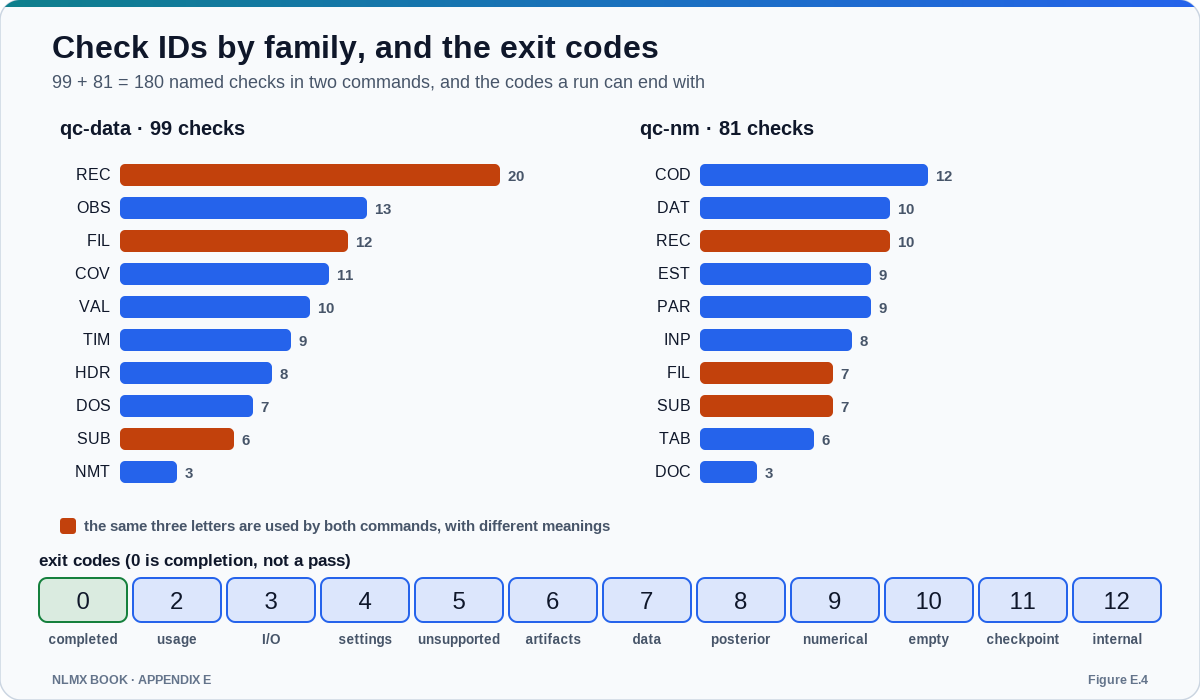
3 prefixes are used by both commands: FIL, REC, SUB. The dataset checker's REC is record consistency and its SUB is individual and subject; the control-stream checker's REC is record presence, order and includes and its SUB is subroutines, model and required PK. An ID is unambiguous only with the command that printed it. The listing and the findings file of each command carry the ID with the check's name; read the name, not the letters.
Checks in one place
The two families together make 180 named checks. The largest family of qc-data is REC (20 of 99 checks, on two pages), and the largest of qc-nm is COD (12 of 81, on three pages); the figure at the top of the page draws both.
Plot and table codes of eda (24 plots, 10 tables)
The standard exploratory outputs have codes of their own, with a P for a plot and a T for a table.
| Plot codes | Subject | Plots | Page |
|---|---|---|---|
| P01–P03 | concentration profiles | 3 | 13.9 |
| P04–P07 | summary and dose plots | 4 | 13.10 |
| P08–P11 | sampling, dosing and BLQ | 4 | 13.11 |
| P12–P17 | covariate plots | 6 | 13.12 |
| P18–P20 | observed exposure | 3 | 13.13 |
| P21–P24 | data, PK-PD, time-varying | 4 | 13.14 |
| Total | 24 |
| Table codes | Subject | Tables | Page |
|---|---|---|---|
| T01, T09, T10 | data summary, missingness, subjects | 3 | 13.15 |
| T02–T03 | demographic and covariate tables | 2 | 13.16 |
| T04–T05 | dosing and observations by time | 2 | 13.17 |
| T06–T08 | exposure and correlation | 3 | 13.18 |
| Total | 10 |
Extensions of settings files
A settings file takes the extension of its command and holds TOML. 16 extensions exist, and one of them (.covar) serves seven commands.
| Extension | Used by | Pages |
|---|---|---|
.qcd |
qc-data | 37.5 (orientation), 37.6 (keys) |
.qcn |
qc-nm | 37.7 (orientation), 37.8 (keys) |
.eda |
eda | 37.9 (orientation), 37.10 (keys) |
.custom |
custom | 37.11 (orientation), 37.12 (keys) |
.report |
report | 37.13 (orientation), 37.14 (keys) |
.nca |
nca | 37.15 (orientation), 37.16 (keys) |
.init |
autoinit | 37.17 (orientation), 37.18 (keys) |
.screen |
screen | 37.19 (orientation), 37.20 (keys) |
.vpc |
vpc | 37.21 (orientation), 37.22 (keys) |
.forest |
forest | 37.23 (orientation), 37.24 (keys) |
.sims |
sims | 37.25 (orientation), 37.26 (keys) |
.power |
power | 37.27 (orientation), 37.28 (keys) |
.er |
er | 37.29 (orientation), 37.30 (keys) |
.gen |
generate (and example) | 37.31 (orientation), 37.32 (keys) |
.ask |
ask | 37.33 (orientation), 37.34 (keys) |
.covar |
cov, inspect, validate, posterior, resume, fit, simulate-study | 37.3 (orientation), 37.4 (keys) |
Extensions of model and result files
| Extension | What it is | Where it is explained |
|---|---|---|
.ctl or .mod |
the NONMEM control stream | 5.1 Control-stream records and parser support |
.ext |
iteration and final estimates | 20.21 EXT, COV, COR, and COI files |
.cov, .cor, .coi |
covariance, correlation and inverse covariance of the estimates | 20.21 EXT, COV, COR, and COI files |
.phi |
the individual parameters and their objective | 20.22 PHI and parameter files |
Output file names
The output files are too many for a table of this size. The A–Z reference has a second section that lists 115 file names with the page that describes each one. The pages of Chapter 38 hold the columns of each file: 38.1 Output folders, identities, overwrite, and completion for the folders and the common files, 38.2 Delimited tables: headers, row grain, missing values, and numbers for the tables and 38.3 JSON, JSONL, text, reports, figures, logs, and checksums for the formats.
Review checklist
- Do you know that exit code 0 is not a pass?
- Given
REC05, do you ask which command printed it? - Can you say which checks belong to the dataset checker and which to the control-stream checker?
- Can you name the extension of the settings file of the command you use most?
Navigation
See the previous page, the next page, the overview, and the complete index reference.