B.6 Terms of operating nlmx: commands, settings, outputs, exit codes, the assistant and validation
What you will learn
- Name each command of the program and the chapter that teaches it.
- Use the vocabulary of a run: settings file, template, echo, output folder, transcript, checksum list, gate.
- Read an exit code and say what to do next.
- Use the vocabulary of the assistant (Maxson) and of the validation chapters: guardrail, audit trail, bundle, fixture, illustration.
Prerequisites: Chapter 4, concepts and conventions. This page is a glossary; the commands are taught in their own chapters and listed in Chapter 36.
The commands
A command is the first word after the program name; each does one job and has a chapter.
| Command | What it does | Chapter |
|---|---|---|
qc-data |
checks a dataset against a catalogue of checks and gives a verdict | 11 |
qc-nm |
checks (and can correct) a NONMEM control stream | 12 |
eda |
exploratory plots and tables of a dataset | 13 |
custom |
reproducible plots and tables from any dataset, as described by a settings file | 13A |
nca |
non-compartmental analysis | 14, 15 |
autoinit |
initial estimates from the dataset alone | 16 |
screen |
screening of candidate structural models | 17 |
fit |
estimation of a model (FOCE-I, Laplace, SAEM and others) | 20 |
cov |
stepwise covariate selection | 23A, 25 |
posterior |
the posterior-stability analysis | 24, 25 |
resume |
continue an interrupted covariate run | 25 |
forest |
covariate effects and exposure, as forest plots | 26 |
vpc |
visual and numerical predictive checks | 27 |
sims |
simulate a study from a fitted model | 28 |
generate, simulate-study |
write a synthetic project of known truth; simulate whole studies | 29 |
power |
Fisher information, power, sample size and simulation of designs | 31 |
er |
exposure–response analysis | 33 |
report |
publish a Markdown file as Word, PDF and HTML | 36A |
ask |
the assistant, Maxson | 35 |
inspect, validate, schema |
the utility commands described in the command-line reference | 36 |
Settings and files
- Positional argument — the dataset (or the main input) written after the command name. Option — a flag such as
-o(output folder) or-c(settings file). - Settings file — a TOML file of a command's options. Each command has its own extension (for example
.qcd,.nca,.vpc,.er,.report), so a file for one command given to another is refused with the extension it should have. Where: Chapter 7, page D.4. - Template (annotated reference) — the commented example of every key, its default and a line of explanation; written by
--print-config FILE. - Echo — the resolved settings that a run writes into its output folder as a settings file of its own, so the run can be repeated with
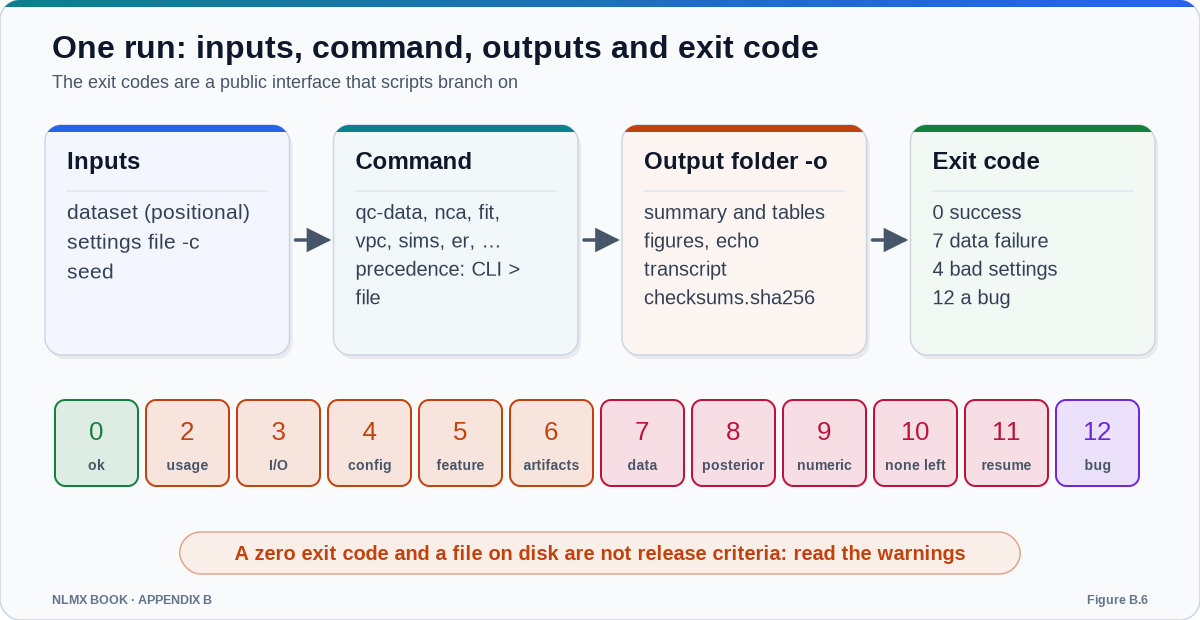
-c. - Precedence — the command line wins over the settings file, which wins over the built-in default. Relative paths in a settings file are taken from the folder of the settings file.
- Unknown key — a settings key that the command does not have; it is an error (exit code 4) and the message lists the valid keys. A misspelling is never ignored.
- Output folder — everything a run writes. It holds a text summary (whose first line records the command), the tables and figures, the echo, a transcript of what was logged, and a checksum list (
checksums.sha256) that lets a reader prove a file is the one that was written. Where: Chapter 38. - Determinism — the same inputs, settings and seed give the same outputs, whatever the number of threads. Where: Chapter 9.
- Seed — the number that fixes the random draws of a run; it is a setting, so it appears in the echo.
- Resume and checkpoint — a long run saves its state so that it can continue; a checkpoint that does not match the run is refused (exit code 11).
Severity, gates and exit codes
- Finding — one reported problem of a data or control-stream check, with a severity. The severities used in the chapters are FAIL (the dataset is not ready), WARN (a concern to answer) and information.
- Gate — a rule that turns a verdict into an exit code, so a script can stop. A data check with the gate set at
errorstops a pipeline with exit code 7 when any error is found. A warning does not change the exit code unless the gate says so. - Exit code — the number a command returns. Pipelines branch on it, so the codes are a public interface:
| Code | Meaning | What to do |
|---|---|---|
| 0 | success (warnings do not change it) | read the warnings anyway |
| 2 | invalid usage | correct the option |
| 3 | file discovery or I/O failure | check the path and permissions |
| 4 | invalid configuration | write the template with --print-config and compare |
| 5 | unsupported model feature | use the supported alternative |
| 6 | inconsistent NONMEM artifacts | find the missing or mismatched file |
| 7 | data validation failure | read the summary the check wrote |
| 8 | posterior reconstruction failure | see Chapter 24 |
| 9 | numerical or learner failure | change the named setting |
| 10 | no evaluable relationships | relax the filter or scope |
| 11 | resume/checkpoint incompatibility | rerun, or keep the original settings |
| 12 | internal invariant violation (a bug) | report the command line and the transcript |
- Warning — a message that does not stop a run. A zero exit code and a file on disk are not release criteria: read the warnings and open the file (page 41.38).
- Retry — a second fit started from other initial estimates after a failure. The parent folder of a retried fit is attempt 0, not the result; the reported fit is the one the chapter names. Where: Chapter 20.
The assistant
- Maxson — the assistant of the program. It turns a request in plain words into commands, runs them only after a yes, and reads the listings. The language model proposes; the program decides what is carried out. Where: Chapter 34.
- Guardrail — a limit enforced by the program, not by the model: the list of allowed commands, forbidden options, ceilings on option values, whether
--yesmay answer confirmations, whether a server must be on this computer, the number of model replies, commands and corrections per request, and time limits. Where: Chapter 35. - Confirmation — a yes from the user before a step runs (
confirm = everyasks for every step). - Modes — run (propose, confirm, execute), plan-only (record the planned commands, run nothing) and guide (show the command, run nothing).
- Audit trail — the files of a session: the transcript, the event log (one JSON object per line), the settings in force, the list of commands run (so that anyone can rerun the analysis without the assistant), and the system prompt. A reviewer can ask of each step who proposed it, who allowed it and what happened.
- Scripted backend (mock) — a stand-in for the language model that reads its replies from a file, used in the book's sessions to show what the guardrails do with a reply. It says nothing about how a real model chooses.
- Fix attempt (correction) — a bounded extra round that a failed command may get, with a limit.
Reports
- Report — the document a team sends out. The
reportcommand turns one Markdown source and, optionally, a settings file into a Word file, a PDF and a web page, with a typeset equation, a table of contents and page numbers. - QA note — the record of what a run wrote against what a person verified, including what was not done. It is the model for the release check of Chapter 36A.
Validation and the words of the book
- Bundle — a frozen output folder of a documented run, with its command and checksums; the case-study chapter cites numbers by page, bundle and command (Chapter 41).
- Reference dataset — a dataset with a known answer, used to test a calculation (Chapter 42).
- Fixture — an input built for a test or an example. A documentation fixture has illustrative values and is not the result of a study.
- Failure fixture — an input built to fail, so that the exit code and the message of a failure are tested (page 42.14).
- Worked illustration — a calculation with invented numbers, marked as such in the text, to show a rule. It is not a result.
- Hand check — recomputing a number by an independent route, as in page A.18.
- Reference software agreement — a comparison of the program's answers with those of established software on the same data (Chapter 40).
- Web apps — the hosted applications built around the program (Chapter 43).
A worked example
Illustration, not a result. A team runs nlmx qc-data -c study.qcd -o qc1 in a script with the gate at error. The script returns 7. Reading the table above, 7 is a data validation failure: the command ran correctly, the dataset did not pass. The next action is not to rerun but to open qc1: the summary's first line gives the command, the findings file lists each finding with its severity, and the checksum list proves the summary is the file that was written. Had the script returned 4, the problem would have been the settings file (an unknown key, say), and nlmx qc-data --print-config template.txt would have shown the valid keys. Had it returned 0 with a warning in the transcript, a person would still read the warning before the result is used.
Review checklist
- Can you name the command for a task and the chapter that teaches it?
- Do you keep the settings echo, the transcript and the checksum list with every output?
- Does your pipeline branch on exit codes, and does anyone read the warnings of a run with exit code 0?
- Do you know which of the assistant's limits the program enforces, and which depend on the model?
Navigation
See the previous page, the overview and the A–Z lookup.