12.27 Worked example: seven corrections
This reproducible example runs nlmx 4.3.0 against a deliberately flawed one-compartment control stream. The documentation source review reflects the newer source tree, so the executable version is stated explicitly rather than implying that the evidence came from 4.4.
Run it
The .qcn file identifies flawed.ctl, enables dataset checking and corrections, targets NONMEM 7.5, emits all main output forms, and uses fail_on = "never" for teaching. From the input directory, the equivalent run is:
nlmx qc-nm -c chapter12.qcn -o ../results/flawed --no-color
The original verdict is NOT READY: 64 PASS, 6 COMMENT, 1 WARN, 4 FAIL, and 6 N/A. Seven corrections produce a READY candidate with 72 PASS, 4 COMMENT, no WARN, no FAIL, and 5 N/A.
What changed
| Correction | Source change | Why review is still needed |
|---|---|---|
problem |
Inserts $PROBLEM flawed. |
Replace with the intended scientific description. |
ignore |
Changes IGNORE=# to IGNORE=@. |
Confirm all included/excluded rows. |
bounds |
Changes (10,5,1) to (1, 5, 10). |
Confirm intended clearance bounds and units. |
zero_fix |
Changes $SIGMA 0 to $SIGMA 0 FIX. |
Decide whether zero residual variance is defensible. |
interaction |
Adds INTERACTION. |
Confirm estimator/error-model requirements. |
maxeval |
Adds MAXEVAL=9999. |
Treat it as a budget, not a convergence promise. |
table_options |
Adds ONEHEADER NOPRINT. |
Confirm the downstream table contract. |
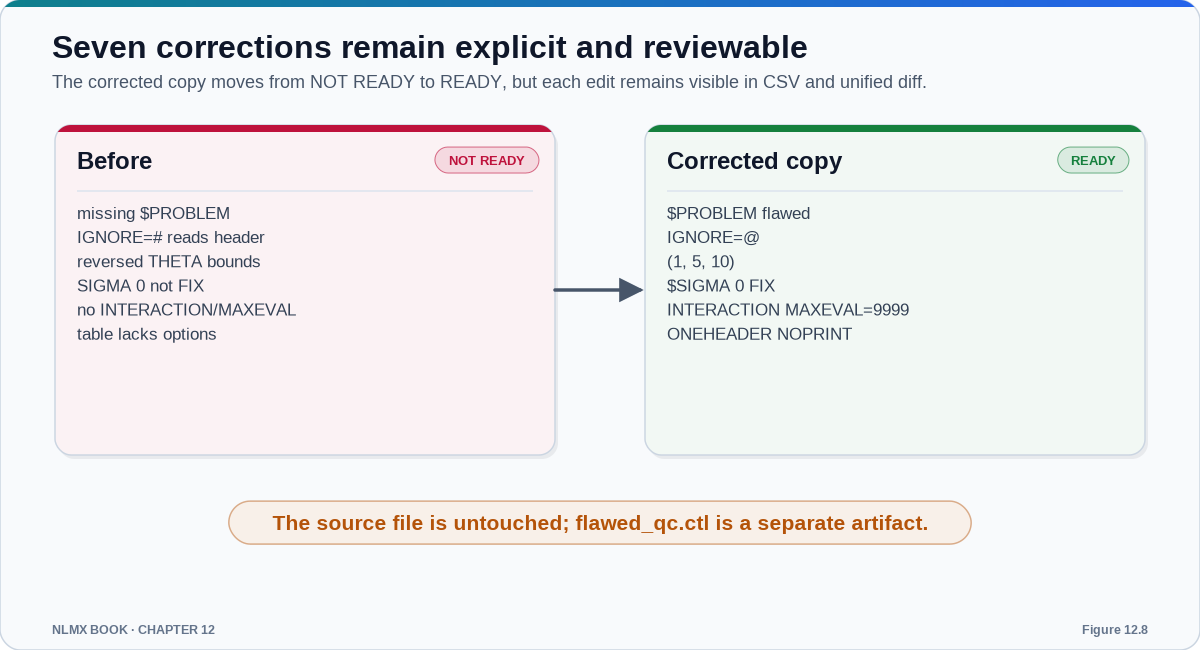
The corrected file also receives a provenance banner pointing to the changes and diff. It is a candidate, not an approved replacement. The example intentionally stops before a NONMEM run; production validation must execute the model and compare translation, estimates, objective, diagnostics, and output tables.
Common mistakes
- Presenting this synthetic READY result as a software-equivalence validation.
- Copying its bounds, variance, or
MAXEVALinto another model. - Ignoring that evidence used nlmx 4.3.0.
- Reviewing the summary but not the exact diff.
Checklist
- Open the input, configuration, summary, changes, and diff.
- Explain every correction in scientific terms.
- Reproduce the status counts with the pinned executable.
- Run the reviewed candidate in the target NONMEM version.
- Replace teaching assumptions with project-approved choices.
Further reading
Use the ctlinput control stream, settings file, ctlcorrected candidate, txtsummary, and unified diff.