Documentation

Complete nlmx report reference

This page condenses the complete nlmx 4.16.2 publication interface. Use the numbered pages for explanation and examples; use this page during authoring and final review.

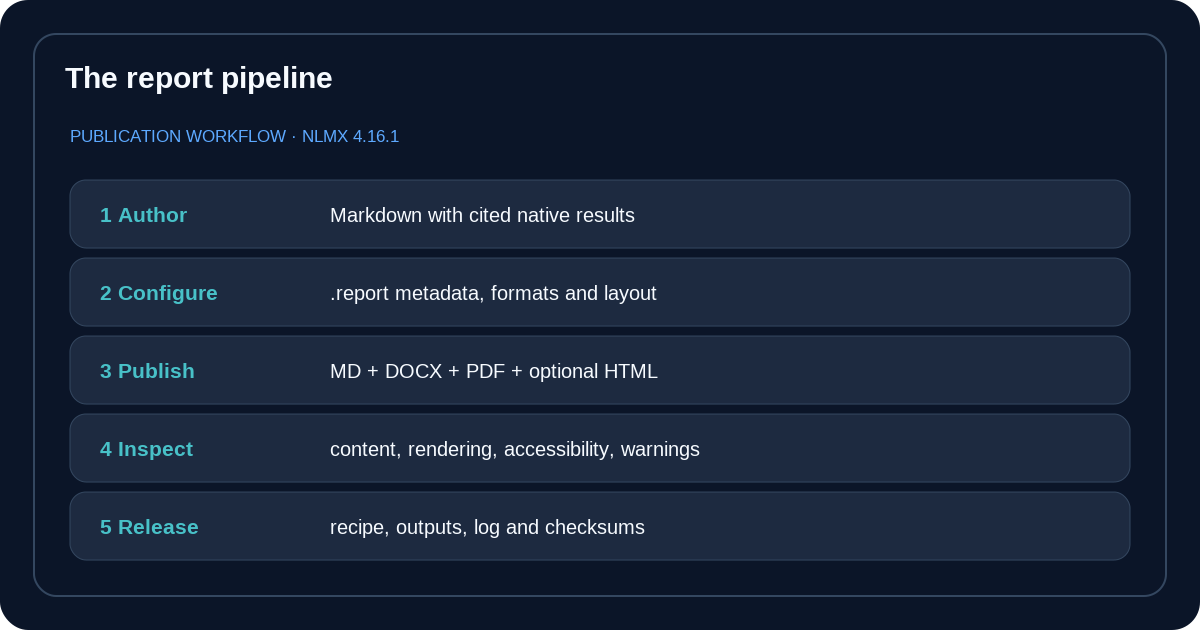
The report pipeline

Inputs and outputs

Item Behavior
Markdown file positional path or [input] file; relative images use its folder
Standard input positional -; relative images use process start folder
Inline text --markdown or [input] markdown
Markdown output always written; cannot be disabled
DOCX on by default; --no-docx
PDF on by default; --no-pdf
HTML off by default; --html

Settings tables and keys

Table Keys
[input] file, markdown
[output] dir, name, md (must not be false), docx, pdf, html
[document] title, subtitle, author, date, lang
[layout] page_size, landscape, margin_mm, font_size, toc, toc_depth, page_numbers
[html] css, embed_images

Defaults and ranges

Control Default / accepted
page A4 portrait; A3/A4/A5/Letter/Legal
margin 25 mm; 5-60
body size 11 pt; 6-24
TOC off; depth 3 when enabled; range 1-6
page numbers on in DOCX/PDF
HTML images embedded

Exit codes

Code Meaning
0 outputs written; warnings can still require correction
2 invocation/source conflict
3 output/discovery/I/O failure
4 invalid settings/value
7 Markdown could not be read as text
10 empty Markdown

Authoring and release sequence

  1. Read native analysis outputs; define claims and source lines.
  2. Write structured Markdown with equations and local publication figures.
  3. Generate/edit .report; freeze metadata, formats and page geometry.
  4. Run with an explicit log and new/controlled output folder.
  5. Check exit, warnings, output set and checksums.
  6. Verify claims against sources and render every released target.
  7. Complete accessibility/provenance review and record approval.

Evidence: txtinstalled help, annotated template, executed outputs, and executed QA.

Begin at 36A.1 or go directly to 36A.22.