Renaming and File Formats
Two groups of options that deal with the shape of files: renaming the columns of the masked dataset
(--rename-columns, --rename-except, --rename-prefix), and reading files that are not a plain comma-separated
table with a header (--delimiter, --no-header, --columns, --comment-chars, --output-name).
1. Renaming columns
Column names can give away what a column means (HIVVL, SURGDATE). Renaming hides that. Every rename is recorded in
keymap.txt (section 1), so reverse puts the original names back.
| Option | What it does |
|---|---|
--rename-columns LIST |
rename the listed columns. A bare name gets an automatic name (COL plus the column's position); OLD=NEW chooses the new name |
--rename-except LIST |
rename every column except those listed (use it when most columns are renamed) |
--rename-prefix P |
the prefix of automatic names (default COL, giving COL13, COL14, ...) |
Automatic names
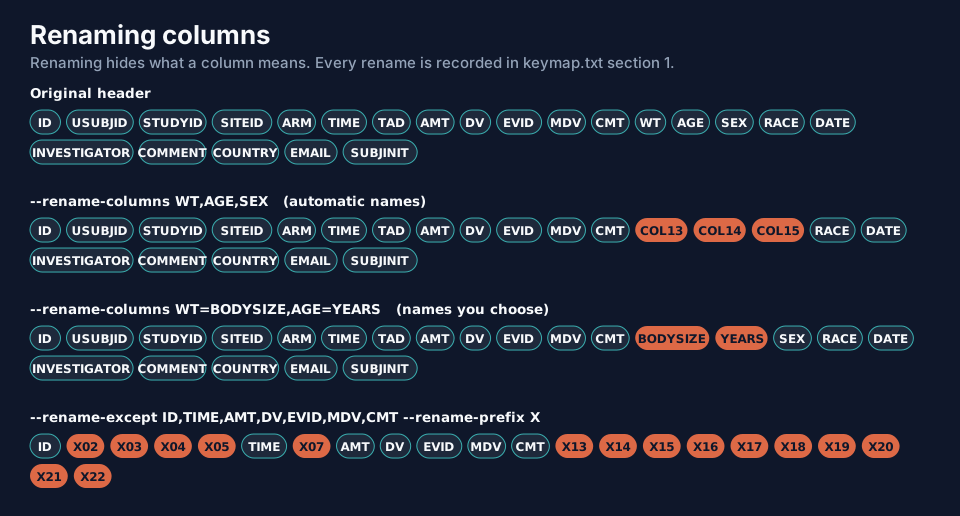
data-obfuscator run --input pk_study.csv --output ./masked --level 2 --seed 2026 --rename-columns WT,AGE,SEX
WT, AGE and SEX are the 13th, 14th and 15th columns, so they become COL13, COL14 and COL15. Note that
renaming only changes the header: the values are masked exactly as they would have been (SEX is still recoded).
Names you choose
data-obfuscator run --input pk_study.csv --output ./masked --level 2 --seed 2026 --rename-columns WT=BODYSIZE,AGE=YEARS
Everything except a list
data-obfuscator run --input pk_study.csv --output ./masked --level 2 --seed 2026 \
  --rename-except ID,TIME,AMT,DV,EVID,MDV,CMT --rename-prefix X
The seven columns listed keep their names (the ones a NONMEM control stream needs); all the others become X02, X03,
X04, ... In PowerShell put the list in quotes.
Renames are recorded and undone
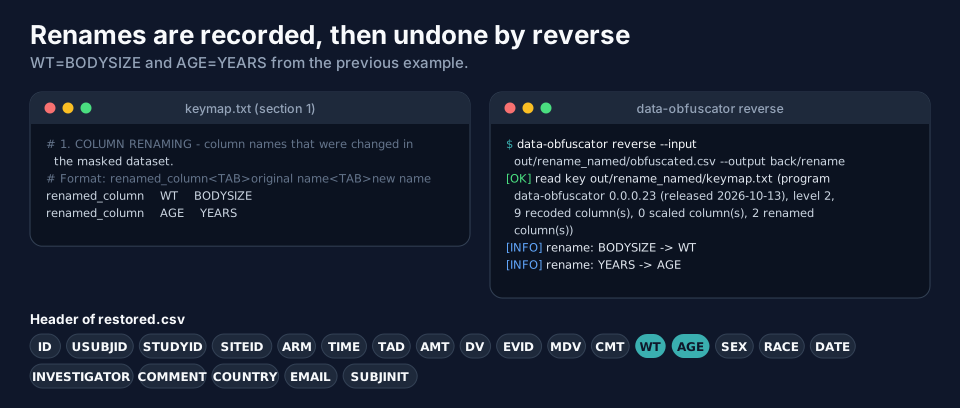
reverse undoes renaming as its first step (rename: BODYSIZE -> WT), and the restored header is the original one. A
column that the key does not know (one the LLM added) is kept and placed after the restored columns.
Column names are protected data too: summary.txt, column_report.txt and config.used.txt keep the original names
(and so does the key), so they must stay private.
2. Reading other file formats
The program reads CSV, TSV, semicolon-separated and whitespace-separated files. The delimiter is detected from the header line; say so when detection cannot work.
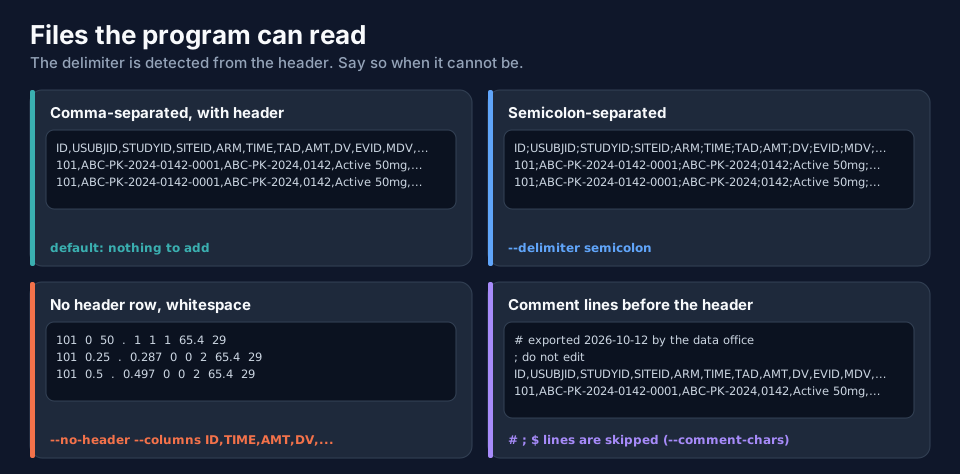
| File | What to add | Notes |
|---|---|---|
| comma-separated with header | nothing | the default |
semicolon-separated (;) |
--delimiter semicolon |
common with European spreadsheet exports |
| tab-separated | --delimiter tab |
|
whitespace-separated, no header (classic NONMEM .dat) |
--no-header --columns ID,TIME,DV,... |
the program writes a header line in the output |
| comment lines before the header | nothing | lines starting with #, ; or $ are skipped; change with --comment-chars |
--delimiter accepts auto, comma, tab, semicolon and space (also csv, tsv, whitespace, nonmem).
A file without a header
A NONMEM data file usually has no header. Say so and give the names:
data-obfuscator run --input pk_whitespace.dat --output ./masked --level 1 --seed 2026 \
  --no-header --columns ID,TIME,AMT,DV,EVID,MDV,CMT,WT,AGE
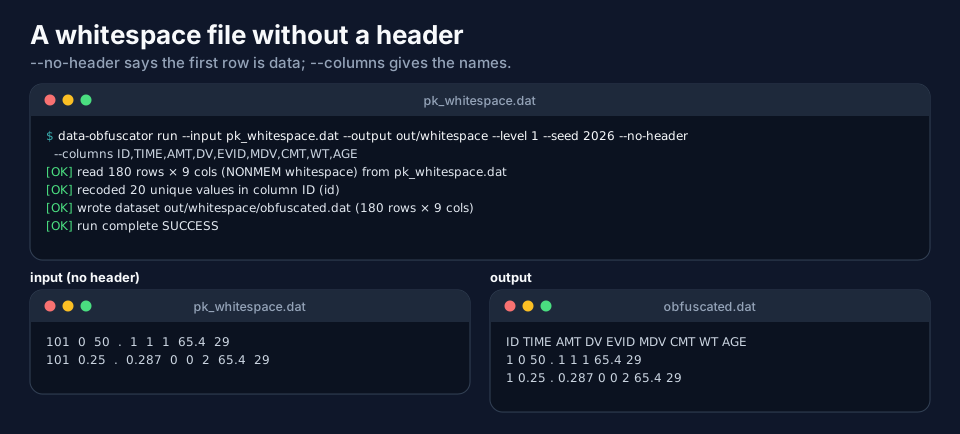
The input has nine columns and no names; the output is obfuscated.dat (the extension follows the input), with the
header ID TIME AMT DV EVID MDV CMT WT AGE added and the subject numbers recoded. If your NONMEM $DATA statement
expects no header, add IGNORE=@ or remove the first line.
Comment lines
A file exported with notes at the top works as it is:
# exported 2026-10-12 by the data office
; do not edit
ID,USUBJID,STUDYID,SITEID,ARM,TIME,...
The two comment lines are skipped when reading. They are not written to the output. To use other comment characters,
for example !: --comment-chars '!'.
Rows with the wrong number of fields
If a data row has more or fewer fields than the header, the program warns, because NONMEM would reject the file:
[WARN] 1 data row(s) do not have 22 fields like the header - NONMEM would reject this file. They keep their shape in the
       masked copy so the problem stays visible; fields beyond the header are copied UNMASKED.
Read this warning carefully: a field beyond the header is not masked because the program does not know what it is. Fix the file (usually an unquoted comma inside a text field) and run again.
3. The name of the masked file
--output-name study_masked.csv writes the masked dataset under that name instead of obfuscated.csv. The other files
keep their names.
data-obfuscator run --input pk_study.csv --output ./masked --level 1 --seed 2026 --output-name study_masked.csv
Next
Options Files shows how to keep all of these options in a file.