Options Files
Every option of run and run2 can be given on the command line (--level 3) or in an options file (level = 3).
A file makes a run repeatable, documents what you did, and keeps long commands short. This page covers the file format,
the rule for what wins when an option is set twice, and the ready-made example files.
1. A first options file
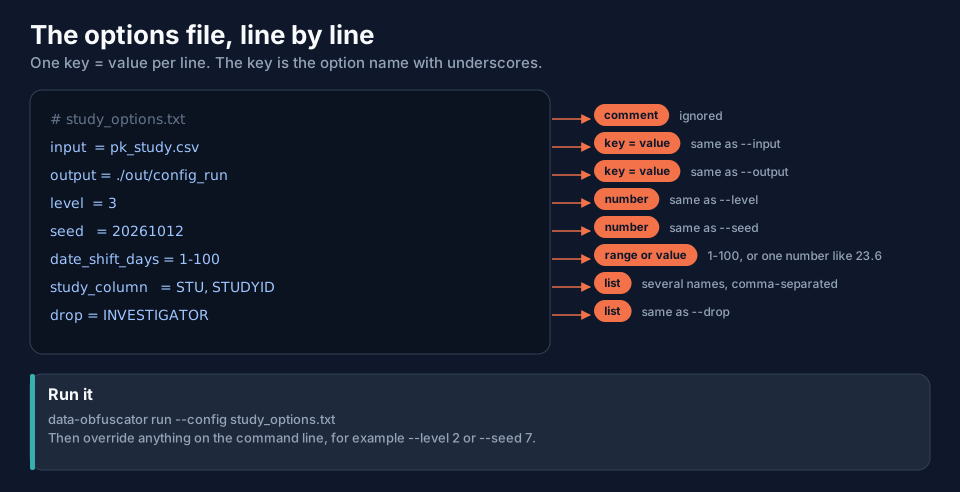
# study_options.txt
input  = pk_study.csv
output = ./masked
level  = 3
seed   = 20261012
date_shift_days = 1-100
study_column   = STU, STUDYID
drop = INVESTIGATOR
Run it with:
data-obfuscator run --config study_options.txt
Download it: txtstudy_options.txt. Two more examples, written for this documentation and
tested on the example data: txtoptions-level3-hashed.txt (level 3, hashed IDs, own
date window and scale range, two columns dropped) and txtoptions-run2.txt (for run2, with
one input line per dataset).
2. The file format, line by line
| Topic | Rule |
|---|---|
| Line forms | key = value (also key: value, --key value, --key=value; a bare --flag means true) |
| Keys | not case-sensitive; - and _ are the same: id-style is ID_STYLE is id_style |
| Comments | a line starting with # or //; a trailing # comment after a value is stripped too |
| Lists | separate items with , ; or |: keep = ID, TIME, DV |
| Booleans | true/false, yes/no, on/off, 1/0, y/n |
| Numbers | seed is a whole number or auto; scale_range is MIN-MAX (or one number) |
| Quotes | optional "..." around a value; quote any value that contains # (comment_chars = "#;quot;) |
| Paths | taken literally, so input = C:\data\pk.csv works on Windows |
| Repeated keys | the last one wins (but see input in run2, where repeating is how you list datasets) |
| Not for the file | --no-color, --version and --help are command-line only |
A key is the option name with underscores: --date-shift-days is date_shift_days, --freetext-columns is
freetext_columns, --rename-except is rename_except. The complete list, with aliases and defaults, is the option
reference in CONFIGS.md.
seed = auto is available only in a file: the program draws a random seed and records it in summary.txt.
3. What wins: command line, file, default
An option can be set in three places. The order is fixed:
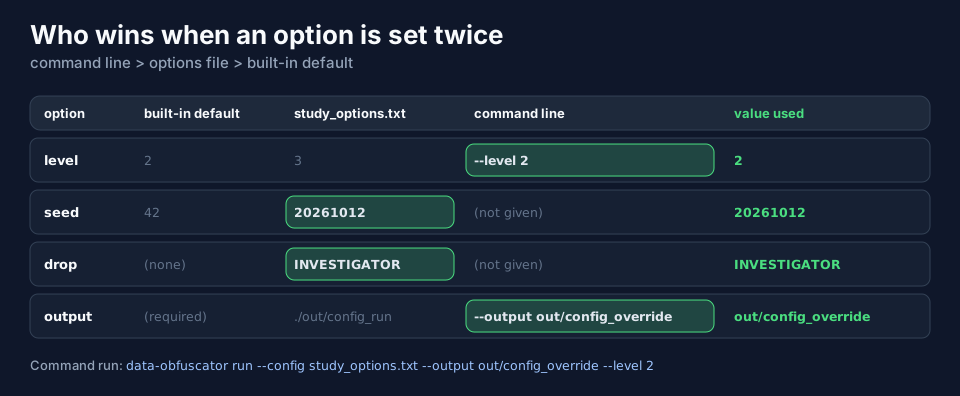
So one file can serve many runs: the command line changes just what differs.
data-obfuscator run --config study_options.txt --output out/config_override --level 2
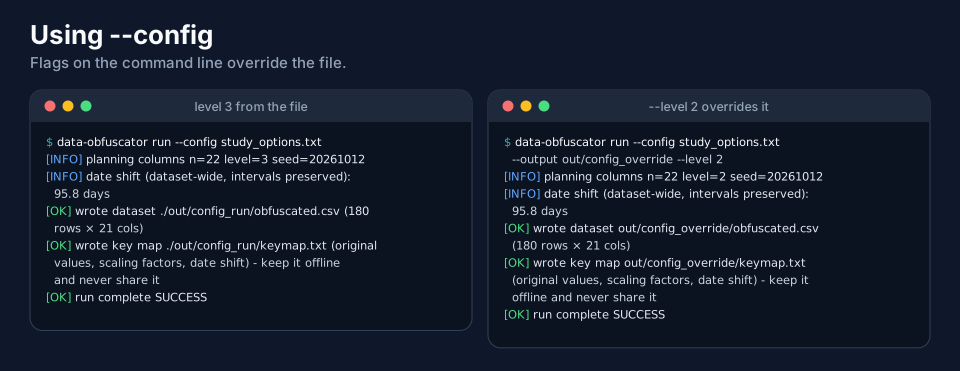
In the right-hand run the level is 2 (flag), while the seed 20261012 and the dropped column still come from the file. Note the
warning printed for the line study_column = STU, STUDYID, because the example dataset has no STU column:
study_column lists 'STU' but the input has no such column - ignored. Listing a name that is not present is harmless.
One exception to remember
A bare flag such as --drop-freetext can turn a setting on but cannot turn off something the file turned on. The exception
is --write-keymap [BOOL], which takes a value: --write-keymap false overrides a file that left it on.
4. config.used.txt: every option as used
Every run writes config.used.txt: all options after the file, the command line and the defaults have been merged. It is
a record, not a template: placeholders such as keep = (all) and id_column = (auto) mean "not set" and must not be
fed back as they are. To repeat a run, use your own options file and the same seed.
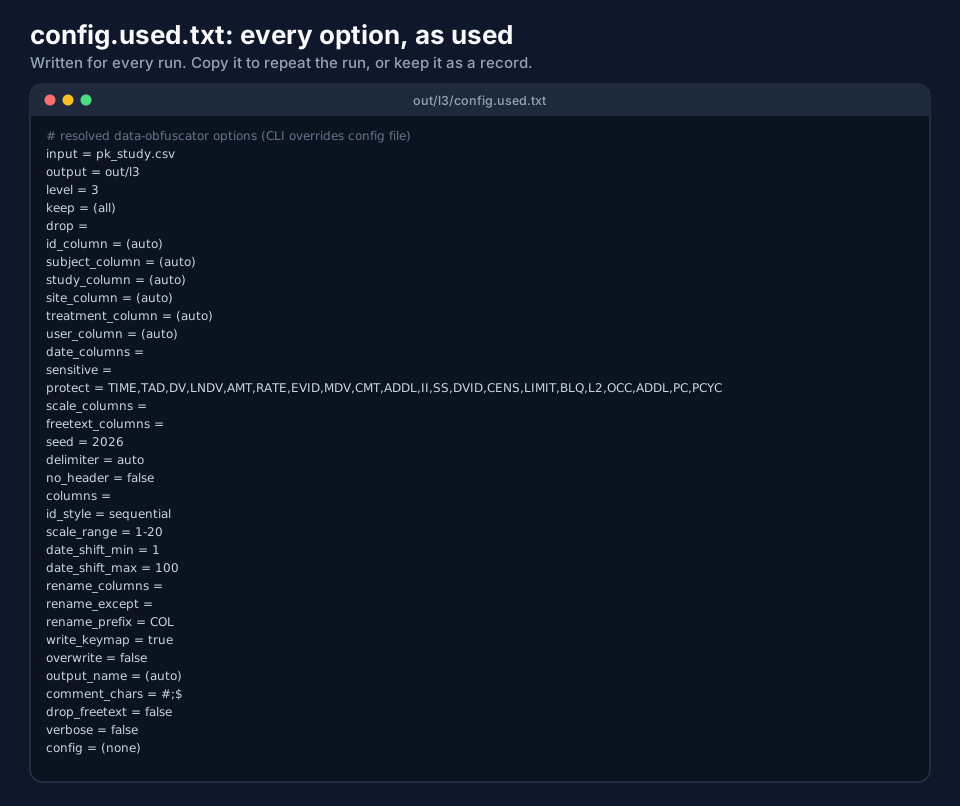
Look for (auto) (the program detected the roles itself), the seed, and date_shift_min/date_shift_max (the window the
shift was drawn from). The file names your input and the seed: keep it private. Download an example:
txtexample-config.used-level2.txt.
5. The example files of the project
The project folder has an examples/configs folder with ready-to-run options files, each starting with a commented header
(purpose, what it masks, how to run it, what to do next). Run any of them from the project folder:
data-obfuscator run --config examples/configs/11-level2-clinical.txt
| File | Use it for | Level |
|---|---|---|
00-minimal.txt |
the smallest possible file: only input and output |
2 |
01-full.txt |
every option in one file | 2 |
10-level1-light.txt to 13-level4-maximum.txt |
one file per masking level | 1 to 4 |
20-purpose-qc.txt ... 27-purpose-whitespace-nonmem-nohdr.txt |
the purpose of the work: QC, NONMEM control stream, mrgsolve, exploration and NCA, small context window, external sharing, audit trail, headerless .dat file |
2, 4 |
30-qc-nearly-clean.txt ... 36-rename-all-except.txt |
special cases: planted defects, IV infusion, pooled studies with several columns per role, tab-delimited PK/PD, renaming | 2, 3 |
examples/adam/run2-config.txt |
run2 with four ADaM datasets |
3 |
6. Tips
- Put your seed in the file. Without it a run uses 42 (public knowledge).
- Use relative paths and run from the folder of the file: the same file then works on another computer.
- Keep one options file per study next to the data, and the output folder name in it (
output = ./masked); add--overwriteonly when you mean to replace. - A file with the header that the project examples have is still a valid file: every line that starts with
#is a comment.
Next
Output Files and Keymaps describes every file a run writes.