Masking Levels
--level is the most important option: it decides how much is hidden. This page shows what each level does to the same
records, column by column, with the real numbers of the example dataset, and helps you choose.
data-obfuscator run --input pk_study.csv --output ./masked --level 2
--level accepts 1, 2, 3, 4 or the names light, clinical, covariate, maximum. The default is 2.
Each level includes everything the one before it does.
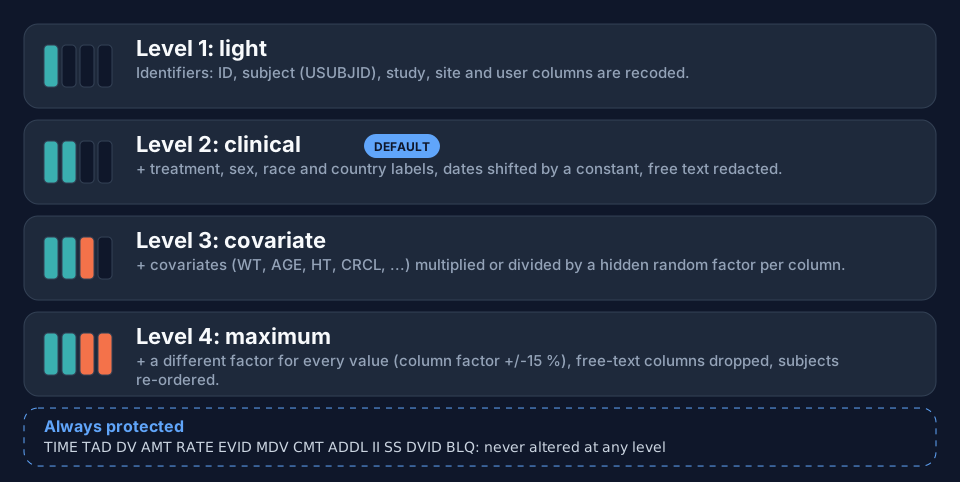
| Level | Name | Adds |
|---|---|---|
| 1 | light | recodes the identifiers: ID, USUBJID, STUDYID, SITEID and the user (investigator) |
| 2 | clinical | + treatment, sex, race and country labels recoded; dates shifted; free text redacted |
| 3 | covariate | + covariates (WT, AGE, ...) multiplied or divided by one hidden random factor per column |
| 4 | maximum | + every scaled value gets its own factor (the column factor ±15 %); free-text columns dropped; rows sorted by the masked ID |
1. The same records at every level
Two records of the example (subjects 101 and 103) at all four levels. Orange cells differ from the original; a dash means the column no longer exists.
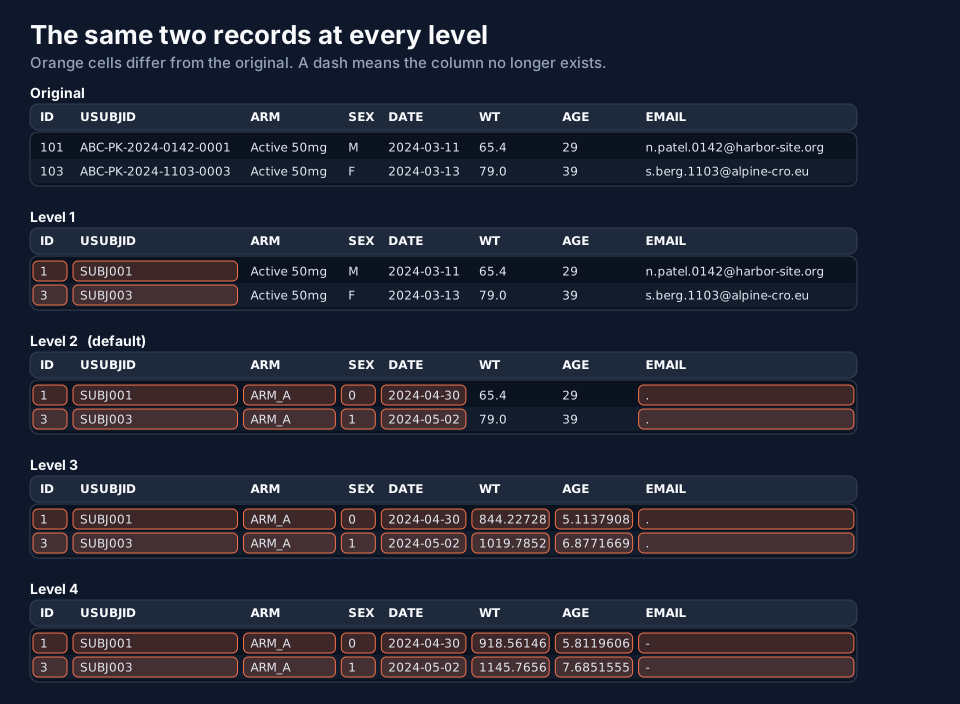
Read it row by row:
- Level 1 changes only
IDandUSUBJID. The treatment (Active 50mg), sex, date, weight, age and e-mail address are all still the real ones. - Level 2 recodes the labels (
Active 50mgbecomesARM_A,M/Fbecome0/1), shifts the date (all dates move by the same 50.8 days, so intervals are kept) and redacts the e-mail (.). The weight and the age are still real. - Level 3 scales
WTandAGE: 65.4 and 29 become 844.22728 and 5.1137908. EveryWTof the dataset is multiplied by the same hidden factor (12.9087...) and everyAGEdivided by another (5.6709...), so the ordering and the ratios inside a column are preserved. - Level 4 gives each value its own factor, so the ratio between two subjects' weights is no longer the real one; the free-text columns are not in the file at all.
2. Every column, every level
The table below is column_report.txt of four runs on the same file, side by side.
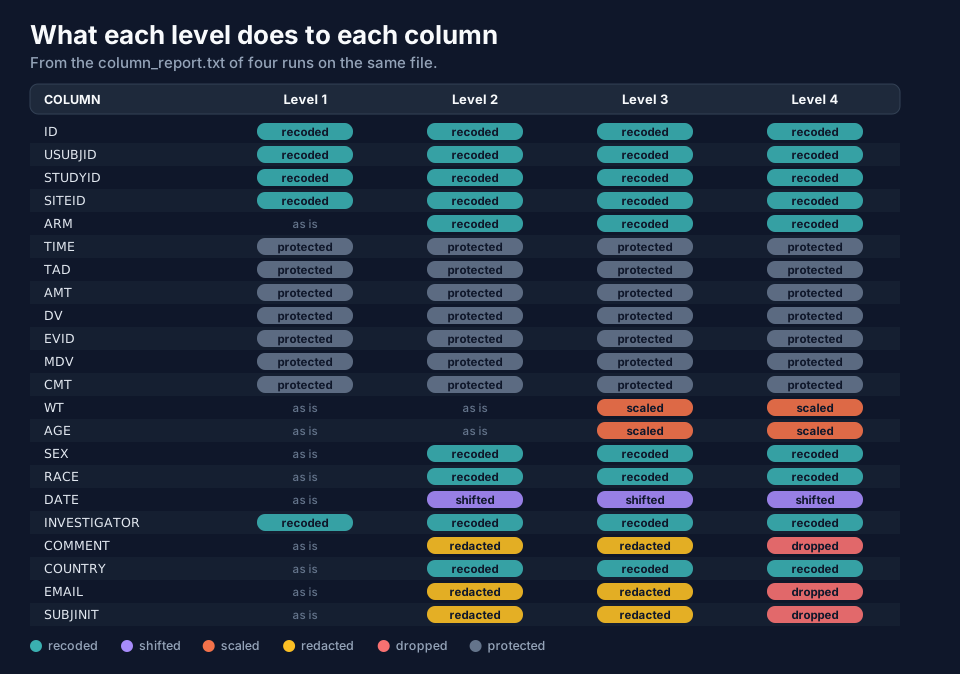
Two rows deserve a second look:
TIME,TAD,AMT,DV,EVID,MDV,CMTare protected at all levels. No option below level 4 can change them, and level 4 does not either.WTandAGEare scaled at level 3 and 4 only; which columns count as covariates is decided from the name (WT,AGE,HT,BMI,CRCL, ...) or by--scale-columns(page Scaling Covariates).
3. The four levels in numbers
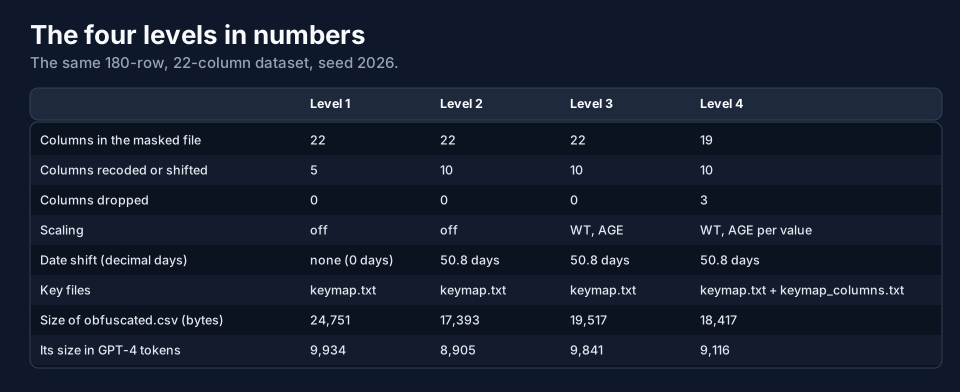
- Level 4 writes 19 columns: the three free-text columns (
COMMENT,EMAIL,SUBJINIT) are dropped. - Level 1 shifts nothing (date shift 0 days): the
DATEcolumn is copied as it was. - Only level 4 needs a second key file,
keymap_columns.txt, because it records a factor for each value. - The masked file gets bigger when numbers are scaled (level 3: 19,517 bytes against 17,393 at level 2) because a
scaled value has more digits (
844.22728instead of65.4). Plan for that if you paste the data into an LLM: the token counts are in the last row.
You can download the four masked datasets and compare them yourself:
csvlevel 1, csvlevel 2,
csvlevel 3, csvlevel 4. They were made from
csvexample-pk_study.csv with --seed 2026.
4. Choosing a level
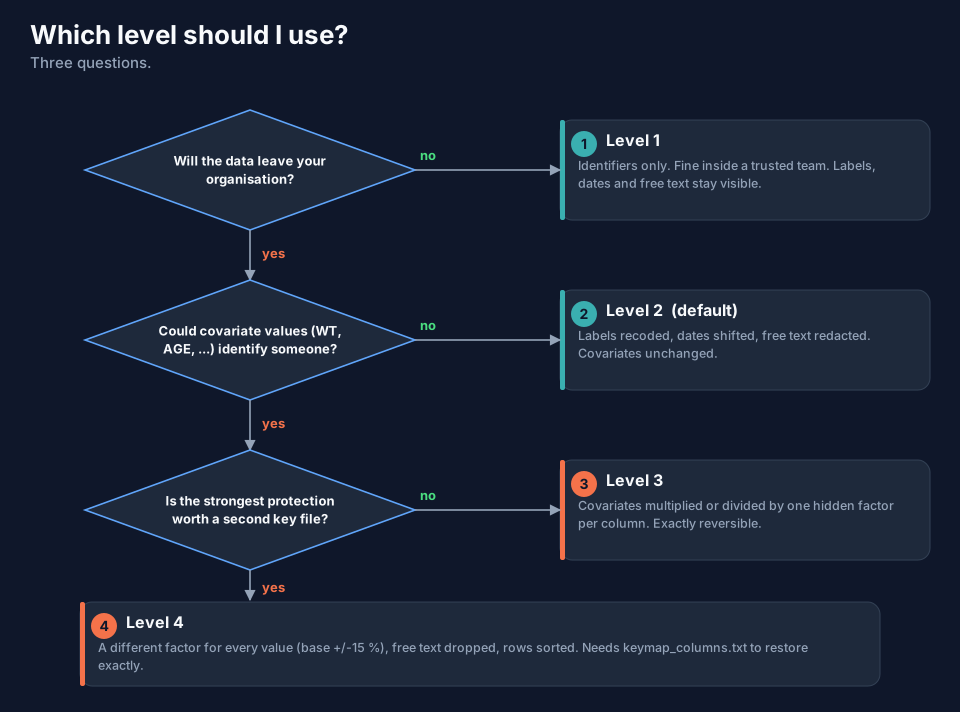
| If ... | Use |
|---|---|
| the data stay in a trusted team and only the identifiers must not show | 1 |
| the data leave your organisation (the usual case) | 2 (default) |
| covariate values could identify someone (a very tall or very light participant, a rare age) | 3 |
| the strongest protection is worth a second key file and a restore that needs it | 4 |
A rule of thumb: start at 2, and go up only for a reason. The higher the level, the less the LLM can say about
real covariate effects: at level 3 and 4 a weight of 844 is not a weight in kilograms, and the LLM must be told (the
prompts in llm.txt do that; see LLM Prompts and Tokens).
5. What level 1 warns about
Because level 1 leaves labels, dates and free text as they are, it warns about what it finds:
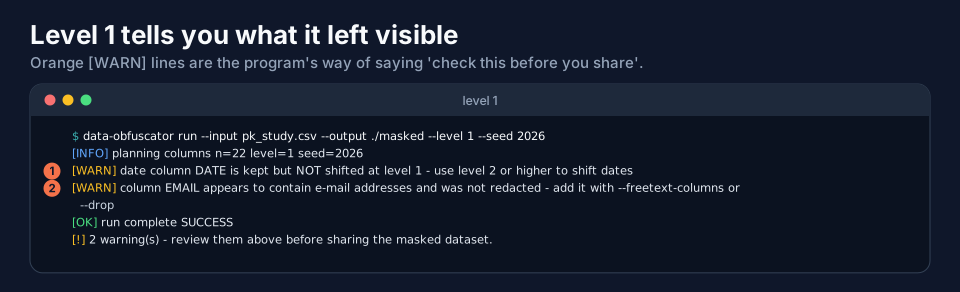
Take them seriously: DATE is kept but NOT shifted means calendar dates are in the file; EMAIL appears to contain e-mail addresses and was not redacted means e-mail addresses are in the file.
6. Restoring each level
| Level | What reverse needs |
Result |
|---|---|---|
| 1, 2, 3 | keymap.txt |
exact (except redacted text) |
| 4 | keymap.txt and keymap_columns.txt |
exact, even if rows and columns were shuffled |
| 4 | keymap.txt only |
approximate (numbers within about 15 %) |
Details and figures are on the page Restoring Data: reverse.
Next
Columns and Roles explains how the program decides which column is which, and how to override it.