Columns and Roles
The program decides what to do to a column from its role, and the role comes from the column's name. This page explains the automatic detection, how to correct it when your names are different, and the four options that choose which columns are kept, dropped, protected or recoded.
1. Roles and how they are detected
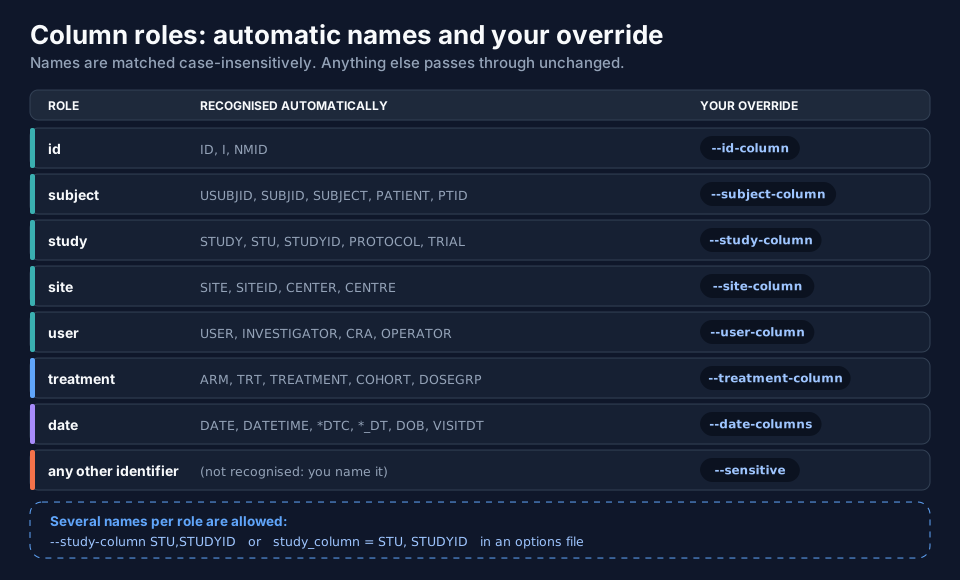
Names are matched case-insensitively. The table is the one used by the program; a column whose name is not in it passes
through unchanged (that is why column_report.txt is worth reading after a first run).
| Role | Recognised names | What happens |
|---|---|---|
| id | ID, I, NMID |
recoded (level 1+) |
| subject | USUBJID, SUBJID, SUBJECT, PATIENT, PTID, PID, SUBJ |
recoded (level 1+) |
| study | STUDY, STU, STUDYID, PROTOCOL, TRIAL, ... |
recoded (level 1+) |
| site | SITE, SITEID, CENTER, CENTRE, ... |
recoded (level 1+) |
| user | USERID, USER, INVESTIGATOR, INV, CRA, OPERATOR, ANALYST |
recoded (level 1+) |
| treatment | ARM, TRT, TREATMENT, GROUP, COHORT, DOSEGRP, ... |
recoded (level 2+) |
| sex, race, country | SEX, GENDER; RACE, ETHNIC; COUNTRY |
recoded (level 2+) |
| date | DATE, DATETIME, names ending DTC or _DT, DOB, VISITDT, ... |
shifted (level 2+) |
| free text | COMMENT, NOTE, EMAIL, PHONE, NAME, INITIALS, SUBJINIT, ADDRESS, ... |
redacted (level 2+), dropped (level 4) |
| covariate | WT, WEIGHT, AGE, HT, HEIGHT, BMI, CRCL, EGFR, SCR, ALT, AST, BILI, ALB, BSA, LBWT |
scaled (level 3+) |
| protected | TIME, TAD, DV, AMT, RATE, EVID, MDV, CMT, ... |
never altered |
The full lists are in CONFIGS.md (section 6.2).
2. When your names are different: the role options
If your study column is called PROJECT or your site column SITENAME, say so. Each role has an option, and several
names per role are allowed, comma-separated or by repeating the flag:
| Option | Role |
|---|---|
--id-column |
NONMEM subject number |
--subject-column |
unique subject identifier (USUBJID, SUBJID) |
--study-column |
study |
--site-column |
site or centre |
--treatment-column |
treatment or arm |
--user-column |
investigator or user |
--date-columns |
dates to shift |
data-obfuscator run --input pk_extra.csv --output ./masked --level 2 --seed 2026 \
  --id-column ID --subject-column USUBJID --study-column STUDYID --site-column SITEID \
  --treatment-column ARM --user-column INVESTIGATOR --date-columns DATE
In an options file the same thing is study_column = STU, STUDYID. The names you give extend or override the automatic
ones; a name that is not in the file produces a warning (study_column lists 'STU' but the input has no such column - ignored).
--sensitive: a column the program cannot know
Suppose the file has a laboratory number column LABNO (LAB-9684, LAB-5080, ...). Its name is not in any table, so it
would pass through readable (and the program warns about it). Name it with --sensitive and its values are recoded
like identifiers:
data-obfuscator run --input pk_extra.csv --output ./masked --level 2 --seed 2026 --sensitive LABNO
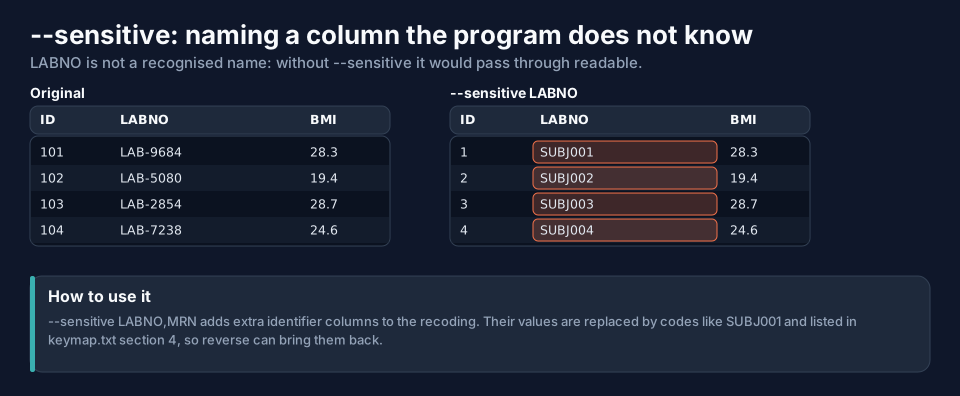
The recoded values (SUBJ001, SUBJ002, ...) are written to keymap.txt (section 4), so reverse can bring the
laboratory numbers back. --sensitive LABNO,MRN takes several columns.
3. --protect: columns that must never change
The columns of the PK/PD structure are protected automatically. At level 3 a weight is scaled, which is what you want
for privacy, but if a covariate must stay real (say, an analysis needs the real WT), protect it:
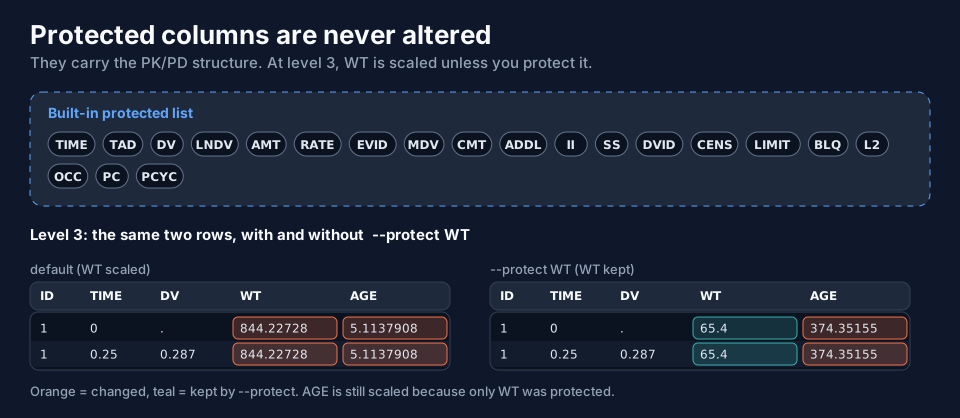
data-obfuscator run --input pk_study.csv --output ./masked --level 3 --seed 2026 --protect WT
In the figure the weight stays 65.4 while the age is still scaled (374.35155): only the columns you list are
protected. The built-in names stay protected as well; --protect is for adding your own columns, such as a derived
exposure column.
4. --keep and --drop: which columns leave the file
| Option | What it does |
|---|---|
--keep COLS |
the output has only these columns, in this order. Default: all. |
--drop COLS |
removes these columns. --drop wins over --keep. |
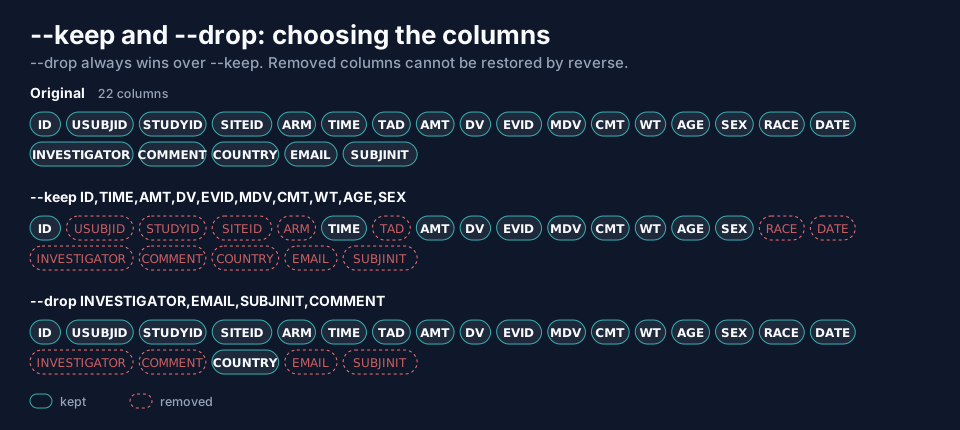
data-obfuscator run --input pk_study.csv --output ./keep --level 2 --seed 2026 --keep ID,TIME,AMT,DV,EVID,MDV,CMT,WT,AGE,SEX
data-obfuscator run --input pk_study.csv --output ./drop --level 2 --seed 2026 --drop INVESTIGATOR,EMAIL,SUBJINIT,COMMENT
The first run writes 10 columns (ID,TIME,AMT,DV,EVID,MDV,CMT,WT,AGE,SEX); the second writes 18. Things to know:
- Listing a column that does not exist is silently ignored.
- If nothing would be left, the run stops instead of writing an empty file.
- Removing a core PK/PD column (
TIME,DV,AMT,EVID) is allowed but produces a warning, because the dataset may no longer be analysable. - Dropped columns cannot be restored: they are not in the masked file and the key does not store them.
reversesays so in its report. --dropis the safest way to remove a column you know is sensitive but cannot be recoded: it is gone for good.
5. A checklist for a new dataset
- Run once at level 2 into a scratch folder.
- Open
column_report.txt. Is every column understood? Anything passed through that identifies someone? - Fix the roles (role options), name the unknowns (
--sensitive) or drop what must not leave. - Run again with the final level and your own seed.
Next
IDs and Seeds describes the three code styles and what the seed controls.