Masking Several Datasets: run2
A common job: your study data are several CDISC ADaM datasets (ADSL, ADEX, ADPC, ADLB, ...), and you want an
LLM to combine them into one NONMEM-style master dataset without seeing any real identifier. run cannot do that: it
masks one dataset at a time, with different codes in each, so the LLM could not join them. run2 masks the datasets
together.
1. What run2 does
| Shared by all the datasets | Why it matters |
|---|---|
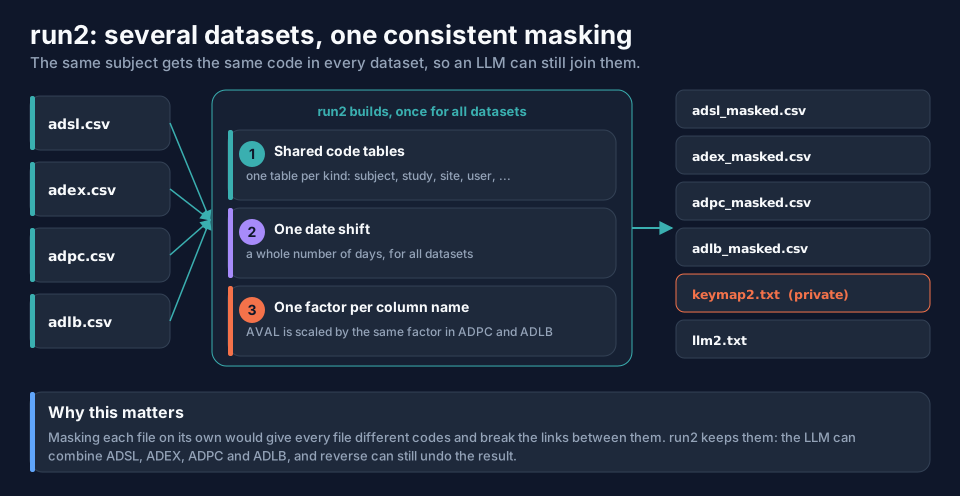
| One code table per identifier kind (subject, study, site, treatment, user, sex, race, country) | the same real USUBJID has the same code in every file, so the LLM can join on it |
| One date shift, a whole number of days | date-only (ADT) and date-time (ADTM, EXSTDTC) columns move by exactly the same amount, so every interval between datasets stays exact |
| One factor per scaled column name (level 3) | AVAL has the same factor wherever it occurs, so values from different datasets stay comparable |
The four example datasets used on this page (download them to follow along): csvexample-adam-adsl.csv (12 subjects, 17 columns), csvexample-adam-adex.csv (24 dosing records), csvexample-adam-adpc.csv (168 concentrations) and csvexample-adam-adlb.csv (72 laboratory values).
2. Giving run2 its datasets
Three ways; all give the same result.
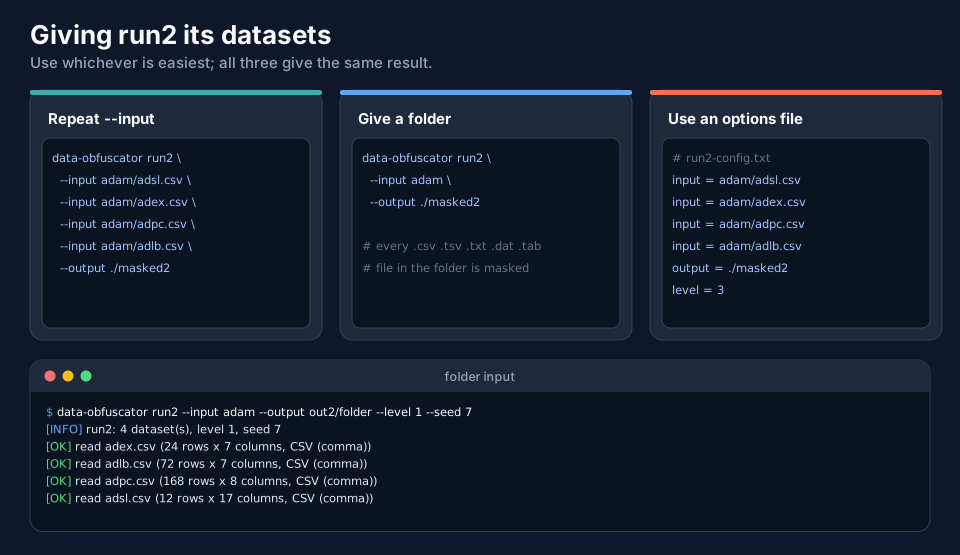
data-obfuscator run2 --input adam/adsl.csv --input adam/adex.csv --input adam/adpc.csv --input adam/adlb.csv --output ./masked2 --level 3
data-obfuscator run2 --input adam --output ./masked2                    # every .csv .tsv .txt .dat .tab file in the folder
data-obfuscator run2 --config options-run2.txt                          # input = ... once per dataset
An options file: txtoptions-run2.txt (tested on the example data). The folder form reads the files in alphabetical order.
3. A complete run2
data-obfuscator run2 --input adam/adsl.csv --input adam/adex.csv --input adam/adpc.csv --input adam/adlb.csv \
  --output ./masked2 --level 3 --seed 7 --scale-columns AVAL,WEIGHTBL
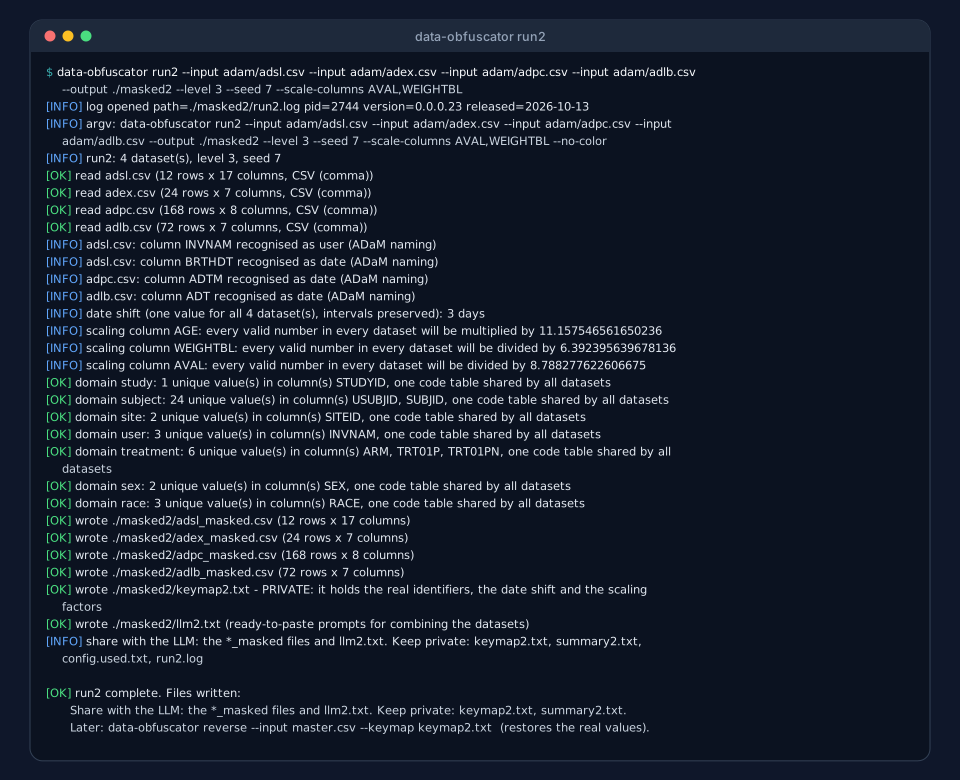
Read the log from the top:
run2: 4 dataset(s), level 3, seed 7, then onereadline per dataset, with rows and columns.- The ADaM hints: columns that
run's own detection would have left alone are recognised by their ADaM names. date shift (one value for all 4 dataset(s), intervals preserved): 3 days.- The scaling: one factor per column name:
AGEis multiplied by 11.16,WEIGHTBLdivided by 6.39,AVALdivided by 8.79, in every dataset that has the column. - The shared code tables: one per kind, with the number of distinct values and the columns they cover (24 subject
values from
USUBJIDandSUBJIDtogether). - The files written.
Two columns of the example are not recognised by name and so are not scaled: CRCLBL (baseline creatinine clearance) stays
as it was unless you add it with --scale-columns CRCLBL. As in run, check what was passed through.
4. The shared code tables, in practice
The same subject has the same code in every file:
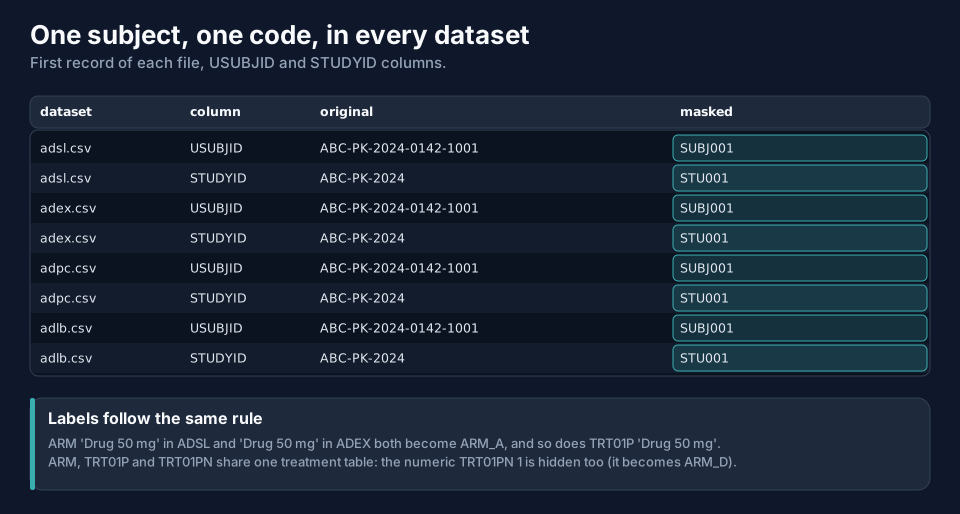
ABC-PK-2024-0142-1001 is SUBJ001 in ADSL, ADEX, ADPC and ADLB. The treatment label Drug 50 mg is ARM_A wherever it
occurs (in ARM and in TRT01P); the numeric TRT01PN is recoded as well, because it identifies a treatment too.
5. Dates: one whole-day shift
run2 draws the shift as a whole number of days (here 3). A date-only column (ADT, TRTSDT) and a date-time column
(ADTM, EXSTDTC) therefore move by exactly the same amount, and the intervals between datasets (time since first dose,
visit windows) remain real.
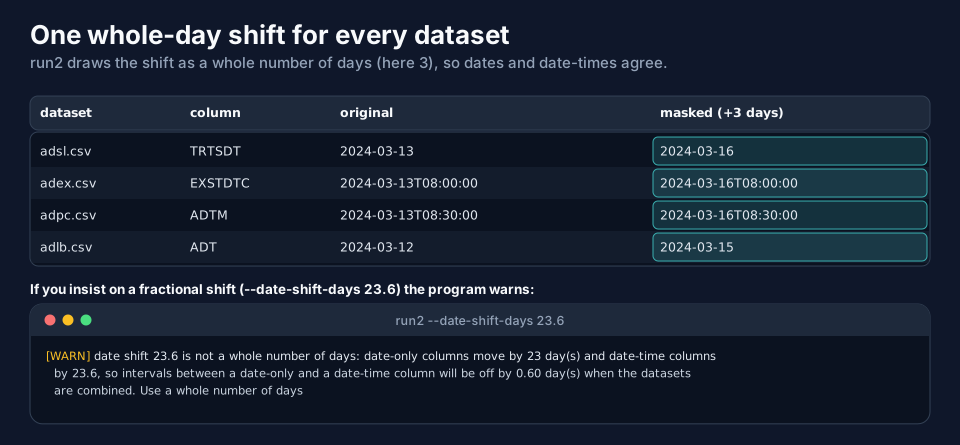
If you insist on a fractional value (--date-shift-days 23.6) the program warns that date-only columns will move by 23 days and
date-time columns by 23.6, so an interval between a date-only and a date-time column will be off by 0.60 day. Use a whole
number. The default window is 1–100, as in run; set your own with --date-shift-days 30-60.
6. ADaM names are recognised
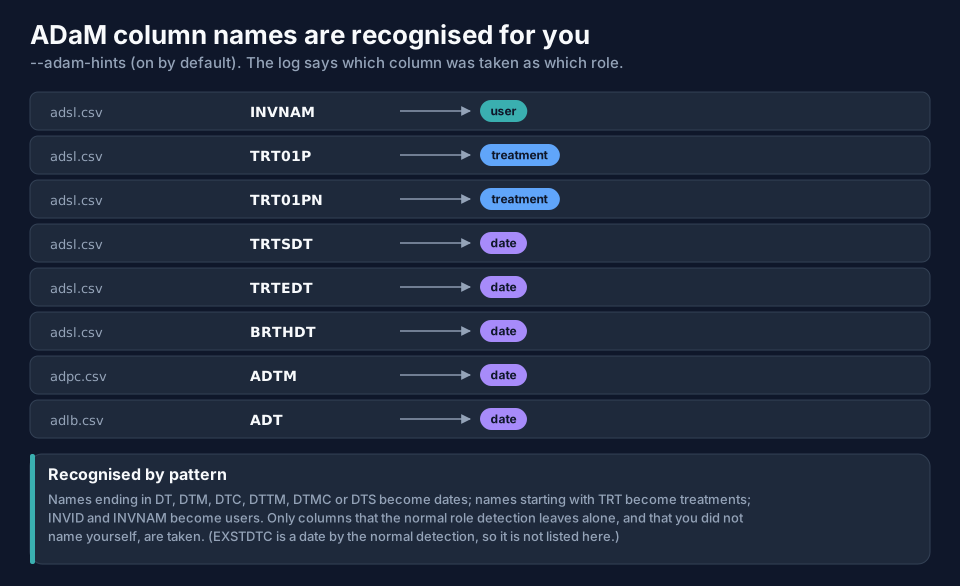
On top of run's own role detection, run2 recognises ADaM and SDTM naming: names ending in DT, DTM, DTC,
DTTM, DTMC or DTS are dates, names starting with TRT are treatments, and INVID and INVNAM are users. Only
columns that run's detection leaves alone, and that you did not name yourself, are taken. --adam-hints false switches this
off; the role options (--date-columns, --subject-column, ...) work as in run.
7. What run2 writes
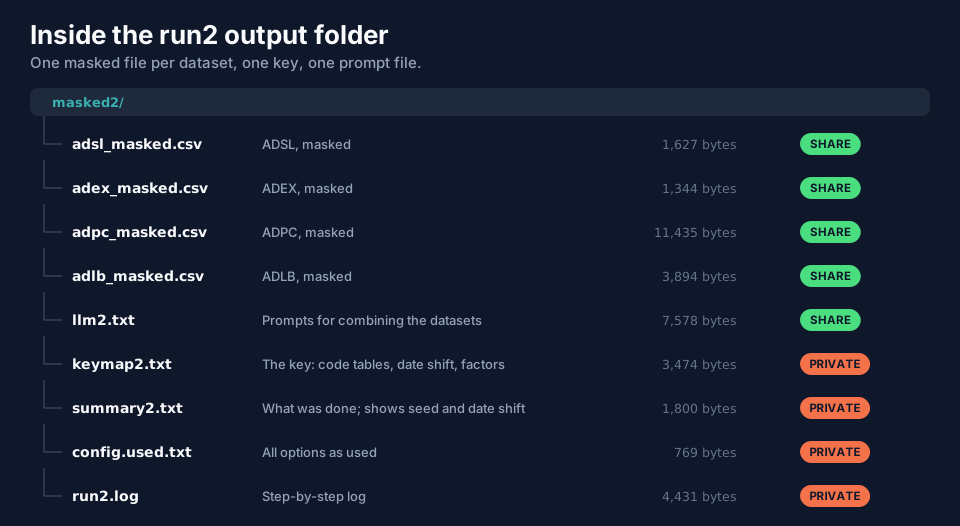
| File | Content | Share? |
|---|---|---|
adsl_masked.csv, adex_masked.csv, ... |
one masked file per input: same columns and row order (columns you dropped removed, free text .) |
yes |
llm2.txt |
prompts to build the master dataset and to check it, with rules that keep the result reversible | yes |
keymap2.txt |
the key | never |
summary2.txt, config.used.txt, run2.log |
the record of the run (shows the seed and the date shift) | never |
Downloads (level 3 example, seed 7): csvadsl, csvadex, csvadpc, csvadlb, txtllm2.txt, txtsummary2.txt.
keymap2.txt
The key has the same rules as keymap.txt (tab-separated, # comments, private), organised for several datasets:
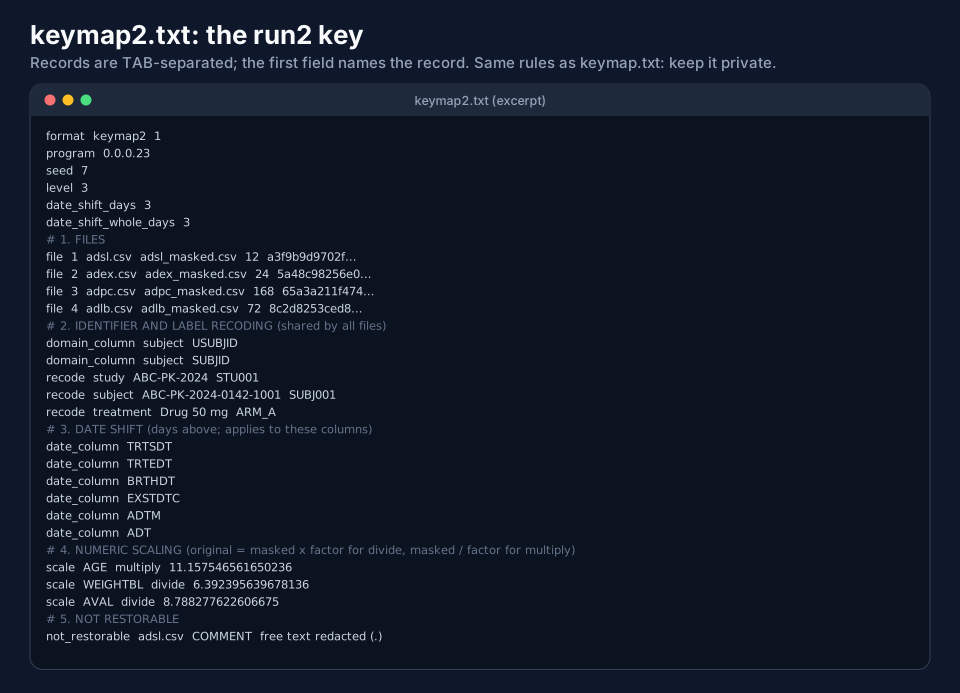
| Section | Holds |
|---|---|
| 1. Files | for each dataset: original name, masked name, rows, SHA-256 |
| 2. Identifier and label recoding | the shared code tables: domain_column (which columns belong to which table) and recode (original, code) |
| 3. Date shift | the shift and the date columns it applies to |
| 4. Numeric scaling | scale lines: column, operation, factor |
| 5. Not restorable | what cannot come back: for example adsl.csv COMMENT free text redacted (.) |
Download: txtexample-run2-keymap2.txt.
llm2.txt
The file lists every dataset, its columns and which of them are masked and how, followed by two prompts:
- Build the master dataset: combine the datasets into one NONMEM-ready dataset, with rules that keep it reversible:
treat identifiers as opaque codes, keep the ADaM column names, derive the numeric
IDfrom the digits of the maskedUSUBJID(SUBJ007gives7), computeTIMEfrom differences of dates, do not transform scaled columns in place, and say which source column eachDVrow came from. - Check the master dataset against the sources: every subject present, record counts reconcile, times in order,
valid
EVID/MDV/CMT/DVIDcombinations, and so on.
It ends with the command that restores the result (next page).
8. How run2 differs from run
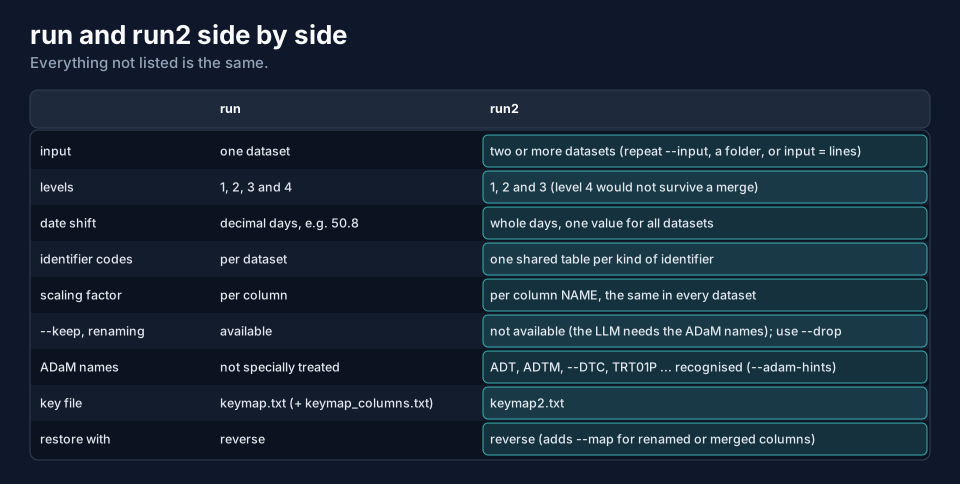
- Levels 1 to 3 only. Level 4 re-sorts rows and gives every value its own factor, which could not be traced through a dataset an LLM has merged and re-ordered. The program refuses with a clear message.
- No
--keep: the datasets have different columns. Use--drop(it applies to every dataset that has the column):--drop BRTHDT,COMMENTleavesADSLwith 15 columns. - No renaming: the LLM has to see the ADaM names.
- One scaling factor per column name, not per dataset.
data-obfuscator run2 --input adam/adsl.csv --input adam/adex.csv --input adam/adpc.csv --input adam/adlb.csv --output ./x --level 4
[X] ERROR: level 4 is not available in run2: it re-sorts rows and gives every value its own random factor, which could not be traced back
    through a dataset that an LLM has merged and re-ordered. Use level 1-3
9. Options of run2
run2 takes the options of run where they apply:
| Option | What it does in run2 |
|---|---|
--input FILE (repeat), a folder, or input = lines |
the datasets (the same file twice is an error) |
--output DIR, --overwrite, --config FILE |
as in run (a non-empty folder is refused: run2 output folder ... already contains N file(s)) |
--level 1-3 |
level 4 is refused |
--seed N |
the random parts: the date shift and the scaling factors |
--id-style |
the style of the shared codes |
--date-shift-days |
a window or one number; drawn as a whole number of days |
--scale-range, --scale-columns |
the range of the factor; extra columns to scale (one factor per column name) |
--drop, --protect, --sensitive, --freetext-columns, --drop-freetext |
as in run, applied to every dataset |
--id-column, --subject-column, --study-column, --site-column, --treatment-column, --user-column, --date-columns |
role columns: the same names apply to every dataset |
--adam-hints BOOL |
recognise ADaM names (default on) |
--delimiter, --comment-chars, --verbose |
as in run |
--write-keymap BOOL |
false writes no keymap2.txt: the masking can then never be reversed |
| not available | --keep, --rename-columns, --rename-except, --rename-prefix |
Next
Restoring a run2 Master Dataset shows what happens after the LLM has built the master dataset: how reverse puts the real
values back.