Restoring Data: reverse
reverse undoes the masking. Give it a masked dataset and the key that run wrote, and it writes the real dataset
back, plus a report of what it did and what it could not do. This page follows a restore from the simplest case to the
hardest (level 4, rows and columns shuffled), shows how to check the result, and lists exactly what cannot come back.
1. What reverse does
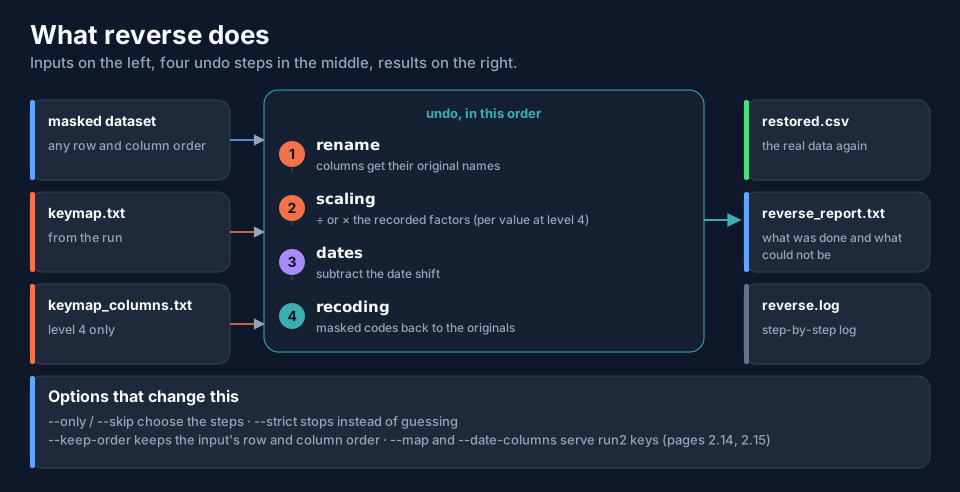
| Step | Undoes | Uses |
|---|---|---|
| 1. rename | column renaming | keymap.txt, section 1 |
| 2. scaling | the multiplication or division of covariates | section 2; at level 4 also keymap_columns.txt |
| 3. dates | the date shift (subtracted) | section 3 |
| 4. recoding | the codes of identifiers and labels | section 4 |
The masked dataset may have its rows and its columns in any order, and it may carry extra columns (a NONMEM table
with PRED and IPRED added, for example): columns are found by name, and level 4 rows by their identifying values,
never by position. Extra columns are kept and put at the end.
2. The simplest restore
data-obfuscator reverse --input masked/obfuscated.csv --output ./restored
The key is looked up next to the input (masked/keymap.txt). If it is somewhere else, say where:
data-obfuscator reverse --input returned_table.csv --keymap keys/keymap.txt --output ./restored
The recorded output of a level 3 restore (the example dataset):
[OK] read key keymap.txt (program data-obfuscator 0.0.0.22 ..., level 3, 9 recoded column(s), 2 scaled column(s), 0 renamed column(s))
[OK] read 180 rows x 22 cols (CSV (comma)) from obfuscated.csv
[INFO] the input is byte-identical to the masked dataset this key was written for
[INFO] scaling: WT (one factor) 180 value(s) exactly
[INFO] scaling: AGE (one factor) 180 value(s) exactly
[INFO] dates: DATE moved back by 50.8 day(s): 180 value(s)
[INFO] recoding: ARM: 180 value(s) mapped back to the original
   ... one line for each of COUNTRY, ID, INVESTIGATOR, RACE, SEX, SITEID, STUDYID, USUBJID
[WARN] these source columns cannot be restored because their values were never stored: COMMENT, EMAIL, SUBJINIT ...
[OK] wrote restored dataset restored/restored.csv (180 rows x 22 cols), SHA-256 fa6f7266...
[OK] wrote restored/reverse_report.txt
[OK] reverse complete SUCCESS
[!] The restored dataset holds the real, identifying data again: do not share it.
It writes three files into the output folder (default ./restored; new or empty unless --overwrite):
restored.csv (the extension follows the input; --output-name changes the name), reverse_report.txt and reverse.log.
The restored dataset holds real, identifying data again. Do not share it, and do not share the report.
Original, masked, restored
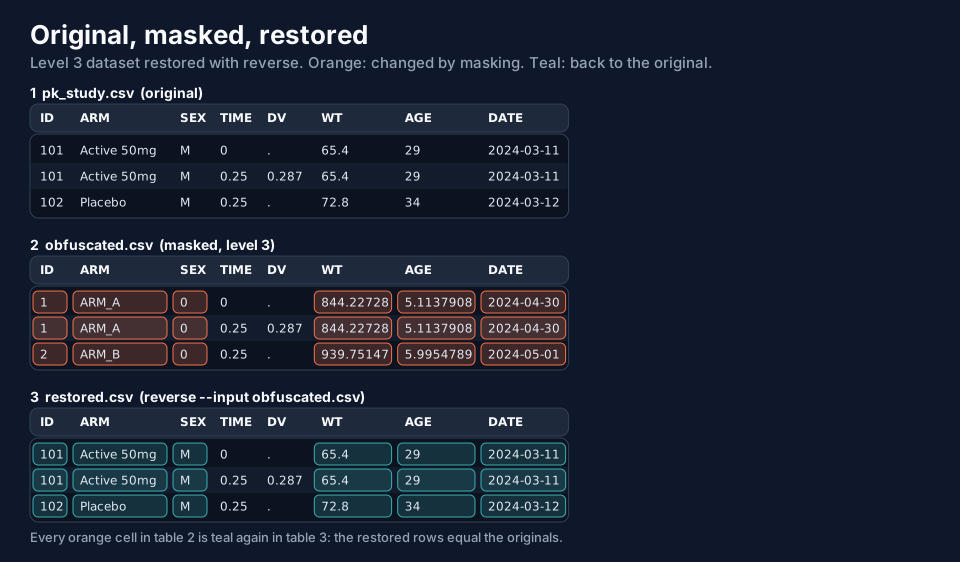
Every changed value of the masked dataset (orange) is back to the original (teal): IDs, labels, the weight (844.22728 ÷ 12.909 = 65.4), the age and the date.
3. Check the result
The report and a comparison with the original tell you how good the restore is. This table compares six restores of the example dataset with the original file, column by column, as numbers (not as text):
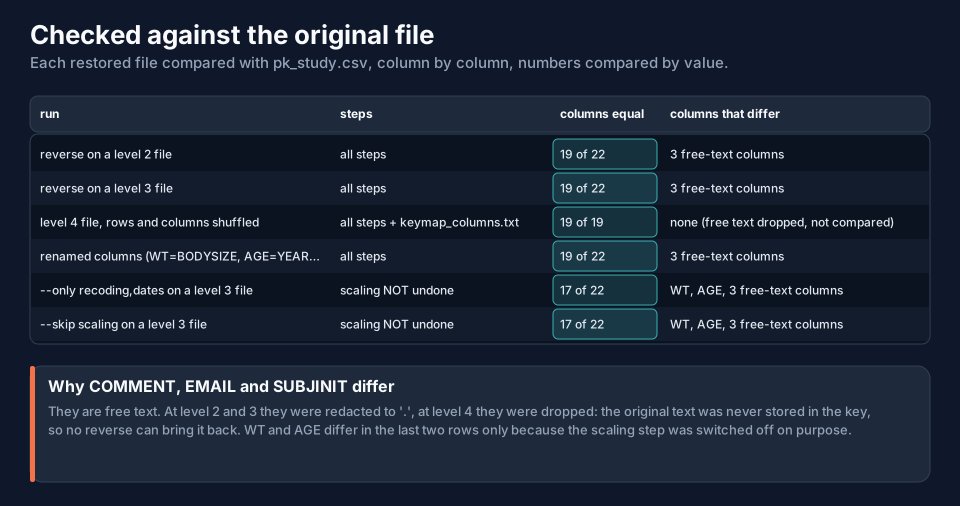
Reading it: every column is equal except COMMENT, EMAIL and SUBJINIT (free text that was redacted: it was never stored),
and in the last two rows WT and AGE, because those two runs deliberately switched the scaling step off (section 5). In the
level 4 row the three free-text columns were dropped from the masked file, so only 19 columns exist to compare.
reverse_report.txt is the same information in words:
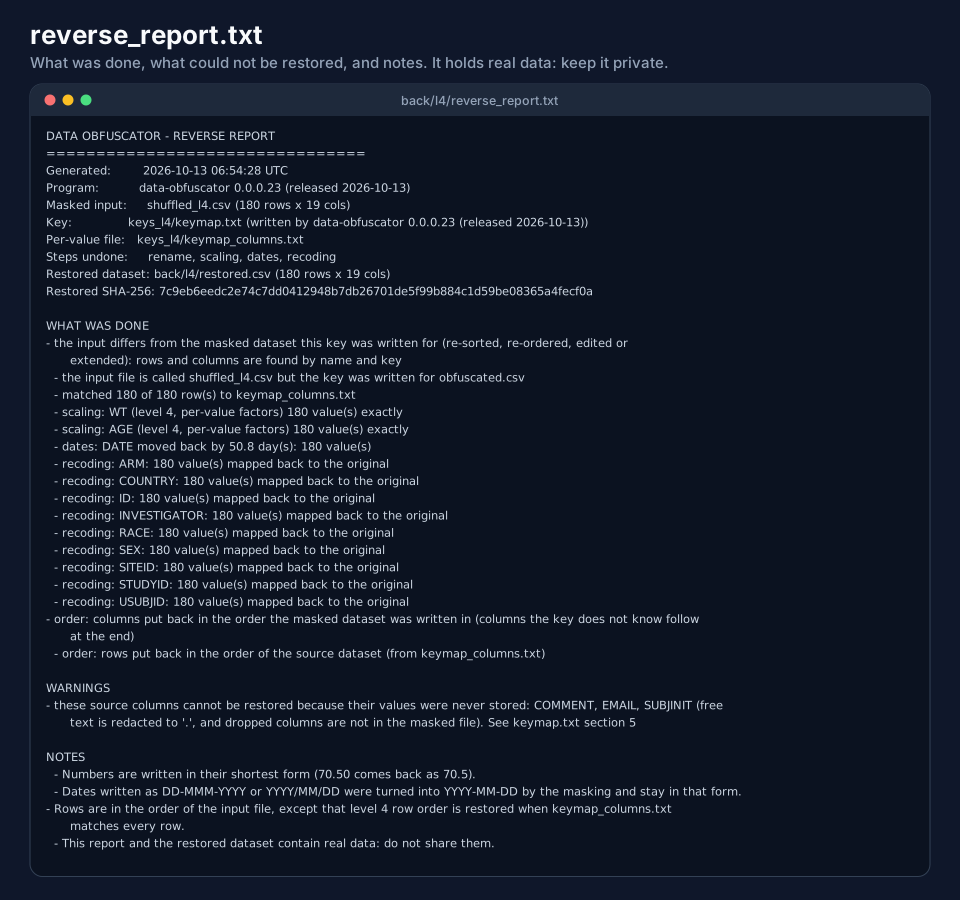
The report states which key was used, the steps undone, one line per column, the warnings, and the SHA-256 of the restored file. Download two examples: txtlevel 3 and txtlevel 4, and the restored level 3 dataset csvexample-restored-level3.csv.
4. Level 4: shuffled rows and columns
At level 4 every scaled value has its own factor, and the rows are sorted by the masked ID. Suppose a collaborator
re-ordered the columns and shuffled the rows. With keymap_columns.txt next to keymap.txt, that is no problem:
data-obfuscator reverse --input shuffled_l4.csv --keymap keymap.txt --keymap-columns keymap_columns.txt --output ./restored
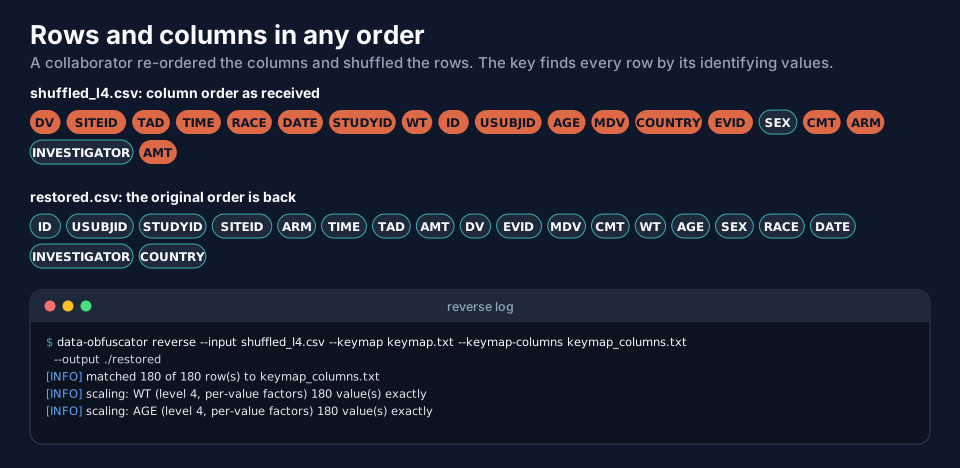
Download the shuffled file to try it with the level 4 key (csvexample-shuffled-level4.csv,
txtexample-keymap-level4.txt, txtexample-keymap_columns-level4.txt); rename the key files to keymap.txt and keymap_columns.txt.
The log says matched 180 of 180 row(s) to keymap_columns.txt and scaling: WT (level 4, per-value factors) 180 value(s) exactly. Rows go back to the source row order, because the file records it.
Rules for the per-value file:
--keymap-columnsdefaults tokeymap_columns.txtnext tokeymap.txt, when it exists.- It must belong to the same run as
keymap.txt(the SHA-256 of the masked file is compared); a mismatch is an error. - Naming a file explicitly that does not exist is an error too:
keymap_columns.txt not found at does_not_exist.txt.
Without keymap_columns.txt: approximate
If the file is missing, the program restores what it can and says so. The base factor is used, so each value is within about 15 % of the original, and the rows keep the order of the input:
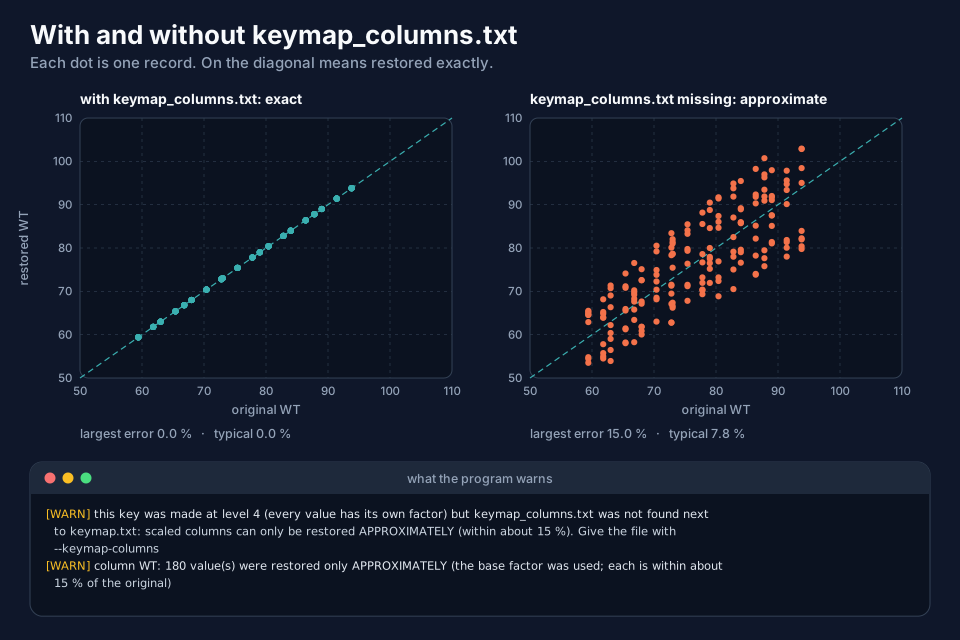
In this recorded run the largest error without the file was 15.0 % and the typical one 7.8 %. Add --strict and the program
refuses to approximate (an error, nothing written). Keep the two key files together.
5. Choosing the steps: --only and --skip
By default all four steps are done. --only undoes just the listed steps, --skip all but the listed ones. The steps are
rename, scaling, dates and recoding, comma-separated, and they are always applied in the same order whatever order
you list them.
data-obfuscator reverse --input obfuscated.csv --only recoding,dates --output ./restored_ids
data-obfuscator reverse --input obfuscated.csv --skip scaling --output ./restored_noscale
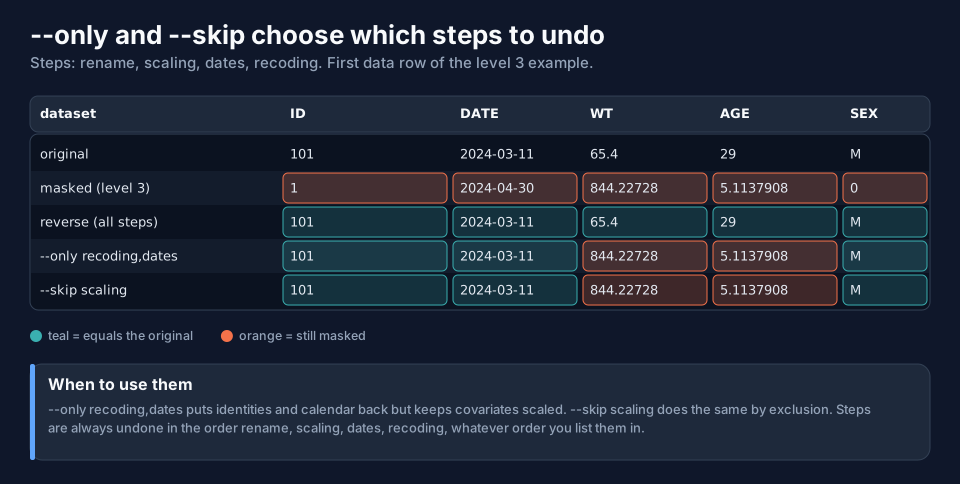
Use it when you need the identities back but not the real covariate values (give a statistician the real subject numbers but scaled weights), or to look at one step at a time when something looks wrong.
6. --strict: stop instead of guessing
Without --strict the program leaves a value it does not know unchanged and warns. With --strict it stops. The figure
shows a file where someone added a subject (999) that the key has never seen:
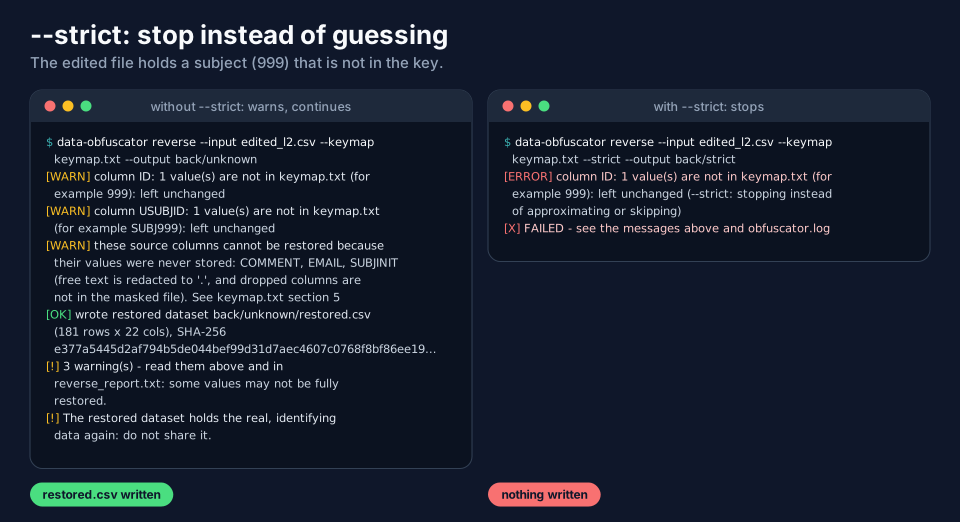
--strict also refuses to approximate level 4 numbers and to skip a column that is missing. Use it in scripts, where a
quiet partial restore would be worse than a failure.
7. Row and column order: --keep-order
The default puts the columns back in the order of the original dataset and, at level 4, the rows back in the source order. If
you want the file to keep the order it came in (to compare row by row with the file you sent to the LLM), add
--keep-order.
data-obfuscator reverse --input shuffled_l4.csv --keymap keymap.txt --keymap-columns keymap_columns.txt --keep-order --output ./restored_same_order
With it, the restored header is DV, SITEID, TAD, TIME, RACE, ..., exactly like the shuffled input, and the values are restored.
8. Reading unusual input files
--delimiter, --no-header, --columns and --comment-chars work as for run (page Renaming and File Formats). A
--delimiter semicolon file is restored the same way.
9. What cannot come back
| Comes back | Exactly | Notes |
|---|---|---|
| IDs, subject, study, site, user codes; treatment, sex, race, country labels | yes | looked up in section 4 of the key |
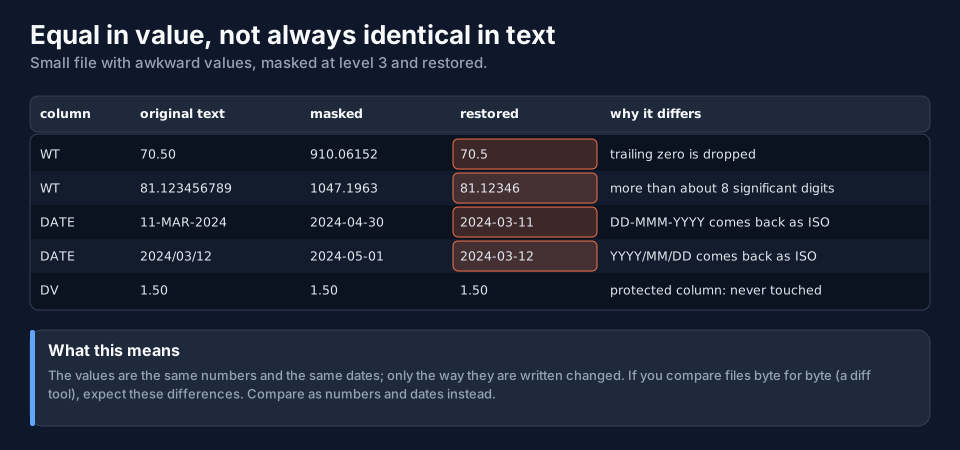
| dates | yes | the shift is subtracted; DD-MMM-YYYY and YYYY/MM/DD come back as YYYY-MM-DD |
| scaled covariates at level 3 | yes | the number, not its text: 70.50 comes back as 70.5 |
| scaled covariates at level 4 | yes with keymap_columns.txt; about 15 % without |
|
| renamed columns | yes | |
| row and column order | yes, with the key | --keep-order keeps the input's |
| redacted free text | no | the original was never stored |
| dropped columns | no | listed in section 5 of the key |
| values an LLM invented or changed | no | left unchanged and reported |
Numbers are compared as numbers in this table: 1.50 and 1.5 are the same value. A file diff will show text differences
that mean nothing; compare as numbers and dates.
10. Quick reference
| Option | What it does |
|---|---|
-i, --input FILE |
the masked dataset (required) |
-k, --keymap FILE |
keymap.txt (default: next to the input); keymap2.txt is recognised automatically |
--keymap-columns FILE |
level 4 per-value factors (default: next to keymap.txt) |
-o, --output DIR |
output folder (default ./restored); --output-name NAME and --overwrite as in run |
--only STEPS, --skip STEPS |
choose the steps: rename, scaling, dates, recoding |
--strict |
stop instead of approximating or leaving unknown values |
--keep-order |
keep the input's row and column order |
--map, --date-columns |
for the key of run2 (next pages) |
Next
Masking Several Datasets: run2 masks a set of related datasets together; Restoring a run2 Master Dataset then restores what an LLM builds from them.