Data Obfuscator
Real data should not be shared with LLMs that are not hosted in your organization. Mask a NONMEM-style pharmacometric dataset, or several CDISC ADaM and SDTM domain datasets together, so they can be shown to an LLM or a collaborator without breaking the PK/PD structure that makes the data worth analysing. Masked files stay consistent with each other, so the LLM can still join them.
LLMs need to see the data. Your data should not leave as it is.
Large language models are useful for exploring a dataset, drafting a NONMEM or mrgsolve model and reviewing data for errors, but only if they can see the data. Pharmacometric datasets are full of things that should not leave your organisation unchanged.
- Identifiers such as USUBJID, STUDYID, SITEID and investigator, which point straight back to a trial and the people in it.
- Calendar dates of dosing and sampling, which are personal data in many privacy regimes.
- Free text and labels: comments, initials, e-mail addresses, arm names, country and race.
- Exact covariate values and rare combinations that can single out a person.
- Column names that reveal a compound, a protocol or a site.
| Hand-scrubbing goes wrong when… | Consequence |
|---|---|
| The same subject gets two new IDs, or two subjects get one | The analysis is silently wrong |
| A dose, time or EVID/MDV/CMT flag is edited or a row is re-sorted | NONMEM rejects the file or it no longer reflects the study |
| Dates are shifted row by row | Intervals between visits are destroyed |
| The scrub cannot be repeated and the mapping is lost | You cannot redo it after the next data cut or translate results back |
| A generic anonymiser is used | It does not know EVID=1 rows are doses or that ADDL/II encode repeat dosing |
Whether sharing data with an external service is allowed depends on your sponsor agreements, consent, privacy law and company policy. This tool is a technical aid, not a compliance certificate.
Masks the identifying parts and leaves the pharmacology alone
Give it one NONMEM-style dataset, or a set of ADaM and SDTM domain datasets (CSV, TSV, semicolon or whitespace-delimited, with or without a header). It writes masked copies and everything you need to use them safely.
Recodes IDs and labels
Every distinct source value always becomes the same new value: subjects, studies, sites, investigators, arms, sex, race and country.
Shifts dates by one offset
One random offset for the whole file, so every interval, and the link between DATE+CLOCK and TIME, survives.
Hides covariate values
Optionally multiplies or divides each covariate column by a hidden random factor between 1 and 20. At level 4 every value gets its own factor.
Never touches the PK/PD core
TIME, TAD, DV, AMT, RATE, EVID, MDV, CMT, ADDL, II, SS, DVID, BLQ and friends stay byte-for-byte as they were, in each subject’s time order.
Writes an LLM prompt pack
llm.txt holds three prompts (analyse the data, build a NONMEM control stream, run QC checks) filled in from your masked file.
Estimates tokens
tokens.txt estimates token counts for GPT, Claude, Gemini, Llama, Qwen and Mistral families so you know the file fits before pasting.
Keeps a private key
keymap.txt records everything needed to undo the masking, and reverse applies it, even to a re-sorted dataset.
Redacts or drops free text
Comments, initials, e-mail addresses and similar columns are redacted, or dropped at level 4, and column names can be renamed.
Explains itself
A per-column report, a summary, the resolved options, a flushed log and orange warnings for anything to review before sharing.
What you share and what you keep
| File | Purpose | Share it? |
|---|---|---|
obfuscated.csv | The masked dataset | Yes |
llm.txt | Prompt pack tailored to this dataset | Yes, paste the prompt you need |
tokens.txt | Token estimates for major LLM families | Harmless |
column_report.txt | Role and action per column; lists original column names | Only if column names are not sensitive |
summary.txt, config.used.txt, obfuscator.log | What was done, resolved options, trace | No: they reveal the seed, date shift and paths |
keymap.txt, keymap_columns.txt | The private key to undo the masking | Never |
Rule of thumb: share only obfuscated.* and llm.txt.
Mask a dataset in one command
Everything defaults sensibly: level 2 and seed 42. Orange lines in the output are warnings to read before you share anything.
# the smallest possible run
data-obfuscator run --input pk.csv --output ./masked

# a more deliberate run
data-obfuscator run -i pk.csv -o ./masked_l3 --level 3 --seed 20261008 \
  --keep ID,USUBJID,STUDYID,ARM,TIME,TAD,AMT,RATE,DV,EVID,MDV,CMT,WT,AGE,SEX,DATE \
  --date-columns DATE

# options in a file
data-obfuscator run --config study_options.txt
Running again into a folder that already holds files stops with an error, so you never overwrite results by accident. Choose a new folder or add --overwrite.
Use your own seed when privacy matters, because 42 is a well-known default, and keep summary.txt and config.used.txt private.
Recommended workflow, start to finish
- MaskRun
data-obfuscator runat the level that suits the audience. - Read the warnings and column reportName unusual identifier columns, drop what you do not need, or convert unreadable date formats.
- Check the outputConfirm nothing identifying is left in values or column names; use
--rename-columnsif names give something away. - Add unitsDatasets do not record units; the prompts ask the model to use the ones you state.
- SendSend
obfuscated.csvplus one prompt fromllm.txt;tokens.txttells you whether it fits. - Translate backUse
data-obfuscator reversewith your key to restore real IDs, dates and numbers, even if rows were re-sorted. - Re-run after a data cutSame options and seed give the same mapping and a byte-identical file; compare the SHA-256 in
summary.txt.
Choose how much to mask
Each level includes everything from the levels below it. Level 2 is the right default for everyday sharing.
| Level | Name | What changes |
|---|---|---|
| 1 | light | Recodes ID, USUBJID, STUDYID, SITEID and user/investigator columns. Dates are not shifted and free text is not removed. |
| 2 | clinical (default) | Also recodes ARM, SEX, RACE and COUNTRY, shifts dates by one offset and redacts free text. |
| 3 | covariate | Also multiplies or divides every number in each covariate column (WT, AGE, HT, BMI, lab values…) by one hidden factor per column. Keeps ratios, rank order and within-subject constancy. |
| 4 | maximum | Scales covariates with a base factor per column and a different factor for every value (base ± 15 %), drops free-text columns and orders rows by masked ID. |
Scaled covariates at levels 3 and 4 are not physiological. Choose level 3 when exact values could identify someone and the analysis only needs ratios and shape; choose level 4 for the strongest built-in masking, such as an external hand-off.
Four commands
| Command | What it does |
|---|---|
run | Masks one dataset and writes the masked file, prompt pack, token estimates, key and reports. |
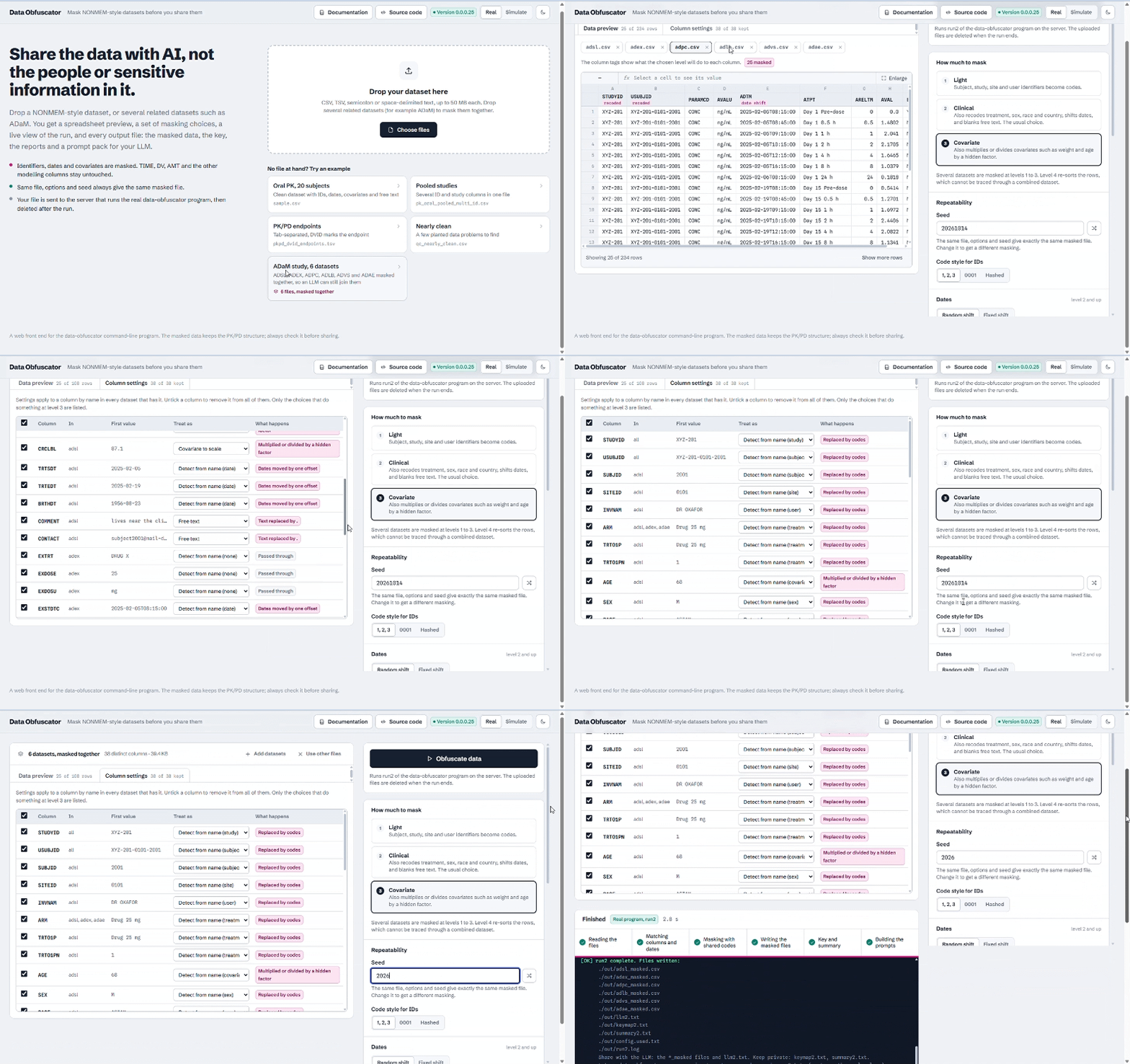
run2 | Masks several datasets together, for example CDISC ADaM (ADSL, ADEX, ADPC, ADLB) or SDTM domain datasets, with shared code tables, one date shift and one factor per scaled column so an LLM can still join them. |
reverse | Turns a masked dataset, or a model’s output, back into real IDs, dates and numbers using your key. Rows and columns may be in any order. |
tokens | Estimates the tokens of the input and of every file already in the output folder, and writes tokens.txt. |
data-obfuscator run2 --input adsl.csv --input adex.csv --input adpc.csv --input adlb.csv --level 3 --output ./masked2
data-obfuscator run2 --input ./sdtm_folder --output ./masked_sdtm
data-obfuscator reverse --input masked/obfuscated.csv --output ./restored
data-obfuscator tokens --input pk.csv --output ./maskedRoles are detected from column names
Names are matched case-insensitively. Anything not recognised passes through unchanged, so name unusual identifier columns yourself or drop them. The run warns about unrecognised text columns.
| Role | Examples | What happens |
|---|---|---|
| id, subject | ID, NMID, USUBJID, SUBJID, PATIENT | Recoded (level 1+) |
| study, site, user | STUDYID, PROTOCOL, SITEID, CENTER, INVESTIGATOR | Recoded (level 1+) |
| treatment, sex, race, country | ARM, TRT, COHORT, SEX, RACE, COUNTRY | Recoded (level 2+) |
| date | DATE, DATETIME, DOB, columns ending DTC or _DT | Shifted (level 2+) |
| free text | COMMENT, NOTE, EMAIL, PHONE, NAME, INITIALS, ADDRESS | Redacted (level 2+), dropped (level 4) |
| covariate | WT, AGE, HT, BMI, CRCL, EGFR, SCR, ALT, AST, BILI | Scaled (level 3+) |
| protected | TIME, TAD, DV, AMT, RATE, EVID, MDV, CMT, ADDL, II, SS, DVID, BLQ | Never altered |
Three ID styles are available: sequential (default), padded and hashed. Several columns that describe the same thing, such as STU, STUDYID and STUDY, can share one masked label.
Deterministic, loud and safe by default
Byte-identical re-runs
Same input, options and seed give an identical masked dataset at every level and ID style, verifiable by SHA-256.
Consistent mapping
The same subject always maps to the same new ID, and each subject’s rows keep their time order.
Core columns untouched
Dosing events and DV are byte-for-byte unchanged unless you explicitly drop those columns.
Malformed rows stay visible
Rows with the wrong number of fields keep their shape and the run warns, so QC of the masked file still sees the defect.
No accidental overwrite
A run never writes into a folder that already holds files unless you say --overwrite.
Offline, one binary
A native executable with no runtime to install and no network code. Your data never leaves the machine you run it on.
What it does not do
Masking lowers re-identification risk. It does not replace your organisation’s approval process.
- It is not formal anonymisation and gives no legal guarantee. Rare covariate combinations, unusual dosing histories or very small studies can still make a subject recognisable.
- It is not encryption. Anyone with the keymap and the masked file can reverse the masking.
- It cannot recognise what it does not know: a study title hidden in an unrecognised text column passes through, so read the warnings.
- Renaming a column does not change its values.
- The date shift is one constant per dataset; the default 1–100 day window is small, so widen it for external sharing.
Before you share
- I read every orange warning and dealt with it.
- I opened
column_report.txtand every column has the role I expected. - No identifying text remains, in values or column names.
- I am sending
obfuscated.*andllm.txtonly, not the keymap, summary, config or log. - The level matches the audience.
- I have the approval my organisation requires.
Build, license and links
Data Obfuscator is a single offline program with nothing else to install at run time. It runs on Windows, macOS and Linux; see the README on GitHub for build and usage instructions.
| Details | |
|---|---|
| Licence | CC BY-ND 4.0: use and cite it, but do not alter and share the result without permission. |
| Author | Obinna (Obi) Obianom |
Frequently asked questions
What is the Data Obfuscator?
Data Obfuscator (the data-obfuscator command) is an offline program that masks a NONMEM-style pharmacometric dataset, or multiple CDISC ADaM and SDTM domain datasets together, so they can be shown to an LLM or a collaborator without breaking the PK/PD structure that makes the data worth analysing.
Does it upload my data?
No. It is a single native program with no network code at all, so your data never leaves the machine you run it on.
Is the masked data anonymous?
Not formally. Masking lowers re-identification risk but is not formal anonymisation, gives no legal guarantee and does not replace your organisation’s approval process. It is also not encryption: anyone with your key files and the masked file can reverse it.
Can I get my real values back?
Yes, only with your private key. The reverse command restores real IDs, dates and numbers from a masked dataset or a model’s output, even if rows were re-sorted or columns re-ordered.
Which masking level should I use?
Level 2 (clinical, the default) suits everyday sharing and keeps covariates real. Use level 3 when exact covariate values could identify someone, and level 4 for the strongest built-in masking.
Can it combine several datasets for an LLM?
Yes. The run2 command masks several datasets together, such as CDISC ADaM or SDTM domain datasets, with shared code tables and one date shift so the LLM can still join them.